Email Order UI — Direct Send Design
This document builds up and discusses the UI design changes needed to let users
send an Email Order directly from the system — part of
PDEV-969 — Enable Direct email sending for Email Orders
(under the PDEV-968
umbrella). The backend send capability already exists — see the
Email module API reference
(POST /v1/shop-access/email/job). The work here is the front-end surface that
will call it.
We start by recording the current view, then walk through the redesigned panel and its copy-only fallback.
Current Email Order View
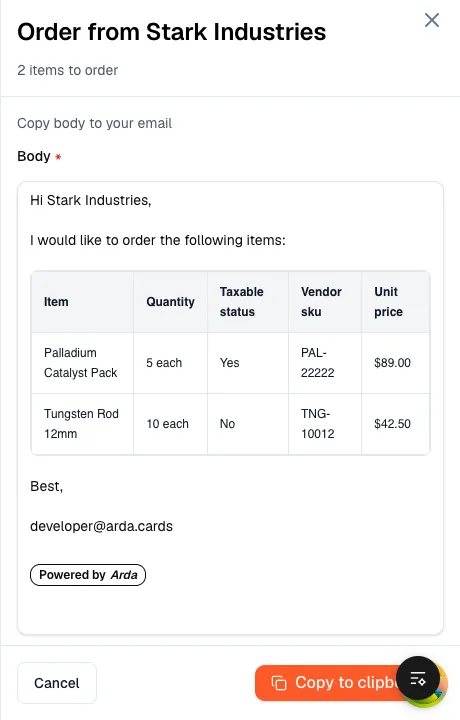
Section titled “Current Email Order View”The Email Order surface is the EmailPanel slide-over in the
arda-frontend-app Order Queue (/order-queue). It opens from the right when a
user orders items whose supplier order method is EMAIL. It composes a
formatted order email but does not send it:
- Header — “Order from
{supplier}” (or the single item’s name) and a “{N}items to order” subtitle, with a close (X) control. - Body — a read-only rendering of the message: a greeting
(“Hi
{supplier},”), the line “I would like to order the following items:”, an items table (Item, Quantity, Taxable status, Vendor sku, Unit price), an optional “Deliver To” block, a “Best,” sign-off with the sender’s name or email, and a “Powered by Arda” badge. - Footer — Cancel and Copy to clipboard. Copy writes both a rich HTML version and a plain-text version to the clipboard.
The only outbound action is Copy to clipboard — there is no direct send.
The user pastes the message into their own mail client to actually send it.
Closing the gap (a real “Send” wired to the backend job endpoint) is the
purpose of this project.
The screenshot below is the panel running against mock data (sample “Stark Industries” items):
Live Mock
Section titled “Live Mock”A working prototype of the redesigned panel — the same Email Order, now with a real Send action and an editable, mail-client-like composition surface. It runs live in this page, so you can try the interactions directly:
- Gmail-style addresses, seeded with you. To, Cc, and From are recipient-chip fields. From defaults to your logged-in email (it becomes the message’s reply-to) and Cc is pre-seeded with the same address, so a copy comes back to you (self-CC). To opens empty for you to fill. Type an address and press Enter (or comma) to add a chip, double-click a chip to edit, and click its × — or Backspace in the empty input — to remove it. A hint notes that messages are sent via the tenant’s configured sender address.
- Body — a single prefilled rich-text canvas with the items table embedded.
The Body is one Tiptap-powered editor with
StarterKit(paragraphs, bold/italic, lists) plus a customitemsTableNode View. It arrives prefilled with a greeting, a short intro, the items table sitting inline between the intro and the sign-off, and the sign-off itself — you can rewrite any of the prose above / below / between the table and add new paragraphs anywhere. - Items table, all cells editable. Every cell in the embedded items table is editable — item name, quantity, taxable status (click to toggle Yes/No), vendor SKU, unit price, and Notes. Click a value to edit, Enter commits, Esc cancels, and an edited field shows a ↺ to restore just that value.
- Powered by Arda — toggle switch. A switch below the items table controls whether the “Powered by Arda” signature is included in the sent message (default on). Flipping it off hides the badge and drops it from the plain text and HTML payloads.
- Revert & undo. Revert all in the footer (shown once any field has been edited) resets every field, the body, and the badge toggle back to their defaults; ⌘Z / Ctrl+Z undoes the most recent address change (Tiptap owns its own undo stack for the body).
- Send — split primary. Send is a split button: the main action sends the HTML body (fires on ⌘↵ / Ctrl+↵), and the caret menu offers Open in email. A successful Send closes the panel and accepts the order (in this mock, the panel switches to a confirmation with a Reset to start over).
- Copy — plain text. Copy writes the body as plain text to the clipboard, then accepts the order and closes the panel.
- Open in email. The Send menu’s Open in email opens a
mailto:draft in your local mail client (To/Cc/Subject + the plain-text body). It opens in a new browser tab/window so the composer is not navigated away. In restricted mode it is a button beside Copy, so it is available even when direct send is not provisioned.
A toast also confirms each outcome (e.g. “Email sent”, “Message copied to clipboard”), but the panel closing is the primary confirmation.
No direct sending available
Section titled “No direct sending available”This section captures the variant for when direct send is not available — for
example, a tenant whose EmailConfiguration has no authorized send address, so
the panel falls back (as today’s EmailPanel does). The address chips and the
Send split are hidden. The body, items table, and Powered-by-Arda toggle
are unchanged, and the footer offers Open in email as the default action
with Copy secondary — so without a backend send, the user can review the
body and either open a mailto: draft in their local client or copy the
message.
Data Inserts
Section titled “Data Inserts”The Email Order is assembled from data: the body prose is prefilled from
tenant/user context (with the items rendered as a table below it), and the send
envelope (To, Cc, subject, from) is resolved at send time. The table lists each
data-driven element, where it comes from in the system, the placeholder the
live mock above uses (in mocks/_sample-order.ts), and whether the mock lets
you edit it inline (click the value; “Revert all” in the footer restores every
field). Static chrome — field labels and the “Powered by Arda” badge (toggleable
via the switch above the footer) — is omitted from the table.
| Element | Where the data comes from | Mock value (this page) | Editable in mock |
|---|---|---|---|
| Body prose | Prefilled from the selected items’ primary supply → Supplier (Business Affiliate) contact name (itemDetails.primarySupply.supplier) and the authenticated user’s sign-off (userContext.name / userContext.email) — a single Tiptap document combining greeting, intro line (“I would like to order the items listed below…”), and sign-off. Renders above the items table. | bodyDefault — greeting to “Stark Industries”, sign-off from “developer@arda.cards” | Yes — one rich-text canvas (Tiptap + StarterKit) |
| Item name | Item details for each selected order-queue card (itemDetails.name) | orderLines[].name | Yes — per-row cell |
| Quantity | Primary supply reorder quantity — amount + unit (primarySupply.orderQuantity) | orderLines[].quantity | Yes — per-row cell |
| Taxable status | Item taxable flag (item / supply attribute) | orderLines[].taxable | Yes — click Yes/No to toggle |
| Vendor SKU | Supplier-specific SKU on the item’s primary supply | orderLines[].sku | Yes — per-row cell |
| Unit price | Unit price on the item / primary supply | orderLines[].unitPrice | Yes — per-row cell |
| Deliver-to address (optional) | Tenant delivery / company address | Not modeled in mock | — |
| Recipient (To) | Supplier contact email (Business Affiliate). Required for direct send (PDEV-969); not wired in today’s copy-only EmailPanel. | toAddresses (“orders@…”, “tony@…”) | Yes — Gmail-style To chips (add / edit / remove) |
| Recipient (Cc) | Carbon-copy recipients. Seeded with the logged-in user’s email (self-CC, DQ-012) so a copy returns to the sender; editable/removable. | ccAddresses (seeded with “developer@arda.cards”) | Yes — Gmail-style Cc chips (add / edit / remove) |
| Subject | Tenant company name + send date, composed server-side | Not modeled | — |
| From address (reply-to) | The editable “From” is the message reply-to, defaulting to the logged-in user’s email (DQ-004 / DQ-012). The actual envelope sender is bound to the tenant’s EmailConfiguration (shown read-only as “sent via …”). | From chip = senderEmail (“developer@arda.cards”); envelope sender = fromAddress (“noreply@…”) | Yes — single From chip (reply-to); envelope sender is read-only |
Copyright: © Arda Systems 2025-2026, All rights reserved