Product
Point-in-time description of Arda’s products: markets, personas, features, offerings.
A single-page reference for everything you can use when authoring documentation on this site. Use it as a copy-paste catalogue when you can’t remember the exact syntax for an admonition, a tabbed example, or a stepped procedure.
For the rules about which of these to use and how the build enforces them, see Frontmatter and Build Rules.
Every document starts with a YAML frontmatter block:
---title: "Document Title"description: "Single sentence (40–300 chars) describing what this page is."tags: [domain, category, topic]domain: <domain-name>maturity: publishedauthor: "Your Name"---title, description, and author are required and enforced at build time. Valid domain values: product, domain, system, vision, roadmap, process, technology, legal, decisions, about, notes.
## H2 — Top-level section in the body
### H3
#### H4
Do not start the body with an # H1 — Starlight already renders the frontmatter title as the page H1.
| Syntax | Output |
|---|---|
**bold** | bold |
*italic* | italic |
***bold-italic*** | bold-italic |
~strike~ | |
`inline code` | inline code |
<ins>underline</ins> | underline |
<sub>subscript</sub> | subscript |
<sup>superscript</sup> | superscript |
Use sparingly. Keyboard shortcuts use <kbd>: Ctrl + Shift + P.
Bulleted with -, numbered with 1. (the renderer numbers automatically), and two-space indentation for nesting.
> Quotation text.>> Second paragraph of the quote.Railway Oriented Programming — Every operation returns
Result<T>. Success flows throughmapandflatMap; failure short-circuits through the pipeline.
Starlight provides four aside types. The triple-colon shorthand works in .md files; the <Aside> component works in .mdx files.
.md files):::noteUseful information that users should know, even when skimming content.:::
:::tip[Convention]Helpful advice. Custom title in square brackets.:::
:::cautionUrgent info that needs immediate user attention to avoid problems.:::
:::dangerAdvises about risks or negative outcomes of certain actions.:::<Aside> component (.mdx files)Syntax-highlighted code with optional titles, line highlighting, and diff markers.
class ItemService(private val universe: ItemUniverse) {
    suspend fun findById(id: UUID): Result<Item> =        universe.findById(id)
suspend fun create(input: ItemInput): Result<Item> // new suspend fun create(input: ItemDTO): Result<Item> // removed}export async function middleware(request: NextRequest) { const token = request.cookies.get('session')?.value; if (!token) { return NextResponse.redirect(new URL('/login', request.url)); } return NextResponse.next();}Every fenced block should declare a language. Use text for prose-like blocks (file trees, pseudocode) rather than leaving the tag off.
.mdx files only)val result: Result<Item> = universe.findById(id)result.fold( onSuccess = { item -> respond(item) }, onFailure = { error -> respondError(error) })SELECT * FROM item_bitemporalWHERE e_id = :eId AND effective_from <= :asOf AND (effective_to IS NULL OR effective_to > :asOf)ORDER BY recorded_at DESCLIMIT 1;curl -s -X GET \ "https://dev.api.arda.cards/v1/item/item/${ITEM_ID}" \ -H "Authorization: Bearer ${TOKEN}" \ -H "X-Tenant-ID: ${TENANT_ID}" | jq ..mdx files only)<Card> is presentational; <LinkCard> makes the whole card clickable. Both are wrapped in <CardGrid> for layout.
Product
Point-in-time description of Arda’s products: markets, personas, features, offerings.
Domain
Knowledge and concepts about material flow, operations science, and the information model.
.mdx files only)Create a branch from main using the naming convention username/branch-name.
Write content in Markdown or MDX under the appropriate src/content/docs/ subdirectory.
Add frontmatter with at minimum title, description, author.
Preview locally with make dev — changes reflect instantly.
Open a PR — a preview deployment is generated automatically.
Markdown tables work everywhere when cells are simple:
| Entity | Module | Domain | Status |
|---|---|---|---|
Item | item-data-authority | Reference Data | Published |
KanbanCard | kanban-card | Resources | Published |
BusinessAffiliate | business-affiliate | Reference Data | MVP2 |
PurchaseOrder | purchase-order | Procurement | MVP2 |
When cells need to contain pipes, JSX expressions, or multi-line content in an .mdx file, switch to HTML <table>.
inline code for identifiers, file names, CLI commandsFenced code blocks with the plantuml language tag are rendered as inline SVG images at build time by the remark-plantuml plugin.
Pair every diagram with a 1–3 sentence prose summary so AI assistants (which rarely consume images) can read the same content their humans see.
See the PlantUML guide for sequence/class diagram conventions, named-color rules, and validation.
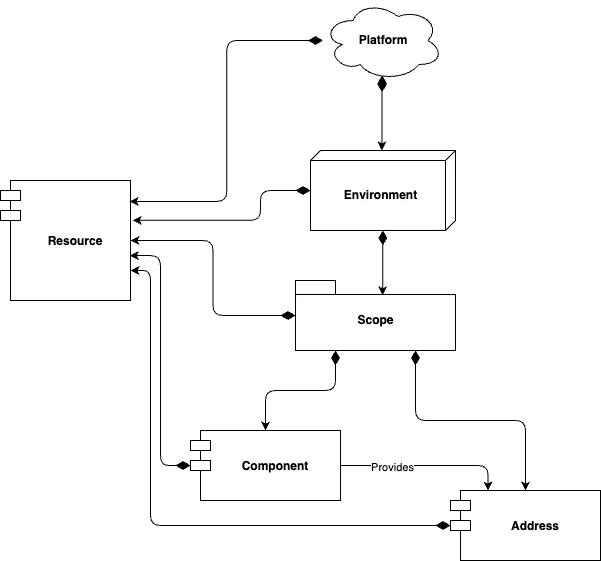
Draw.io diagrams are committed as exported *.drawio.svg or *.drawio.png files alongside the page that uses them, then referenced with standard Markdown image syntax (or <img> for SVG inside .mdx).
The repo’s src/assets/ directory has working examples.
Use bold terms followed by colon-prefixed descriptions for glossary-like entries.
Effective Time : The business-validity time axis. When a fact was true in the real world.
Recorded Time : The system-record time axis. When the system learned about the fact.
Bitemporal Coordinate : A pair of (effective, recorded) timestamps that uniquely identifies a point in the two-dimensional time space.
Bitemporal persistence1 enables full audit history without destructive updates.
Use four asterisks for section breaks (Arda convention — distinguishes them from the three-dash frontmatter delimiter):
<Aside> instead of :::tip shorthand in .mdx files.{foo} in backticks to disambiguate from JSX expressions.≥) or direct Unicode (≥); named entities (≥) are rejected by the MDX parser.The repo’s knowledge-base/mdx-gotchas.md has the full list.
- for bulleted lists.--- (three hyphens) for horizontal rules inside a section; use **** (four asterisks) for major section breaks.See Allen, J.F. (1983) “Maintaining Knowledge about Temporal Intervals” for the theoretical foundation. ↩
Copyright: © Arda Systems 2025-2026, All rights reserved