This is the full developer documentation for Arda Platform Documentation
# Arda Platform Documentation
> Documentation for the people who build Arda — and the agents collaborating with them. No fluff, no jargon hunting.
**The Arda Platform turns kanban on the shop floor into a closed-loop control system that small and mid-size manufacturers can actually run.** Physical cards scan into digital reorders, planning runs in the background, and stockouts stop being a recurring fire drill. Under the hood: an API-first, MCP-native architecture grounded in operations science — Little’s law, bitemporal state, decoupled control loops. On the surface: a shop-floor experience that prefers cards and scans over screens. This site documents how the platform is built, deployed, run, and extended — for the people doing each of those, and the AI assistants helping them.
## Find your starting point
[Section titled “Find your starting point”](#find-your-starting-point)
Pick the role closest to yours. Every link drops you at a curated entry point.
[Product Manager ](./product/)Personas, use cases, and the roadmap of capabilities the platform supports.
[Product or DevOps Engineer ](./current-system/)Architecture, design patterns, runtime, OAM, and the SRE runbooks that keep production honest.
[Customer Service or Sales Engineer ](./product/use-cases/)Workflows users actually run, plus release notes you can quote back to a customer with confidence.
[AI or Tooling Builder ](./about/agent-access/)The /llms.txt index, raw .md endpoints, and how to point your assistant at this site.
## Explore by content area
[Section titled “Explore by content area”](#explore-by-content-area)
[Product ](./product/)Markets, personas, features, offerings — what the platform does for the customer.
[Domain ](./domain/)Information model, glossary, the language we use to describe the business.
[Current System ](./current-system/)Architecture, runtime, data model, OAM — how it works today.
[Process ](./process/)Engineering craft, project lifecycle, SRE practices, deployment conventions.
[Technology ](./technology/)Per-technology references: Next.js, Ktor, Astro & Starlight, Exposed, CDK, AG Grid, Cedar.
[Vision ](./vision/)Long-term view of the mature system once foreseeable roadmap projects are complete.
[Decisions ](./decisions/)Durable choices and the rationale behind them.
[Roadmap ](./roadmap/)What is shipping, what is next, and where past projects landed.
## 🤖 Built for AI-augmented teams
[Section titled “🤖 Built for AI-augmented teams”](#-built-for-ai-augmented-teams)
Arda’s teams use AI assistants every day — drafting PRs, drafting runbooks, drafting answers to customer questions. This site is designed so those agents read it as easily as the humans do.
* [`/llms.txt`](./llms.txt) — curated index of canonical entry points. Drop it into any tool that supports the [llms.txt convention](https://llmstxt.org).
* [`/llms-full.txt`](./llms-full.txt) — the whole site as a single Markdown bundle for RAG, embedding, or `@docs` attachments.
* [`/llms-small.txt`](./llms-small.txt) — hierarchy and per-page descriptions, sized for a tight context window.
* **`/.md`** — every rendered page is also served as raw Markdown. Just append `.md` to any page’s URL.
Point your tools here
Send your AI tooling team to [Agent Access](about/agent-access/) for the full convention, exclusion rules, and `robots.txt` policy.
## ✍️ Contribute
[Section titled “✍️ Contribute”](#️-contribute)
Every page is plain Markdown in a public GitHub repository. The bar is low, the conventions are documented, and the build catches you when you stray.
[Authoring Guide ](./about/authoring/)Start here — frontmatter, links, diagrams, the queued CI/CD pipeline.
[Frontmatter and Build Rules ](./about/authoring/frontmatter-and-build-rules/)What the build enforces, what reviewers expect, how to read a CI failure.
[Templates ](./about/templates/)Runbooks, design docs, decision logs, ADRs, content pages — start from one.
[Markdown Gallery ](./about/authoring/markdown-gallery/)Every component and syntax the site supports, in one place.
One-line orientation
Clone the repo, copy a template, run `make pr-checks`, open a PR. The post-merge workflow handles versioning, the changelog, and the deploy.
# About
> About section overview describing the documentation site itself: structure, toolchain, authoring workflows, and conventions for human and AI contributors.
Information about the documentation site itself: its structure, toolchain, authoring workflows, publishing process, and conventions for contributors (human and AI).
## Build Plugins
[Section titled “Build Plugins”](#build-plugins)
The documentation site uses two custom remark plugins that transform Markdown at build time. Authors do not need to configure anything — just follow the authoring conventions and the plugins do the rest.
| Plugin | What it does |
| ------------------------- | ------------------------------------------------------------------------------------------------------------------------------------------------------ |
| `remark-resolve-md-links` | Rewrites relative `.md` links to Starlight’s directory-based URL structure. Authors write standard file-path links; the plugin handles URL conversion. |
| `remark-plantuml` | Renders `plantuml` fenced code blocks into inline SVG images. No external service required. |
Both plugins are registered in `astro.config.mjs` and run automatically on every build.
# Agent Access
> How AI assistants and tools consume the Arda documentation site — the curated llms.txt index, raw .md page sources, robots.txt policy, and what is excluded.
This site is intentionally agent-friendly. The published content is public reference material and one of the project goals is to make it easily consumable by AI assistants, MCP clients, search bots, and similar tooling.
This page documents the agent-facing surfaces, what they contain, what is excluded, and how they are maintained.
## Agent surfaces
[Section titled “Agent surfaces”](#agent-surfaces)
| Surface | URL pattern | Purpose |
| --------------- | ----------------- | ------------------------------------------------------------------------ |
| Curated index | `/llms.txt` | Short, hand-picked index of canonical entry points + pointers to bundles |
| Compact bundle | `/llms-small.txt` | Hierarchy + summaries — for token-tight agents |
| Full bundle | `/llms-full.txt` | Entire site as a single Markdown blob — for one-shot RAG ingestion |
| Raw page source | `/.md` | Any rendered page also served as raw Markdown |
| Crawler policy | `/robots.txt` | Explicit allow rules for known AI crawlers |
All four are emitted as part of the standard build and deployed alongside the rendered HTML. Their absolute URLs at production are:
*
*
*
*
For preview builds the prefix is `https://arda-cards.github.io/documentation/...`.
## What’s in `/llms.txt`
[Section titled “What’s in /llms.txt”](#whats-in-llmstxt)
The curated index follows the [`llms.txt` proposal](https://llmstxt.org). It contains:
* A title and one-paragraph description of the site.
* Pointers to the small and full bundles.
* An **Optional** section listing about 20 hand-picked entry points — the top-level section indexes plus a few high-leverage deep references (architecture patterns, the information model, the authoring guide, the four core technology references).
The index is deliberately short. Agents that need more should follow it into the small or full bundles.
## What’s excluded
[Section titled “What’s excluded”](#whats-excluded)
The agent surfaces deliberately exclude `roadmap/**`. Roadmap content is project-internal — designs, plans, analyses, and session logs that decay in relevance after the project ships. Agents would otherwise pick up superseded designs and cite them as authoritative.
Excluded:
* `roadmap/in-progress//...`
* `roadmap/completed//...`
* `roadmap/backlog/...`
* `roadmap/ideas/...`
The exclusion only affects the agent surfaces (`/llms.txt`, `/llms-small.txt`, `/llms-full.txt`, and the `/.md` raw endpoints don’t render for excluded paths). The human site (`/roadmap/...` HTML pages) remains fully browsable.
## Crawler policy
[Section titled “Crawler policy”](#crawler-policy)
The `robots.txt` explicitly allows:
| Vendor | Training crawler | Live fetch | Search index |
| --------- | ----------------- | ------------- | --------------------- |
| Anthropic | `ClaudeBot` | `Claude-User` | `Claude-SearchBot` |
| OpenAI | `GPTBot` | — | `OAI-SearchBot` |
| Google | `Google-Extended` | — | `Googlebot` (default) |
All other user-agents are also allowed (`User-agent: * Allow: /`). The site is reference material; we choose breadth over scarcity.
## How the surfaces are generated
[Section titled “How the surfaces are generated”](#how-the-surfaces-are-generated)
Two Starlight plugins handle generation; both are configured in `astro.config.mjs`.
* [`starlight-llms-txt`](https://github.com/delucis/starlight-llms-txt) emits `/llms.txt`, `/llms-small.txt`, and `/llms-full.txt`. Configuration: project name, description, exclude patterns (`roadmap/**`), promote patterns (durable section roots), and an `optionalLinks` array driving the curated index.
* [`starlight-dot-md`](https://github.com/morinokami/starlight-dot-md) emits a `/.md` route alongside every rendered page, returning the raw source.
`robots.txt` is a static file at `public/robots.txt` — Astro copies it through to `dist/` unchanged.
## Maintaining the curated index
[Section titled “Maintaining the curated index”](#maintaining-the-curated-index)
When a section grows or shrinks, update the `optionalLinks` array in `astro.config.mjs`. Keep it short — fewer than 30 entries is the target. The full bundle covers the rest.
When a project completes and its content is durable enough to live outside `roadmap/`, promote the relevant pages into a permanent section (e.g. `current-system/`, `domain/`) before retiring the project’s roadmap directory. The agent surfaces will pick up the promoted content automatically.
## Discoverability tips for agent authors
[Section titled “Discoverability tips for agent authors”](#discoverability-tips-for-agent-authors)
If you are building an agent or MCP client that consumes this site:
* Start at `/llms.txt`. It is short and tells you which bundles to fetch next.
* For per-page reads, append `.md` to any URL. The raw markdown contains frontmatter (title, description, tags, domain, maturity, author) plus the unrendered body.
* For bulk ingestion, `/llms-full.txt` is one \~10 MB markdown file with all included pages concatenated. Suitable for a single embedding pass.
* For sparse retrieval, `/llms-small.txt` contains hierarchy and per-page descriptions only — useful when a small index needs to fit a tight context.
## Related
[Section titled “Related”](#related)
* [`knowledge-base/agent-access-surfaces.md`](https://github.com/Arda-cards/documentation/blob/main/knowledge-base/agent-access-surfaces.md) — repo-side notes on plugin configuration and update procedures.
* [`process/craft/documentation/`](../../process/craft/documentation/) — broader documentation conventions.
# Overview
> Authoring guide overview covering the standards and conventions for writing technical documentation in the Arda Astro Starlight site.
This guide covers the standards and conventions for writing technical documentation in the Arda Platform documentation site. The site is built with [Astro Starlight](https://starlight.astro.build/) and all content is written in Markdown (`.md`) or MDX (`.mdx`).
## PR conventions
[Section titled “PR conventions”](#pr-conventions)
This repository uses **PR-body changelogs** and a **queued CI/CD pipeline**. Three rules to remember as an author:
1. **Do not edit `CHANGELOG.md`.** Put your changelog entry in the PR description under a `## CHANGELOG` heading (the repo’s PR template has the placeholder). The post-merge `changelog-assembly` workflow writes `CHANGELOG.md` and tags the release for you.
2. **Use the PR template** — it has `## Summary`, `## CHANGELOG`, `## Closes`, `## Verification` sections. The `changelog-check` workflow will fail your PR if the `## CHANGELOG` block is missing or empty.
3. **Reviewer policy is path-scoped via CODEOWNERS.** PRs that only touch `src/content/docs/roadmap/` need no approval; everything else needs an approving review from `@Arda-cards/engineering`. Use the `REVIEW-REQUIRED` label to force a review even on roadmap-only PRs.
Step-by-step author guidance, including labels (`auto-merge`, `REVIEW-REQUIRED`, `manual-changelog`), preview/production deploy URLs, and the post-merge automation, lives in [Getting Started](getting-started/). The shared design across `documentation` and `arda-frontend-app` is documented at [Queued CI/CD](../../current-system/oam/configuration/deployment/queued-cicd/).
## Frontmatter and build rules
[Section titled “Frontmatter and build rules”](#frontmatter-and-build-rules)
Every page carries a YAML frontmatter block. `title`, `description` (40–300 characters), and `author` are required and **enforced at build time** — `make pr-checks` fails the schema validation on a violation. Internal links must include the `.md` extension; the same `make pr-checks` run catches broken or extensionless links through the Lychee link checker.
Beyond those enforced rules there are a few **conventions** that reviewers expect — no duplicate in-body `# H1`, code fences carry a language tag, and every PlantUML diagram is paired with a 1–3 sentence prose summary — but those are not currently enforced by the build.
See [Frontmatter and Build Rules](frontmatter-and-build-rules/) for the canonical reference, including required and recommended fields, enumerated values, style for `description`, MDX-specific constraints, what each `make pr-checks` step actually catches, and how to read the build failures when something is off.
## Document Organization
[Section titled “Document Organization”](#document-organization)
Content is organized by audience and purpose across the following top-level sections:
| Section | Audience | Content Type |
| ----------------- | ------------------------------------ | ---------------------------------------------------------- |
| `product/` | End users (shop managers, operators) | How-to guides, concept explanations, platform guides |
| `domain/` | Domain experts, analysts | Information model, domain concepts, glossary |
| `current-system/` | Developers and engineers | Architecture, API reference, patterns, data model, runtime |
| `vision/` | All stakeholders | Future-state architecture, target designs |
| `roadmap/` | Project managers, stakeholders | Project status, backlog, ideas |
| `process/` | Engineers, team leads | Development workflows, SRE procedures, craft guides |
| `technology/` | Engineers | Technology-specific references (Cedar, AG Grid, etc.) |
| `legal/` | Compliance, management | Licensing, certification, compliance |
| `decisions/` | Engineers, architects | Decision records, discussion logs |
| `about/` | Authors, contributors | Authoring guides, templates, style conventions |
Within each section, follow the [Diataxis](https://diataxis.fr/) framework:
* **Tutorial** — A learning-oriented walkthrough. Leads the reader through a complete task to build competence.
* **How-To Guide** — A goal-oriented set of steps. Assumes the reader knows what they want; explains how to do it.
* **Reference** — Information-oriented material. Accurate, complete, and terse. Suitable for lookup.
* **Explanation** — Understanding-oriented discussion. Explores context, background, and rationale.
Each article should serve one Diataxis type. If content spans two types, split it into separate articles.
## File and Path Conventions
[Section titled “File and Path Conventions”](#file-and-path-conventions)
* File names use lowercase `kebab-case`: `adding-items.md`, `purchase-order-v1.md`.
* Directories use lowercase `kebab-case` as well.
* Every directory that contains content pages must have an `index.md` serving as the section landing page.
* Cross-repository path references use `/repo-name/path/to/file` (no system absolute path).
### Links
[Section titled “Links”](#links)
Use standard Markdown file-path links with the `.md` extension for all internal references. A build-time remark plugin (`remark-resolve-md-links`) automatically rewrites these to Starlight-compatible URLs, so source files stay clean and navigable in editors and GitHub.
**Recommended forms:**
| Link syntax | Meaning |
| ----------------------------------- | -------------------------------------- |
| `[text](sibling.md)` | Page in the same directory |
| `[text](./sibling.md)` | Same (explicit relative) |
| `[text](../other-section/page.md)` | Page in a parent or sibling directory |
| `[text](sub-dir/index.md)` | Section landing page in a subdirectory |
| `[text](sibling.md#section-anchor)` | Specific heading on another page |
| `[text](#anchor)` | Heading on the current page |
**Rules:**
* Always include the `.md` extension on internal links — the plugin only processes `.md` links.
* Use relative paths, not absolute paths starting with `/`.
* Do not manually convert links to Starlight’s directory URL form (e.g., `../sibling/`). The plugin handles this automatically.
* External links use full URLs: `[text](https://example.com)`.
* Anchor-only links (`#section`) are passed through unchanged.
* Links inside fenced code blocks are not modified.
* **Link text**: Use the target document’s `title` frontmatter value or `# Heading` as the link text. For example, link to the PlantUML Guide as `[PlantUML Guide](plantuml-guide.md)`, not `[click here](plantuml-guide.md)`.
### Link Resolution — How the Plugin Transforms Paths
[Section titled “Link Resolution — How the Plugin Transforms Paths”](#link-resolution--how-the-plugin-transforms-paths)
Caution
Links without the `.md` extension are **not processed** by the plugin and will resolve differently between local dev (`/`) and CI preview (`/documentation/`). This is the most common cause of links that pass locally but fail in CI.
Starlight serves each `.md` page as a directory URL (e.g., `page.md` becomes `/section/page/`). The `remark-resolve-md-links` plugin compensates for this by adding one `../` to every `.md` link in non-index pages at build time. Authors do not need to account for this adjustment — **write standard filesystem-relative paths with the `.md` extension and the plugin handles the rest.**
**Key rules:**
* Write the path exactly as the filesystem relative path from your file to the target file.
* Always include `.md` — a link like `../sibling` (without `.md`) bypasses the plugin and breaks under the `/documentation/` base path.
* Index pages (`index.md`) do not get the extra `../` — their URL is already their directory.
**Worked example:**
Given this file structure:
```text
docs/
product/
features/
upload.md ← source file (non-index)
personas/
sam.md ← target file
```
From `upload.md` to `sam.md`, the filesystem relative path is `../personas/sam.md`. Write exactly that — the plugin will transform it to `../../personas/sam/` at build time, which resolves correctly from the page URL `/product/features/upload/`.
**Validation:** Run `make test-preview` locally before pushing. This builds with the preview base path (`/documentation/`) which is stricter than the default production build and will catch resolution errors that pass locally.
To compute the correct link and verify it resolves correctly, use the helper script:
```bash
# From the documentation/ directory:
node tests/resolve-link.mjs
# Example:
node tests/resolve-link.mjs \
src/content/docs/product/features/upload.md \
src/content/docs/product/personas/sam.md
# Output: ../personas/sam.md
```
The script simulates the plugin transformation and verifies the resulting URL resolves to the target page. If the link would break, it prints a warning with the expected vs. actual resolution.
## Adding and Removing Sections
[Section titled “Adding and Removing Sections”](#adding-and-removing-sections)
For a step-by-step guide on creating and removing documentation sections — including using the built-in Section Creator widget available on the local dev server — see [Adding and Removing Sections](adding-sections/).
## Provenance
[Section titled “Provenance”](#provenance)
Content provenance is tracked centrally in the [Content Provenance](../provenance/) page rather than inline within individual files. When adding new content migrated from another source, add an entry to the provenance table for the appropriate section.
## Markdown Formatting
[Section titled “Markdown Formatting”](#markdown-formatting)
### General Rules
[Section titled “General Rules”](#general-rules)
* One blank line before and after headings, lists, blockquotes, and code blocks.
* Use `-` for bulleted lists (not `*`).
* Use spaces only for indentation — no tabs.
* Use 2 spaces per indentation level in lists and code blocks.
* Use `---` (three hyphens) for horizontal rules.
### Headings
[Section titled “Headings”](#headings)
* The document title is the only `H1` (`#`). Do not repeat the `title` frontmatter value in the body.
* Use `##` through `####` for sections and subsections.
* Do not skip heading levels (e.g., do not jump from `##` to `####`).
### Admonitions
[Section titled “Admonitions”](#admonitions)
The documentation site uses Starlight’s admonition syntax.
In `.md` files, use the triple-colon shorthand:
```markdown
:::note
Useful information that users should know, even when skimming content.
:::
:::tip
Helpful advice for doing things better or more easily.
:::
:::caution
Urgent info that needs immediate user attention to avoid problems.
:::
:::danger
Advises about risks or negative outcomes of certain actions.
:::
```
In `.mdx` files, use the `` component:
```mdx
import { Aside } from '@astrojs/starlight/components';
Helpful advice for doing things better or more easily.
```
Available types: `note` (default), `tip`, `caution`, `danger`.
### Starlight Components (MDX only)
[Section titled “Starlight Components (MDX only)”](#starlight-components-mdx-only)
When writing `.mdx` files, the following Starlight components are available:
```mdx
import { Tabs, TabItem, Card, CardGrid, LinkCard, Steps, Code, Aside } from '@astrojs/starlight/components';
```
* `` / `` — Tabbed content panels
* `` / `` — Content cards for navigation or feature highlights
* `` — Card that links to another page
* `` — Numbered step-by-step instructions
* `` — Enhanced code blocks with title, line highlighting, and diff markers
* `` — Callout boxes (note, tip, caution, danger)
See the [Starlight documentation](https://starlight.astro.build/components/using-components/) for full usage details.
### Tables
[Section titled “Tables”](#tables)
Tables work in standard Markdown `.md` files. See [Markdown Gallery](markdown-gallery/) for syntax examples.
Note
MDX files (used in Storybook) do not support Markdown table syntax — use HTML `` elements in those files. Plain `.md` files in the documentation site support standard Markdown tables.
### Code Blocks
[Section titled “Code Blocks”](#code-blocks)
Use fenced code blocks with a language identifier:
````markdown
```kotlin
data class Item(val id: UUID, val name: String)
```
````
Supported identifiers include `kotlin`, `typescript`, `sql`, `yaml`, `json`, `http`, `bash`, `plantuml`, `text`.
## Diagrams
[Section titled “Diagrams”](#diagrams)
### PlantUML
[Section titled “PlantUML”](#plantuml)
Use PlantUML for architecture, sequence, and domain model diagrams. See [PlantUML Guide](plantuml-guide/) for syntax, conventions, the C4 shape gallery, and common pitfalls.
A build-time remark plugin (`remark-plantuml`) converts `plantuml` code blocks into inline SVG images during the site build. No external image service is needed — just write the PlantUML source directly in your Markdown.
Embed a PlantUML diagram using a fenced code block:
````markdown
```plantuml
@startuml
hide footbox
title My Sequence Diagram
actor User
participant System
User -> System ++ : Action
return Response
@enduml
```
````
### Draw\.io
[Section titled “Draw.io”](#drawio)
For layout-heavy diagrams (network topology, UI wireframes, complex flowcharts), use Draw\.io:
1. Create a file named `.drawio.svg` in the `_assets/` or `assets/` subdirectory next to the document.
2. Edit with the Draw\.io desktop app, the web app at [app.diagrams.net](https://app.diagrams.net/), or the IntelliJ/VS Code plugin. The editing data is embedded in the SVG file itself.
3. Embed in the document: ``.
## Templates
[Section titled “Templates”](#templates)
Reusable templates for common document types are in the [Templates](../templates/) section. Use the template that matches the document’s purpose:
**General templates:**
| Template | When to Use |
| -------------------------------------------------------------------------- | ----------------------------------------------------------------------------------- |
| [Architecture Decision Record](../templates/architecture-decision-record/) | Documenting technology and design decisions |
| [Behavior Description](../templates/behavior-description/) | Use cases and scenarios within the functional domain taxonomy |
| [Bug Report](../templates/bug-report/) | Defect documentation with reproduction steps |
| [Code Review Report](../templates/code-review-report/) | Quality or architectural review findings |
| [Decision Log](../templates/decision-log/) | Open questions, design alternatives, and their resolutions during planning sessions |
| [Design Document](../templates/design-document/) | Technical architecture for new components or significant features |
| [Implementation Analysis](../templates/analysis/) | Spec-vs-implementation gap analysis |
| [Implementation Plan](../templates/implementation-plan/) | Describing a planned technical change for engineers to implement |
| [Operational Runbook](../templates/runbook/) | Step-by-step operational procedures |
| [Pull Request Description](../templates/pull-request/) | PR body for any repository |
| [Refactoring Plan](../templates/refactoring-plan/) | Planned incremental refactoring with risk assessment |
| [Security Audit Report](../templates/security-audit-report/) | Recording security review findings and remediation |
| [Task Plan](../templates/task-plan/) | Team Lead coordination plan for multi-agent work |
| [Test Plan](../templates/test-plan/) | Acceptance test scope and coverage matrix |
| [Threat Model](../templates/threat-model/) | STRIDE-based threat analysis of features and components |
| [User Persona](../templates/user-persona/) | Creating user persona profiles |
| [User Story](../templates/user-story/) | Defining feature requirements in user story format |
**Backend service templates** (in [Backend Service Templates](../templates/backend-service/)):
| Template | When to Use |
| ------------------------------------------------------------------------------------------ | ------------------------------------------------------------------------- |
| [Feature Requirements](../templates/backend-service/feature-requirements/) | Specifying a new feature with domain modeling and structured requirements |
| [Incremental Service Requirements](../templates/backend-service/incremental-requirements/) | Specifying changes to an existing Kotlin backend service |
| [New Service Implementation](../templates/backend-service/new-service/) | Specifying a new Kotlin backend service module from scratch |
| [Task Specification](../templates/backend-service/task-specification/) | Defining a scoped implementation task with acceptance criteria |
## Style Conventions
[Section titled “Style Conventions”](#style-conventions)
* Write in the second person (“you”, “your”) for guides addressed to a reader.
* Use present tense: “The service validates the request” (not “will validate”).
* Prefer active voice: “The engineer implements the endpoint” (not “the endpoint is implemented by the engineer”).
* Spell out abbreviations on first use: “Operation Authorization Module (OAM)”.
* Use backticks for inline code, file names, directory paths, and configuration keys: `` `index.md` ``, `` `maturity` ``.
* Reference specific files, line numbers, and code paths where applicable — concrete references are more useful than vague descriptions.
* Use bold for UI labels and terms being defined: **Item**, **AVAILABLE**, **maturity**.
* Capitalize the names of Arda-specific concepts and domain terms: Universe Pattern, State Engine, Action Pattern.
# Adding and Removing Sections
> Section management how-to for authors, describing the Section Creator widget and the manual file edits required to add or remove sub-sections in the docs site.
This guide describes how to create and remove sub-sections in the documentation site. You can use the **Section Creator widget** on the local dev server or work with the files manually.
## Adding a Section
[Section titled “Adding a Section”](#adding-a-section)
### Using the Section Creator Widget
[Section titled “Using the Section Creator Widget”](#using-the-section-creator-widget)
When running the site locally (`npm run dev`), the [About](../../) page displays a **Create New Section** form at the top of the page. The widget is not present in the published site.
The form collects:
* **Parent Section** — where the new sub-section will be created, populated from the sidebar configuration.
* **Title** — the display title for the section’s landing page.
* **Folder Name** — optional. The directory name in `kebab-case` (e.g., `my-new-section`). If omitted, it is derived automatically from the title.
* **Sidebar Order** — controls the position within auto-generated sidebar sections (lower numbers appear higher).
* **Domain** — the top-level section this content belongs to.
* **Maturity** — lifecycle status (`draft`, `review`, `published`, `proposed`).
* **Tags** — comma-separated keywords for discoverability.
On submit, the widget:
1. Creates the directory under `src/content/docs///`.
2. Writes an `index.md` with the appropriate frontmatter.
3. Updates `src/sidebar.json` if the parent section uses explicit sidebar items (auto-generated sections pick up new directories automatically).
4. Shows a confirmation screen with the path to the new file. Click **Done** to return to the form.
### Manual Procedure
[Section titled “Manual Procedure”](#manual-procedure)
#### Step 1: Create the directory and index file
[Section titled “Step 1: Create the directory and index file”](#step-1-create-the-directory-and-index-file)
Create a new directory with a `kebab-case` name under the parent section, and add an `index.md`:
```text
src/content/docs///
└── index.md
```
The `index.md` must include the standard frontmatter:
```yaml
---
title: "Sub-Section Title"
sidebar:
order: 50
tags: [, ]
domain:
maturity: published
author: "Arda Systems"
---
```
Add an introductory paragraph describing the sub-section’s scope.
#### Step 2: Add content pages
[Section titled “Step 2: Add content pages”](#step-2-add-content-pages)
Create `.md` files inside the directory, one per topic:
```text
src/content/docs///
├── index.md
├── first-topic.md
└── second-topic.md
```
Each page uses the same frontmatter pattern. Use `sidebar.order` to control ordering within the sub-section.
#### Step 3: Register in the sidebar
[Section titled “Step 3: Register in the sidebar”](#step-3-register-in-the-sidebar)
The sidebar configuration lives in `src/sidebar.json`. There are two patterns depending on how the parent section is configured:
**Auto-generated parent** — sections like `domain`, `legal`, `technology`, and `decisions` use `autogenerate`. New directories are picked up automatically with no configuration change needed.
**Explicit parent** — sections like `product`, `process`, and `about` have hand-crafted `items` arrays. Add an entry for the new sub-section:
```json
{
"label": "New Sub-Section",
"collapsed": true,
"autogenerate": { "directory": "/" }
}
```
Or for finer control over individual pages:
```json
{
"label": "New Sub-Section",
"collapsed": true,
"items": [
{ "slug": "/" },
{ "slug": "//first-topic" }
]
}
```
#### Step 4: Deeper nesting (optional)
[Section titled “Step 4: Deeper nesting (optional)”](#step-4-deeper-nesting-optional)
For sub-sub-sections, repeat the pattern — create a nested directory with its own `index.md`:
```html
/
├── index.md
├── standalone-page.md
└── nested-group/
├── index.md
├── page-a.md
└── page-b.md
```
#### Step 5: Verify
[Section titled “Step 5: Verify”](#step-5-verify)
Run `npm run dev` and check that the new section appears in the sidebar and renders correctly.
## Removing a Section
[Section titled “Removing a Section”](#removing-a-section)
There is no widget for removing sections — this is a manual procedure.
### Step 1: Delete the content directory
[Section titled “Step 1: Delete the content directory”](#step-1-delete-the-content-directory)
Remove the section’s directory and all of its contents:
```bash
rm -rf src/content/docs///
```
### Step 2: Remove the sidebar entry
[Section titled “Step 2: Remove the sidebar entry”](#step-2-remove-the-sidebar-entry)
Open `src/sidebar.json` and find the entry for the removed section.
**Auto-generated parent** — no sidebar edit needed. The directory is gone, so Starlight will no longer generate sidebar entries for it.
**Explicit parent** — find and remove the corresponding object from the parent’s `items` array. For example, delete:
```json
{
"label": "Old Sub-Section",
"collapsed": true,
"autogenerate": { "directory": "/" }
}
```
or any `slug` entries that reference paths under the removed directory.
### Step 3: Fix broken links
[Section titled “Step 3: Fix broken links”](#step-3-fix-broken-links)
Search the documentation for links pointing to the removed section:
```bash
grep -r '' src/content/docs/
```
Update or remove any references to prevent broken links in the published site.
### Step 4: Verify
[Section titled “Step 4: Verify”](#step-4-verify)
Run `npm run dev` and confirm:
* The removed section no longer appears in the sidebar.
* The site builds without errors (`npm run build`).
* No broken links remain (check the build output for warnings).
# Cross-Site Linking Convention
> Cross-site linking convention for authors, defining bi-directional links between the Documentation Starlight site and the UX Prototype Storybook site.
This page documents the bi-directional linking convention between the **Documentation** site (Astro/Starlight) and the **UX Prototype** site (Storybook).
## Site Relationship
[Section titled “Site Relationship”](#site-relationship)
Arda maintains two complementary documentation sites:
| Site | Technology | Purpose | Deployment |
| ----------------- | ----------------- | ------------------------------------------------------------------------------------------------- | ------------------------------------ |
| **Documentation** | Astro + Starlight | Source of truth for product requirements, use case specifications, personas, and domain knowledge | `arda-cards.github.io/documentation` |
| **UX Prototype** | Storybook + React | Interactive prototypes demonstrating use cases with step-by-step stories | `arda-cards.github.io/ux-prototype` |
The Documentation site is the **canonical source** for specification content. The UX Prototype site provides interactive demonstrations that reference back to the specifications.
## Documentation to Storybook Links
[Section titled “Documentation to Storybook Links”](#documentation-to-storybook-links)
### The `downstream-tracking` Frontmatter Field
[Section titled “The downstream-tracking Frontmatter Field”](#the-downstream-tracking-frontmatter-field)
Documentation pages that have a corresponding Storybook prototype can declare a `downstream-tracking` field in their YAML frontmatter:
```yaml
downstream-tracking:
type: storybook
path: "?path=/docs/use-cases-procurement-purchase-orders--docs"
```
When present, the site automatically renders a link to the prototype at the top of the page content. No manual component import is needed.
### Field Structure
[Section titled “Field Structure”](#field-structure)
The field is an object with three properties:
* **`type`** (required): One of `storybook`, `docs`, or `github-issue`.
* **`path`** (required): The URL path appended to the base URL for that type.
* **`label`** (optional): Overrides the default link text.
### Type Resolution
[Section titled “Type Resolution”](#type-resolution)
| Type | Dev Base URL | Production Base URL | Default Label | Link Target |
| -------------- | ----------------------- | ------------------------------------------- | ---------------------------- | ----------- |
| `storybook` | `http://localhost:6006` | `https://arda-cards.github.io/ux-prototype` | ”View Interactive Prototype” | `_blank` |
| `docs` | relative (same site) | relative (same site) | “View Related Documentation” | `_self` |
| `github-issue` | `https://github.com/` | `https://github.com/` | ”View GitHub Issue” | `_blank` |
The Storybook base URL can be overridden with the `PUBLIC_STORYBOOK_URL` environment variable.
### Deriving Storybook Paths
[Section titled “Deriving Storybook Paths”](#deriving-storybook-paths)
Storybook generates URL slugs from `
View full specification →
```
### Environment-Aware Resolution
[Section titled “Environment-Aware Resolution”](#environment-aware-resolution)
The helper resolves URLs based on the build environment:
| Environment | Base URL |
| ----------------------------------- | -------------------------------------------- |
| Development (`import.meta.env.DEV`) | `http://localhost:4321` |
| Production | `https://arda-cards.github.io/documentation` |
### Deriving Documentation Paths
[Section titled “Deriving Documentation Paths”](#deriving-documentation-paths)
Documentation paths follow the Starlight content collection structure. The convention maps from file paths:
1. Start from `src/content/docs/`
2. The file path becomes the URL path (e.g., `product/use-cases/procurement/purchase-orders.md` becomes `/product/use-cases/procurement/purchase-orders/`)
3. Always include the trailing slash
## Local Development
[Section titled “Local Development”](#local-development)
To test cross-site links locally, run both dev servers:
```bash
# Terminal 1 — Documentation (port 4321)
cd documentation && npx astro dev
# Terminal 2 — UX Prototype (port 6006)
cd ux-prototype && npm run storybook
```
Documentation pages with `downstream-tracking` will link to `localhost:6006`. Storybook thin reference pages will link to `localhost:4321`.
# Frontmatter and Build Rules
> Enforced rules every documentation page must satisfy — required frontmatter fields, code-fence tagging, heading conventions, PlantUML pairing, and how the build catches violations.
The documentation site has two kinds of expectations:
* **Enforced** rules — checked by `make pr-checks` (and the equivalent CI gates). A violation fails the build and CI rejects the pull request. These are listed under each section below with an **🔒 Enforced** badge.
* **Conventional** rules — agreed by the authors and reinforced by review, but not mechanically checked. These carry a **🤝 Convention** badge. Violating them is not a CI failure but is a review comment.
Both serve the same goal: keep the site readable by humans and automated agents (LLM assistants, MCP clients, search bots). The enforced rules cover the most consequential gaps; the conventional ones cover the rest.
Most rules are inexpensive to follow once you start from a template under [`about/templates/`](../../templates/). When you copy a template you inherit the required frontmatter and the canonical section structure for free.
## Frontmatter
[Section titled “Frontmatter”](#frontmatter)
Every Markdown or MDX page under `src/content/docs/` carries a YAML frontmatter block. The schema lives in `src/content.config.ts` and is enforced by Astro at content-collection load time.
### Required fields **🔒 Enforced**
[Section titled “Required fields 🔒 Enforced”](#required-fields--enforced)
| Field | Type | Constraint |
| ------------- | ------ | ------------------------------------------------ |
| `title` | string | Starlight base; required |
| `description` | string | Required, **40–300 characters**, single sentence |
| `author` | string | Required, non-empty |
The schema in `src/content.config.ts` is checked by Astro at content-collection load time, which `make pr-checks` runs via the preview build. A missing `description` (or one shorter than 40 / longer than 300 characters), or an empty `author`, fails the build with an `InvalidContentEntryDataError`. CI catches the same violation through the same path.
### Recommended fields
[Section titled “Recommended fields”](#recommended-fields)
| Field | Type | Notes |
| -------------- | ------------------------------------------------------ | ------------------------------------------------- |
| `tags` | array of strings | Defaults to `[]`; populate it |
| `domain` | enum (see below) | Optional; aligns with the directory |
| `maturity` | `stub` / `draft` / `review` / `published` / `proposed` | Defaults to `published` |
| `lastVerified` | ISO date | Optional; the date a human last reviewed the page |
| `supersedes` | path | Optional; points to an earlier page this replaces |
`domain` ∈ `product`, `domain`, `system`, `vision`, `roadmap`, `process`, `technology`, `legal`, `decisions`, `about`, `notes`.
The convention is to use `maturity: published` once the page is written and substantively complete. Pages do not need long stays at `draft` — the build does not care, but consumers of `llms.txt` and agents reading the site will treat `published` as the authoritative signal.
### Style for `description`
[Section titled “Style for description”](#style-for-description)
The `description` field is the most consequential. It appears in:
* `` HTML for non-trivial tables in `.mdx` files.** Simple Markdown tables can work, but cells that contain `|`, JSX expressions, or multi-line content cause the parser to misalign rows. The homepage `index.mdx` uses Markdown tables in the showcase section because the cells are simple — when in doubt or when a cell needs structure, switch to ``.
* **No named HTML entities** (`≥`, `×`) — use numeric entities (`≥`, `×`) or direct Unicode.
* **No bare curly braces in prose** — wrap `{foo}` in backticks to disambiguate from JSX expressions.
* **Use `` instead of `:::tip` shorthand in `.mdx` files.** The triple-colon admonition shorthand is the `.md` convention; in `.mdx` import and use the Starlight `` component for consistency.
The full list of MDX gotchas is in the repo’s `knowledge-base/mdx-gotchas.md`.
## Templates
[Section titled “Templates”](#templates)
Start from a template before writing from scratch. Templates already model the required frontmatter, the canonical sections, and any per-artifact rules.
The catalogue is at [about/templates/](../../templates/) — design documents, decision logs, runbooks, content pages, ADRs, user stories, and more. Each template’s own description tells you when to use it.
## What the build checks
[Section titled “What the build checks”](#what-the-build-checks)
There are two layers of automated checks. `make pr-checks` is the local gate you run before every push; CI runs the same gate plus a few GitHub-Actions-only checks that cannot live locally.
### `make pr-checks` (local + CI)
[Section titled “make pr-checks (local + CI)”](#make-pr-checks-local--ci)
Runs in order:
1. **Astro preview build** — content-collection schema validation runs here. Missing or out-of-range `description`, missing `author`, an unknown `maturity` enum value, etc., all fail at this step with an `InvalidContentEntryDataError`.
2. **Link checker** (Lychee) — runs against the preview-base build (`/documentation/...`). Catches internal links that omit the `.md` extension or point at non-existent files.
3. **Smoke tests** (Playwright) — runs against the built site.
The cycle is fast (\~30 seconds for an incremental build) and matches what CI runs for the same checks.
### CI-only
[Section titled “CI-only”](#ci-only)
These run in GitHub Actions and cannot be triggered locally:
* **`changelog-check`** — verifies the pull request description carries a `## CHANGELOG` section with at least one valid category, and that the diff does not include `CHANGELOG.md` unless the `manual-changelog` label is set. Workflow: `.github/workflows/changelog-check.yaml`.
* **`review-required-gate`** — enforces the CODEOWNERS / `REVIEW-REQUIRED` policy.
* **Build production / deploy** — runs only on the merge-queue group event, not the PR head.
If a CI-only check rejects your PR, the fix is to update the pull request description (for `changelog-check`) or to ensure the right approvals are in place (for `review-required-gate`).
## When the build catches you
[Section titled “When the build catches you”](#when-the-build-catches-you)
The most common failures and how to fix them:
| Error | Fix |
| ---------------------------------------------- | ------------------------------------------------------------------------------------------------------------------------------------------------------------------ |
| `description: Required` or string-length error | Add or extend the `description` field in the page’s frontmatter |
| `author: Required` | Add `author: ""` to the frontmatter |
| `maturity: Invalid enum value` | Use one of `stub` / `draft` / `review` / `published` / `proposed` |
| Link checker: `Cannot find file …` | Add `.md` to the internal link, or fix the relative path |
| `CHANGELOG.md` change rejected by CI | Move the entry to a `## CHANGELOG` block in the PR description and revert the file edit (or add the `manual-changelog` label if a hand-edit is genuinely required) |
## Related
[Section titled “Related”](#related)
* [Authoring guide overview](../) — the starting point for new contributors.
* [PlantUML guide](../plantuml-guide/) — diagram syntax, summaries, and validation.
* [Cross-site linking](../cross-site-linking/) — when to link across sibling repos.
* [Templates index](../../templates/) — start from a template.
* [Agent Access](../../agent-access/) — how the same content is consumed by AI assistants and MCP clients.
* `knowledge-base/frontmatter-schema.md` — repo-side notes (visible from a clone, not on the site) on the schema and backfill scripts.
# Getting Started
> Getting-started authoring guide for new documentation contributors covering tools, prerequisites, and a first-contribution walkthrough for humans and AI agents.
This guide walks you through everything you need to contribute to the Arda documentation site — from installing the required tools to getting your changes published. It is written for two audiences: humans making their first contribution, and AI agents helping a non-technical person contribute.
Tip
If you prefer a visual, point-and-click workflow over terminal commands, see [Using VS Code or Antigravity](../using-vscode/) for a complete walkthrough using the editor’s graphical interface for Git, branching, committing, and creating pull requests.
## Prerequisites
[Section titled “Prerequisites”](#prerequisites)
### Tools
[Section titled “Tools”](#tools)
You need the following tools installed on your machine:
* **Git** — version control. [Download Git](https://git-scm.com/downloads).
* **Node.js** (version 20 or later) — the JavaScript runtime that builds the site. [Download Node.js](https://nodejs.org/).
* **npm** — the package manager, included with Node.js.
* **A text editor** — any editor that can open `.md` files works. [Visual Studio Code](https://code.visualstudio.com/) and [Antigravity](https://antigravity.dev/) are popular choices with built-in Markdown preview.
* **A GitHub account** — the source code is hosted on GitHub. [Sign up at github.com](https://github.com/signup) if you don’t have one.
Tip
**Agent note:** If you are an AI agent assisting a human contributor, verify the prerequisites by running `git --version` and `node --version` in a terminal. If either is missing, guide the user through installation before continuing.
### Terminal Access
[Section titled “Terminal Access”](#terminal-access)
Several steps in this guide require running commands in a **terminal** (also called a command line or shell). On macOS you have a few options:
* **Terminal.app** — the built-in terminal. Open it from **Applications > Utilities > Terminal**, or press `Cmd + Space`, type `Terminal`, and press Enter.
* **VS Code integrated terminal** — if you use Visual Studio Code, press `` Ctrl + ` `` (backtick) to open a terminal panel inside the editor. This is convenient because you can edit files and run commands in the same window.
* **Antigravity integrated terminal** — Antigravity includes a built-in terminal as well. Open it from the **Terminal** menu or the command palette.
Any of these will work for every command in this guide.
### Verify Your Setup
[Section titled “Verify Your Setup”](#verify-your-setup)
Open a terminal and run:
```bash
git --version # Should print git version 2.x or later
node --version # Should print v20.x or later
npm --version # Should print 10.x or later
```
If any command is not found, install the corresponding tool from the links above.
## Step 0: Workspace Folder/Directory
[Section titled “Step 0: Workspace Folder/Directory”](#step-0-workspace-folderdirectory)
It is highly recommended to create a directory dedicated to this and other projects you work on, particularly to facilitate the use of AI tools like Claude Code and Gemini CLI, or the Agent Assistants in Antigravity or VS Code.
Choose a place for your workspace folder, for example in your home directory create a subdirectory called `arda` or `arda-workspace`. This will be the root for your AI-assisted work.
```bash
mkdir ~/arda-workspace
```
If you want to enable AI assistants with pre-defined skills, rules, and agent profiles, you can follow the instructions in the [Agentic Workspace](https://github.com/Arda-cards/agentic-workspace) repository.
## Step 1: Clone the Repository
[Section titled “Step 1: Clone the Repository”](#step-1-clone-the-repository)
If this is your first time working with the project, clone the repository to your local machine:
```bash
cd ~/arda-workspace
git clone https://github.com/Arda-cards/documentation.git
cd documentation
```
If you already have the repository, make sure you are on the latest `main` branch:
```bash
git checkout main
git pull origin main
```
## Step 2: Install Dependencies
[Section titled “Step 2: Install Dependencies”](#step-2-install-dependencies)
From inside the `documentation/` directory, install the project’s dependencies:
```bash
npm install
```
This creates a `node_modules/` directory with all the packages the site needs. You only need to run this again when `package.json` changes.
## Step 3: Start the Development Server
[Section titled “Step 3: Start the Development Server”](#step-3-start-the-development-server)
```bash
npm run dev
```
This starts a local server at ****. Open that URL in your browser to see the site. The server watches for file changes and reloads automatically — you can edit a page and see the result immediately.
Tip
**Agent note:** The dev server must stay running in its own terminal window while you edit. Open a second terminal for git commands and other operations.
## Step 4: Create a Branch
[Section titled “Step 4: Create a Branch”](#step-4-create-a-branch)
The `main` branch of the repository is protected from direct updates (pushes). Never commit directly to `main`. Create a branch for your changes:
```bash
git checkout -b /
```
Replace `` with your GitHub username and `` with a few words about your change using lowercase and `-` as a separator. For example:
```bash
git checkout -b janedoe/fix-typo-in-personas
```
Note
Branch names should start with your GitHub username followed by a slash. This is a project convention.
## Step 5: Edit or Create Content
[Section titled “Step 5: Edit or Create Content”](#step-5-edit-or-create-content)
### Editing an Existing Page
[Section titled “Editing an Existing Page”](#editing-an-existing-page)
All documentation content lives under `src/content/docs/`. Find the file you want to edit and open it in your text editor. Files are organized by section:
```text
src/content/docs/
├── product/ # End-user documentation
├── domain/ # Domain model and concepts
├── current-system/ # Architecture and technical docs
├── process/ # Development workflows
├── about/ # Authoring guides (you are here)
└── ...
```
Each file starts with a YAML **frontmatter** block between `---` markers. Do not remove or break this block — it contains metadata the site needs. Edit the content below the second `---`.
### Creating a New Page
[Section titled “Creating a New Page”](#creating-a-new-page)
1. Create a new `.md` file in the appropriate section directory.
2. Use `kebab-case` for the file name: `my-new-topic.md`.
3. Start the file with the required frontmatter:
```yaml
---
title: "Your Page Title"
tags: [section-name, relevant-keywords]
domain: section-name
maturity: published
author: "Arda Systems"
---
```
4. Write your content below the frontmatter using standard Markdown.
5. Check that the page appears in the sidebar on the dev server. Some sections pick up new pages automatically; others require a sidebar configuration change. See [Adding and Removing Sections](../adding-sections/) for details.
Tip
**Agent note:** After creating a new file, check `src/sidebar.json` to determine whether the parent section uses `autogenerate` (new pages appear automatically) or explicit `items` (you must add the page’s slug to the array).
### Formatting Quick Reference
[Section titled “Formatting Quick Reference”](#formatting-quick-reference)
| What you want | Markdown syntax |
| -------------------- | -------------------------------- |
| Bold text | `**bold**` |
| Italic text | `*italic*` |
| Inline code | `` `code` `` |
| Code block | ` ```language ... ``` ` |
| Link to another page | `[Link Text](other-page.md)` |
| External link | `[Text](https://example.com)` |
| Image | `` |
| Bulleted list | `- item` (use `-`, not `*`) |
| Numbered list | `1. item` |
| Heading (section) | `## Section Title` |
| Heading (subsection) | `### Subsection Title` |
| Note callout | `:::note` … `:::` |
| Tip callout | `:::tip` … `:::` |
For the full formatting reference, see the [Authoring Guide](../) and the [Markdown Gallery](../markdown-gallery/).
## Step 6: Preview Your Changes
[Section titled “Step 6: Preview Your Changes”](#step-6-preview-your-changes)
With the dev server running, check your changes in the browser at ****. Verify that:
* The page renders without errors.
* Links work correctly.
* Headings, lists, and code blocks display as expected.
* The page appears in the sidebar (for new pages).
## Step 7: Commit Your Changes
[Section titled “Step 7: Commit Your Changes”](#step-7-commit-your-changes)
Once you are happy with your edits, save all files and commit:
```bash
git add src/content/docs/path/to/your-file.md
git commit -m "Add description of what you changed"
```
Tip
All Git operations (staging, committing, pushing, creating pull requests) can be done using the VS Code or Antigravity graphical interface instead of terminal commands. See [Using VS Code or Antigravity](../using-vscode/) for step-by-step instructions.
Caution
Only stage the files you changed. Avoid `git add .` which may include unintended files. If you changed multiple files, list them explicitly or use `git add src/content/docs/` to limit the scope.
Write a short, descriptive commit message. Good examples:
* `Add getting-started guide for new contributors`
* `Fix broken link in personas section`
* `Update inventory use case with new field descriptions`
## Step 8: Note your changelog entry (in the PR body, not `CHANGELOG.md`)
[Section titled “Step 8: Note your changelog entry (in the PR body, not CHANGELOG.md)”](#step-8-note-your-changelog-entry-in-the-pr-body-not-changelogmd)
This repository uses **PR-body changelogs**. You do **not** edit `CHANGELOG.md` — CI will reject the PR if you do (see the `manual-changelog` label below for the rare exception). When the PR merges, a post-merge `changelog-assembly` workflow reads your entry from the PR description, computes the next version, prepends a release block to `CHANGELOG.md`, and creates a git tag + GitHub Release automatically.
At this step you don’t have to do anything yet — the PR template you’ll see in Step 10 has the placeholder ready. For now, decide which category (or categories) your change falls under:
| Category | When to use | Version bump (semver) |
| -------------- | --------------------------------- | --------------------- |
| **Added** | New pages, new sections | Minor (X.Y+1.0) |
| **Changed** | Restructured existing content | Major (X+1.0.0) |
| **Fixed** | Typos, broken links, corrections | Patch (X.Y.Z+1) |
| **Removed** | Deleted pages or sections | Major (X+1.0.0) |
| **Deprecated** | Content marked for future removal | Minor (X.Y+1.0) |
| **Security** | Security-related fixes | Patch (X.Y.Z+1) |
The highest-priority category present in your PR drives the version bump (major > minor > patch). You can use more than one category in a single PR.
Tip
**Agent note:** Do not stage or edit `CHANGELOG.md`. Compose a `## CHANGELOG` block in the PR body during Step 10. Choose the category that matches the change’s impact; the assembly workflow handles the version number.
Stage just your content changes:
```bash
git add src/content/docs/path/to/your-file.md
git commit -m "Add description of what you changed"
```
For background on the model (PR body convention, post-merge assembly, the merge queue, the `arda-changelog-bot` identity that owns the assembly commits, and the path-scoped reviewer policy), see [Queued CI/CD](../../../current-system/oam/configuration/deployment/queued-cicd/).
## Step 9: Push Your Branch
[Section titled “Step 9: Push Your Branch”](#step-9-push-your-branch)
Push your branch to GitHub:
```bash
git push -u origin
```
The `-u` flag sets up tracking so future pushes only need `git push`.
## Step 10: Create a Pull Request
[Section titled “Step 10: Create a Pull Request”](#step-10-create-a-pull-request)
1. Go to the repository on GitHub: .
2. GitHub will show a banner offering to create a pull request from your recently pushed branch. Click **Compare & pull request**.
3. The PR description is **prefilled by the repo’s PR template** (`.github/pull_request_template.md`). It has four sections:
* `## Summary` — short description of what changed and why.
* `## CHANGELOG` — one or more category blocks (`### Added`, `### Fixed`, etc.) each with at least one bullet entry. **This block is required**; the `changelog-check` workflow will fail the PR if it’s missing or empty.
* `## Closes` — optional, links any issues this PR closes.
* `## Verification` — what you checked locally (`make pr-checks` passes, preview deploy looks right, etc.).
4. Edit the **Title** to a short summary of your change.
5. Click **Create pull request**.
Alternatively, create the PR from the command line using the GitHub CLI (the template auto-fills the body):
```bash
gh pr create
# Or, to override the title:
gh pr create --title "Your PR title"
```
Caution
Do not erase the `## CHANGELOG` block in the PR description, and do not edit `CHANGELOG.md` in your commits. Both are enforced by the `changelog-check` workflow. If you need a *manual* hand-edit to `CHANGELOG.md` (rare — e.g., correcting a historical entry), add the `manual-changelog` label to the PR so the check allows it.
Tip
**Agent note:** Use `gh pr create` without `--body` so the template loads automatically. Then edit the body with `gh pr edit --body "$(cat body.md)"` if you need to refine the `## CHANGELOG` block.
### Amending your changelog after the PR is open
[Section titled “Amending your changelog after the PR is open”](#amending-your-changelog-after-the-pr-is-open)
If you need to revise the `## CHANGELOG` section after the PR has been created, post a **comment** on the PR containing an updated `## CHANGELOG` block. The post-merge assembly reads the *last* `## CHANGELOG` block found (PR body first, then author comments in chronological order), so the latest comment wins. This avoids editing the PR description or pushing a new commit just to fix the entry.
## Step 11: CI Checks and Review
[Section titled “Step 11: CI Checks and Review”](#step-11-ci-checks-and-review)
After you create the PR, the CI pipeline will automatically run these required status checks:
1. **`changelog-check`** — validates that your PR body contains a `## CHANGELOG` section with valid categories, and rejects the PR if it modifies `CHANGELOG.md` (unless the `manual-changelog` label is set).
2. **`review-required-gate`** — passes by default; only fails if the `REVIEW-REQUIRED` label is set and no approving human review exists.
3. **`Build preview`** — compiles the site, runs the link check across all pages, and runs the Playwright smoke tests.
Plus one deploy step (not a required check, but you’ll want to look at it):
* **`deploy-preview`** — publishes your changes to a preview Pages environment at [arda-cards.github.io/documentation](https://arda-cards.github.io/documentation/). Share this link with reviewers so they can see the rendered pages. Each push to your branch updates the preview.
The production publish at [arda-cards.github.io](https://arda-cards.github.io/) happens automatically **after** your PR merges — the `changelog-assembly` workflow prepends your entry to `CHANGELOG.md` and tags a release, then `build-production` + `deploy-production` push the site to the org-level Pages.
### Who needs to approve
[Section titled “Who needs to approve”](#who-needs-to-approve)
The reviewer requirement is **path-scoped via CODEOWNERS**:
* **Roadmap-only PRs** (only files under `src/content/docs/roadmap/`) — no approval is required. Your CI checks must still pass, but you can merge yourself.
* **Any other path** — an approving review from a member of `@Arda-cards/engineering` is required. Bot approvals do not satisfy this requirement; a real human must approve.
### Labels you can apply
[Section titled “Labels you can apply”](#labels-you-can-apply)
| Label | Effect |
| ---------------------- | ------------------------------------------------------------------------------------------------------------------------------------------------------------------------------------------------------------------------------------------------------------------------------------------------- |
| **`auto-merge`** | Enables GitHub auto-merge. Once all required checks pass *and* (if required) a human reviewer has approved, the PR enters the merge queue and merges automatically. |
| **`REVIEW-REQUIRED`** | Forces a human approving review even on roadmap-only PRs. Use when you want a second pair of eyes on a sensitive change. |
| **`manual-changelog`** | Allows the PR to edit `CHANGELOG.md` directly, bypassing the `changelog-check` rejection. Rare — use only for genuine hand-edits like backfilling a historical entry. The post-merge assembly workflow detects the hand-edit and skips assembly for that commit so the file isn’t double-written. |
You can add labels when creating the PR or at any time before merge. Removing a label reverses its effect.
### Concurrent PRs and the merge queue
[Section titled “Concurrent PRs and the merge queue”](#concurrent-prs-and-the-merge-queue)
`auto-merge` enters the PR into GitHub’s native **merge queue** rather than merging immediately. The queue lets multiple approved PRs land in a single batch when their checks all pass on the synthetic merge commit, without requiring authors to rebase one against the other. Because `CHANGELOG.md` is never edited in PRs, two simultaneous PRs no longer conflict on that file — both can land in the same queue batch, and the assembly workflow runs once per merge (serialized by a concurrency group) to produce consecutive version entries.
See [Queued CI/CD](../../../current-system/oam/configuration/deployment/queued-cicd/) for the full pipeline reference, including the per-repo configuration table (`documentation` uses `merge_method: MERGE` so your author commits are preserved on `main`).
## Step 12: Steward your PR through to merge
[Section titled “Step 12: Steward your PR through to merge”](#step-12-steward-your-pr-through-to-merge)
After the PR is open and checks have run, your remaining job is to:
1. **Verify the preview** — open the URL from the `deploy-preview` job (also linked in the PR’s “Deployments” sidebar) and click through the pages you changed. The link check + smoke tests catch *structural* issues, but they don’t verify your prose reads well.
2. **Wait for / request review** if your PR touches anything outside `src/content/docs/roadmap/`. The PR’s “Reviewers” sidebar shows the team handle (`@Arda-cards/engineering`) auto-requested via CODEOWNERS.
3. **Resolve every review thread** — branch protection requires all conversations to be resolved before merge. Use the **“Resolve conversation”** button on each thread once the comment has been addressed (either by a fix commit or a reply).
4. **Add `auto-merge`** when you’re ready. The PR enters the merge queue once all required checks are green and (if needed) approval is in. You don’t need to be at the keyboard for the merge itself.
5. **If the queue rejects your PR**, GitHub posts a comment on the PR explaining why (usually a check failure on the synthetic merge commit, often a stale base). Fix the cause, push, re-apply the `auto-merge` label, and the queue tries again.
6. **After merge**, the post-merge automation handles the rest:
* `changelog-assembly` writes your release block to `CHANGELOG.md`, tags the commit, creates the GitHub Release. This commit is authored by `arda-changelog-bot[bot]`.
* `build-production` + `deploy-production` push the site to [arda-cards.github.io](https://arda-cards.github.io/).
* You can confirm completion by checking the Actions tab for two successful runs after your merge — one assembly, one production deploy.
If anything in this sequence stalls (a check stuck pending, a queue rejection you don’t understand, an assembly run that failed), open the failing job’s logs and read from the bottom — most failures are self-explanatory. If you’re still stuck, ping the engineering team with a link to the failing run.
## Common Tasks Cheat Sheet
[Section titled “Common Tasks Cheat Sheet”](#common-tasks-cheat-sheet)
| Task | Command |
| ----------------------- | ---------------------------------------------------------------------- |
| Install dependencies | `npm install` |
| Start dev server | `npm run dev` |
| Build the site | `npm run build` |
| Preview built site | `npm run preview` |
| Create a branch | `git checkout -b username/description` |
| Stage specific files | `git add path/to/file.md` |
| Commit | `git commit -m "message"` |
| Push branch | `git push -u origin branch-name` |
| Create PR (CLI) | `gh pr create` *(template auto-loads; edit body if needed)* |
| Run pre-push checks | `make pr-checks` |
| Enable auto-merge | Add the `auto-merge` label on the PR |
| Force human review | Add the `REVIEW-REQUIRED` label on the PR |
| Allow CHANGELOG.md edit | Add the `manual-changelog` label *(rare)* |
| Amend changelog entry | Post a PR comment with an updated `## CHANGELOG` block (last one wins) |
## Troubleshooting
[Section titled “Troubleshooting”](#troubleshooting)
**`npm install` fails** — Make sure you are using Node.js 20 or later. Run `node --version` to check. If you recently updated Node, delete `node_modules/` and `package-lock.json`, then run `npm install` again.
**Dev server won’t start** — Check that port 4321 is not already in use. Stop any other dev servers, then try again.
**Page doesn’t appear in the sidebar** — The parent section may use explicit sidebar items. Check `src/sidebar.json` and add your page’s slug if needed. See [Adding and Removing Sections](../adding-sections/).
**Build fails with link errors** — You may have a broken link. Check the build output for the file and line causing the error. Make sure all internal links use relative paths with the `.md` extension.
**`git push` is rejected** — Your local branch may be behind `main`. Run `git pull origin main --rebase` then push again.
# Markdown Gallery
> Comprehensive reference of every Markdown and MDX syntax, Starlight component, and authoring convention used across the Arda documentation site.
A single-page reference for everything you can use when authoring documentation on this site. Use it as a copy-paste catalogue when you can’t remember the exact syntax for an admonition, a tabbed example, or a stepped procedure.
For the rules about *which* of these to use and how the build enforces them, see [Frontmatter and Build Rules](../frontmatter-and-build-rules/).
## Frontmatter
[Section titled “Frontmatter”](#frontmatter)
Every document starts with a YAML frontmatter block:
```yaml
---
title: "Document Title"
description: "Single sentence (40–300 chars) describing what this page is."
tags: [domain, category, topic]
domain:
maturity: published
author: "Your Name"
---
```
`title`, `description`, and `author` are required and enforced at build time. Valid `domain` values: `product`, `domain`, `system`, `vision`, `roadmap`, `process`, `technology`, `legal`, `decisions`, `about`, `notes`.
## Headings
[Section titled “Headings”](#headings)
```markdown
## H2 — Top-level section in the body
### H3
#### H4
```
Do **not** start the body with an `# H1` — Starlight already renders the frontmatter `title` as the page H1.
## Emphasis
[Section titled “Emphasis”](#emphasis)
| Syntax | Output |
| ------------------------ | ----------------- |
| `**bold**` | **bold** |
| `*italic*` | *italic* |
| `***bold-italic***` | ***bold-italic*** |
| `~strike~` | ~~strike~~ |
| `` `inline code` `` | `inline code` |
| `underline ` | underline |
| `subscript ` | subscript |
| `superscript ` | superscript |
Use sparingly. Keyboard shortcuts use ``: `Ctrl` + `Shift` + `P`.
## Lists
[Section titled “Lists”](#lists)
Bulleted with `-`, numbered with `1.` (the renderer numbers automatically), and two-space indentation for nesting.
* Item one
* Item two
* Nested item
* Another nested item
* Item three
1. Step one
2. Step two
3. Step three
## Blockquotes
[Section titled “Blockquotes”](#blockquotes)
```markdown
> Quotation text.
>
> Second paragraph of the quote.
```
> **Railway Oriented Programming** — Every operation returns `Result`. Success flows through `map` and `flatMap`; failure short-circuits through the pipeline.
## Admonitions (Asides)
[Section titled “Admonitions (Asides)”](#admonitions-asides)
Starlight provides four aside types. The triple-colon shorthand works in `.md` files; the `` component works in `.mdx` files.
### Triple-colon shorthand (`.md` files)
[Section titled “Triple-colon shorthand (.md files)”](#triple-colon-shorthand-md-files)
```markdown
:::note
Useful information that users should know, even when skimming content.
:::
:::tip[Convention]
Helpful advice. Custom title in square brackets.
:::
:::caution
Urgent info that needs immediate user attention to avoid problems.
:::
:::danger
Advises about risks or negative outcomes of certain actions.
:::
```
### `` component (`.mdx` files)
[Section titled “\ component (.mdx files)”](#aside-component-mdx-files)
Note
Default aside — use for supplementary information that doesn’t fit the main flow.
Convention
All universe implementations extend `AbstractScopedUniverse` and are scoped by tenant.
Breaking Change
The `ItemSupply` value object was promoted to a full entity in MVP2. Existing API consumers must update their response parsing.
Security
Never commit AWS credentials or 1Password tokens to source control. Use `op run` for secret injection in local development.
## Code Blocks
[Section titled “Code Blocks”](#code-blocks)
Syntax-highlighted code with optional titles, line highlighting, and diff markers.
ItemService.kt
```diff
class ItemService(private val universe: ItemUniverse) {
suspend fun findById(id: UUID): Result- =
universe.findById(id)
+suspend fun create(input: ItemInput): Result
- // new
-suspend fun create(input: ItemDTO): Result
- // removed
}
```
proxy.ts
```typescript
export async function middleware(request: NextRequest) {
const token = request.cookies.get('session')?.value;
if (!token) {
return NextResponse.redirect(new URL('/login', request.url));
}
return NextResponse.next();
}
```
Every fenced block should declare a language. Use `text` for prose-like blocks (file trees, pseudocode) rather than leaving the tag off.
## Tabs (`.mdx` files only)
[Section titled “Tabs (.mdx files only)”](#tabs-mdx-files-only)
* Kotlin
```kotlin
val result: Result
- = universe.findById(id)
result.fold(
onSuccess = { item -> respond(item) },
onFailure = { error -> respondError(error) }
)
```
* SQL
```sql
SELECT * FROM item_bitemporal
WHERE e_id = :eId
AND effective_from <= :asOf
AND (effective_to IS NULL OR effective_to > :asOf)
ORDER BY recorded_at DESC
LIMIT 1;
```
* curl
```bash
curl -s -X GET \
"https://dev.api.arda.cards/v1/item/item/${ITEM_ID}" \
-H "Authorization: Bearer ${TOKEN}" \
-H "X-Tenant-ID: ${TENANT_ID}" | jq .
```
## Cards and Link Cards (`.mdx` files only)
[Section titled “Cards and Link Cards (.mdx files only)”](#cards-and-link-cards-mdx-files-only)
`
` is presentational; `` makes the whole card clickable. Both are wrapped in `` for layout.
Product
Point-in-time description of Arda’s products: markets, personas, features, offerings.
Domain
Knowledge and concepts about material flow, operations science, and the information model.
[Information Model ](../../../domain/information-model/)Structured representation of the concepts and entities that model the domain.
## Steps (`.mdx` files only)
[Section titled “Steps (.mdx files only)”](#steps-mdx-files-only)
1. **Create a branch** from `main` using the naming convention `username/branch-name`.
2. **Write content** in Markdown or MDX under the appropriate `src/content/docs/` subdirectory.
3. **Add frontmatter** with at minimum `title`, `description`, `author`.
4. **Preview locally** with `make dev` — changes reflect instantly.
5. **Open a PR** — a preview deployment is generated automatically.
## Tables
[Section titled “Tables”](#tables)
Markdown tables work everywhere when cells are simple:
| Entity | Module | Domain | Status |
| ------------------- | --------------------- | -------------- | --------- |
| `Item` | `item-data-authority` | Reference Data | Published |
| `KanbanCard` | `kanban-card` | Resources | Published |
| `BusinessAffiliate` | `business-affiliate` | Reference Data | MVP2 |
| `PurchaseOrder` | `purchase-order` | Procurement | MVP2 |
When cells need to contain pipes, JSX expressions, or multi-line content in an `.mdx` file, switch to HTML ``.
## Inline formatting
[Section titled “Inline formatting”](#inline-formatting)
* **Bold text** for emphasis
* *Italic text* for terms on first use
* `inline code` for identifiers, file names, CLI commands
* ~~Strikethrough~~ for deprecated items
* [External link](https://astro.build) and [internal link](../../../product/)
## PlantUML diagrams
[Section titled “PlantUML diagrams”](#plantuml-diagrams)
Fenced code blocks with the `plantuml` language tag are rendered as inline SVG images at build time by the `remark-plantuml` plugin.
Pair every diagram with a 1–3 sentence prose summary so AI assistants (which rarely consume images) can read the same content their humans see.
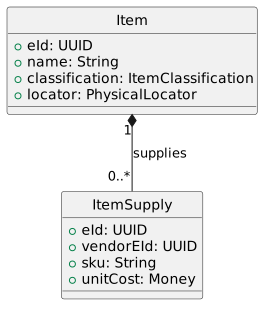
See the [PlantUML guide](../plantuml-guide/) for sequence/class diagram conventions, named-color rules, and validation.
## Draw\.io diagrams
[Section titled “Draw.io diagrams”](#drawio-diagrams)
Draw\.io diagrams are committed as exported `*.drawio.svg` or `*.drawio.png` files alongside the page that uses them, then referenced with standard Markdown image syntax (or `` instead of `:::tip` shorthand in `.mdx` files.
* Avoid bare curly braces in prose — wrap `{foo}` in backticks to disambiguate from JSX expressions.
* Use numeric HTML entities (`≥`) or direct Unicode (`≥`); named entities (`≥`) are rejected by the MDX parser.
The repo’s `knowledge-base/mdx-gotchas.md` has the full list.
## General syntax rules
[Section titled “General syntax rules”](#general-syntax-rules)
* Single blank lines before and after headings, lists, blockquotes, and paragraphs.
* Use `-` for bulleted lists.
* Use spaces only (no tabs); 2 spaces per indentation level.
* Use `---` (three hyphens) for horizontal rules inside a section; use `****` (four asterisks) for major section breaks.
## Footnotes
[Section titled “Footnotes”](#footnote-label)
1. See Allen, J.F. (1983) “Maintaining Knowledge about Temporal Intervals” for the theoretical foundation. [↩](#user-content-fnref-1)
# PlantUML Guide
> PlantUML authoring guide covering general rules, embedding syntax, and the conventions for diagrams used across the Arda documentation site.
PlantUML is the standard diagramming tool for the Arda documentation site. Mermaid should not be used for diagrams embedded in Markdown documents.
## Resources
[Section titled “Resources”](#resources)
* [PlantUML Reference Manual](https://plantuml.com/)
* [Color Names and Samples](https://plantuml-documentation.readthedocs.io/en/latest/formatting/color-names.html)
* [Color Manual](https://plantuml.com/color)
* C4 library: [C4-PlantUML on GitHub](https://github.com/plantuml-stdlib/C4-PlantUML)
* C4 introduction: [Software Architecture Modeling with C4](https://medium.com/software-architecture-foundations/software-architecture-modeling-with-c4-model-e9e61d952121)
## General Rules
[Section titled “General Rules”](#general-rules)
### Pair every diagram with a textual summary
[Section titled “Pair every diagram with a textual summary”](#pair-every-diagram-with-a-textual-summary)
Agents (LLM assistants, MCP clients, search bots) rarely consume images and parse PlantUML source unevenly. Every diagram **must** be paired with a 1–3 sentence prose summary that captures the same semantic content the diagram conveys.
The summary appears immediately **before** the diagram, written as ordinary prose (not a heading, not a callout). Treat it as the diagram’s alt text in long form.
````markdown
The sequence below shows the upload flow from the browser through the BFF to S3. The browser obtains a presigned URL, uploads directly to S3, then notifies the BFF on success.
```plantuml
@startuml
title Upload flow
actor Browser
participant BFF
participant S3
Browser -> BFF: GET /upload-url
BFF --> Browser: presigned URL
Browser -> S3: PUT (presigned)
S3 --> Browser: 200
Browser -> BFF: POST /upload-complete
@enduml
```
````
The summary should:
* State the diagram’s **subject** (what is being depicted) and the **outcome** the reader should take away.
* Use plain US English. Avoid PlantUML jargon (`activation`, `lifeline`) unless the diagram is *about* PlantUML.
* Sit between 80 and 400 characters. Longer narratives belong in the surrounding section, not in the summary.
This rule applies to every diagram type — sequence, class, component, state, deployment. Diagrams used purely as visual decoration (e.g., a logo) are exempt; they should also carry an `alt` attribute (when embedded as `/full
return 200 OK (item details)
return Open Item Details panel
note over FE
Button enabled only when
card status is FULFILLED.
end note
== Perform Action ==
User -> FE ++ : Click "Add to cart"
FE -> BE ++ : POST /v1/kanban/kanban-card//event/request
return 200 OK (KanbanCardStateChange)
FE -> FE : Show toast:\n"Item added"
FE -> BE ++ : GET /v1/kanban/kanban-card/count
return 200 OK (count)
return Badge count updated
@enduml
```
**Key rules**:
1. **One activation block per user gesture.** `User -> FE ++` opens the block; `return ` closes it.
2. **Nest backend calls inside the front-end block.** `FE -> BE ++` / `return` pairs are indented within the outer activation.
3. **Self-calls stay inside the block.** `FE -> FE : ...` does not break the activation — it remains part of the enclosing block.
4. **Notes between blocks.** Place `note over FE` (not `note right of FE`) after the closing `return` and before the next phase separator.
5. **Never use `FE --> User --`** to close a block. Always use `return` so PlantUML manages the deactivation automatically.
### Return Messages
[Section titled “Return Messages”](#return-messages)
Use **dashed arrows** (`-->`) for return messages and notifications from deeper layers to higher layers:
```text
Operations --> BFF : 200 OK\n(url, formFields, objectKey)
```
Do **not** use `..>` — it is not valid in PlantUML sequence diagrams.
When the return immediately follows the activation, prefer `return` over explicit `deactivate`:
```text
BFF -> Operations ++ : POST /items/upload-url
return 200 OK\n(url, formFields, objectKey)
```
### Phase Separators
[Section titled “Phase Separators”](#phase-separators)
Use `== ... ==` separators to divide the diagram into logical phases or steps. Each separator should have a descriptive label:
```text
== Step 1: Request Upload Credentials ==
...
== Step 2: Upload to S3 ==
...
== Step 3: Update Entity ==
```
### Message Labels
[Section titled “Message Labels”](#message-labels)
**Curly braces are not allowed** in message labels — PlantUML interprets them as syntax. Use parentheses or angle brackets instead:
| Instead of | Use |
| ------------------------------- | ------------------------------ |
| `A -> B : 200 OK\n{ url, key }` | `A -> B : 200 OK\n(url, key)` |
| `A -> B : PUT /items/{itemId}` | `A -> B : PUT /items/` |
Curly braces **are safe** inside `note` blocks — they are not parsed as PlantUML syntax there.
### Notes
[Section titled “Notes”](#notes)
Use `note right of ` for implementation details, validation logic, or design notes. Keep notes attached to the participant performing the action:
```text
note right of Operations
Generates UUID for asset-key.
Constructs S3 key from DQ-001 format.
end note
```
Use `note over ` for background processes or cross-cutting concerns:
```text
note over Operations
Periodic cleanup job runs
every 24 hours.
end note
```
### Multi-Line Messages
[Section titled “Multi-Line Messages”](#multi-line-messages)
Use `\n` for line breaks in message labels. Keep to 2-3 lines maximum for readability:
```text
SPA -> BFF ++ : POST /api/storage/upload-url\n(module: operations,\n entityType: item)
```
## Class Diagrams
[Section titled “Class Diagrams”](#class-diagrams)
### Scope
[Section titled “Scope”](#scope)
Show relationships (inheritance, composition, dependency) and key methods/fields. Omit trivial accessors, getters/setters, and boilerplate methods. The diagram should communicate the design, not replicate the source code.
### Basic Example
[Section titled “Basic Example”](#basic-example)
```text
@startuml
title Item Domain Model
class AClass {
+attr: String
+method(p: Int): Double
}
@enduml
```
### Relationships
[Section titled “Relationships”](#relationships)
Use standard UML notation:
| Relationship | Notation |
| -------------- | -------------------- |
| Inheritance | \`Child — |
| Implementation | \`Class .. |
| Composition | `Container *-- Part` |
| Aggregation | `Container o-- Part` |
| Dependency | `Client ..> Service` |
| Association | `A --> B` |
### Stereotypes
[Section titled “Stereotypes”](#stereotypes)
Use stereotypes to indicate the nature of a class when it is not obvious:
```text
class ItemService <>
interface S3BucketAccess <>
class ImageKey <>
```
## C4 Model Diagrams
[Section titled “C4 Model Diagrams”](#c4-model-diagrams)
Use the C4 model for architectural views. The C4 library provides macros for the four levels of detail: Context, Container, Component, and Code.
### C4 Container Diagram
[Section titled “C4 Container Diagram”](#c4-container-diagram)
```text
@startuml C4_example
!include
title Arda Platform — Container View
Person(user, "Shop Manager", "Uses Arda to manage inventory")
Container(frontend, "arda-frontend-app", "Next.js", "Web UI for inventory management")
Container(backend, "operations", "Ktor / Kotlin", "Core domain services and REST API")
ContainerDb(db, "PostgreSQL", "Database", "Bitemporal inventory data")
Rel(user, frontend, "Uses", "HTTPS")
Rel(frontend, backend, "API calls", "REST/JSON")
Rel(backend, db, "Reads/Writes", "JDBC")
@enduml
```
### C4 Shape Gallery
[Section titled “C4 Shape Gallery”](#c4-shape-gallery)
The following shape macros are available:
```text
@startuml C4_shapes
!include
!include
!include
!include
Person(person, "Person")
Person_Ext(personExt, "External Person")
System(system, "Internal System")
System_Ext(systemExt, "External System")
SystemDb(db, "Database")
SystemQueue(queue, "Message Queue")
Container(container, "Container")
ContainerDb(containerDb, "Container DB")
Component(component, "Component")
Deployment_Node(node, "Deployment Node")
@enduml
```
### C4 Boundary Gallery
[Section titled “C4 Boundary Gallery”](#c4-boundary-gallery)
```text
@startuml C4_boundaries
!include
!include
Boundary(aBoundary, "A Boundary")
Enterprise_Boundary(eBoundary, "Enterprise Boundary")
System_Boundary(sBoundary, "System Boundary")
Container_Boundary(containerBoundary, "Container Boundary")
System_Boundary(b1, "Internal System") {
Container(webApp, "Web Application", "Next.js")
Container(api, "API Service", "Ktor")
}
@enduml
```
### C4 Layout Directives
[Section titled “C4 Layout Directives”](#c4-layout-directives)
```text
LAYOUT_TOP_DOWN() ' Default top-to-bottom flow
LAYOUT_LEFT_RIGHT() ' Left-to-right flow
HIDE_STEREOTYPE() ' Remove stereotype labels from shapes
```
## Common Pitfalls
[Section titled “Common Pitfalls”](#common-pitfalls)
| Pitfall | Fix |
| ------------------------------------------------- | -------------------------------------------------------------------------------------------------- |
| `..>` in sequence diagrams | Use `-->` for dashed return arrows |
| `{braces}` in message labels | Use `(parentheses)` or `` |
| Missing `hide footbox` | Always add after `@startuml` |
| Unvalidated diagrams | Always render and verify before committing |
| Overly detailed class diagrams | Show design-relevant members only |
| Missing `@startuml`/`@enduml` | Required — PlantUML will not parse without them |
| Mermaid syntax in Markdown | Use PlantUML exclusively per workspace conventions |
| Continuous activation bar spanning entire diagram | Use discrete activation blocks — one `User -> FE ++` / `return` pair per user gesture |
| Hex color codes (`#ffffcc`, `#333333`) | Use named colors (`LightYellow`, `DarkSlateGray`) — see [Color Manual](https://plantuml.com/color) |
## Conventions for Arda Diagrams
[Section titled “Conventions for Arda Diagrams”](#conventions-for-arda-diagrams)
* Use C4 Container or Component diagrams for architecture overviews.
* Use sequence diagrams for API flows and service interactions.
* Use class diagrams for domain model documentation.
* Use `HIDE_STEREOTYPE()` in C4 diagrams for cleaner output.
* Keep diagram titles concise and include the view level (e.g., “Container View”, “Sequence: Create Item”).
* Store complex, reused diagrams as separate `.puml` files in `_assets/plantuml/` and include them via `!include`.
# Using Hypothesis with AI Agents
> Hypothesis-with-agents guide explaining how AI coding agents read and write inline annotations through the Hypothesis MCP server during documentation review.
AI coding agents (Claude Code, Gemini CLI, etc.) can read and write Hypothesis annotations through the **Hypothesis MCP server**. This lets agents participate in documentation review workflows — reading feedback left by team members and responding to or resolving comments while editing source files.
This page covers two workflows:
1. **Commenting on published documentation** — an agent annotates pages on the live site.
2. **Reading and responding to comments during authoring** — an agent working in the `documentation/` repository fetches annotations, addresses feedback in source files, and replies to threads.
## Prerequisites
[Section titled “Prerequisites”](#prerequisites)
Before using these workflows:
1. **Hypothesis account** — follow the [How to Comment on Documentation](../../commenting/) guide to create an account and join the `arda-products` group.
2. **Hypothesis MCP server** — must be configured in Claude Code. See the [Hypothesis MCP Setup](https://github.com/Arda-cards/agentic-workspace/blob/main/mcp-setup.md#hypothesis) for full instructions. The key requirements are:
* An `.npmrc` in the workspace root with `@arda-cards` registry pointing to GitHub Packages (uses `gh auth token` for credentials — no separate PAT needed).
* A Hypothesis API token stored in 1Password as `op://Private/Hypothesis-API/credential`. Generate a token at [hypothes.is/account/developer](https://hypothes.is/account/developer).
* The MCP server entry in `settings.json` (already included in the Arda workspace settings).
## Workflow 1: Commenting on Published Documentation
[Section titled “Workflow 1: Commenting on Published Documentation”](#workflow-1-commenting-on-published-documentation)
An agent can leave annotations on any page of the published documentation site at `https://arda-cards.github.io/documentation/`.
### Example prompts
[Section titled “Example prompts”](#example-prompts)
**Search for existing feedback on a page:**
```text
Search Hypothesis annotations on https://arda-cards.github.io/documentation/domain/information-model/
for any comments tagged "question" in the arda-products group.
```
**Leave a review comment:**
```sql
Create a Hypothesis annotation on https://arda-cards.github.io/documentation/current-system/architecture/design-pattern-index/
with the text "This section should reference the new State Engine pattern added in v2.4"
and tags ["suggestion", "architecture"].
```
**Read all team annotations on a page:**
```text
Get all Hypothesis annotations for the arda-products group on
https://arda-cards.github.io/documentation/process/craft/project-management/project-planning/
and summarize the open discussion threads.
```
### How it works
[Section titled “How it works”](#how-it-works)
The agent uses these MCP tools:
* `search_annotations` with `uri` set to the page URL and `group` set to the group’s public ID.
* `create_annotation` with the page URL, comment text, and optional tags. Annotations default to the `arda-products` group.
* `get_group_annotations` to fetch all annotations across the group (useful for a broad review sweep).
## Workflow 2: Reading and Responding During Authoring
[Section titled “Workflow 2: Reading and Responding During Authoring”](#workflow-2-reading-and-responding-during-authoring)
When editing documentation source files, an agent can fetch annotations left on the published version of that page, address the feedback by modifying the source, and then reply to the annotation thread.
### Example prompts
[Section titled “Example prompts”](#example-prompts-1)
**Fetch and address feedback:**
```text
I'm editing documentation/src/content/docs/domain/information-model/index.md.
Check Hypothesis for any annotations on the published version of this page
(https://arda-cards.github.io/documentation/domain/information-model/).
For each annotation tagged "suggestion" or "typo", make the fix in the source file
and reply to the annotation with what you changed.
```
**Review sweep across a section:**
```text
Search Hypothesis for all annotations in the arda-products group tagged "question".
For each one, tell me which source file it corresponds to and summarize the question.
```
**Resolve a discussion:**
```sql
Update annotation to add the tag "RESOLVED"
and reply with "Fixed in commit abc1234".
```
### Mapping URLs to source files
[Section titled “Mapping URLs to source files”](#mapping-urls-to-source-files)
The published URL `https://arda-cards.github.io/documentation//` maps to the source file:
```text
documentation/src/content/docs//index.md
```
or for non-directory pages:
```text
documentation/src/content/docs/.md
```
The agent can derive this mapping automatically from the annotation’s `uri` field.
## Tool Reference
[Section titled “Tool Reference”](#tool-reference)
| Tool | What it does | When to use it |
| ----------------------- | ------------------------------------------------- | -------------------------------------------------------------- |
| `get_groups` | Lists groups you belong to | Find the `arda-products` group public ID |
| `search_annotations` | Search with filters (group, URI, text, user, tag) | Find annotations on a specific page or by a specific reviewer |
| `get_annotation` | Get full details of one annotation | Read the complete text and quote context of a specific comment |
| `get_group_annotations` | Fetch all annotations in a group (paginated) | Broad review sweep across all documented pages |
| `create_annotation` | Create a new annotation | Leave feedback on a published page |
| `update_annotation` | Update text or tags on an annotation | Mark a thread as resolved, or edit a previous comment |
## Tips
[Section titled “Tips”](#tips)
* **Use tags consistently** — `question`, `suggestion`, `typo`, `RESOLVED` are the established conventions (see [How to Comment on Documentation](../../commenting/#tips)).
* **Default group** — The MCP server defaults to the `arda-products` group (pubid `e4e5jGAx`) when no group is specified. Pass `group: "__world__"` only if you intend to create a public annotation. Use `get_groups` to discover pubids for other groups.
* **Batch operations** — `get_group_annotations` paginates internally and can fetch up to 2000 annotations in a single call. Use it for sweeps; use `search_annotations` for targeted queries.
* **Permission prompts** — Each MCP tool triggers a permission prompt on first use in a session. Read tools are safe to approve broadly. Write tools (`create_annotation`, `update_annotation`) modify annotations visible to the team.
# Using VS Code or Antigravity
> VS Code and Antigravity authoring guide for non-technical contributors, covering editor setup, dev server, and Git/GitHub workflows for documentation.
This guide shows how to use **Visual Studio Code** (VS Code) or **Antigravity** to contribute to the documentation site without memorizing terminal commands. Both editors provide a graphical interface for editing files, running the dev server, and working with Git and GitHub.
If you haven’t yet installed the prerequisites (Git, Node.js, a GitHub account), complete the [Prerequisites](../getting-started/#prerequisites) section of the Getting Started guide first, then return here.
Tip
**Agent note:** If you are an AI agent helping a non-technical user, this guide is the recommended path. It avoids raw terminal commands in favor of UI interactions that are easier to follow. Fall back to the terminal commands in the [Getting Started](../getting-started/) guide only when the UI equivalent is unavailable.
## Installing Your Editor
[Section titled “Installing Your Editor”](#installing-your-editor)
### VS Code
[Section titled “VS Code”](#vs-code)
1. Download VS Code from in your browser.
2. GitHub shows a yellow banner: **“your-branch had recent pushes — Compare & pull request”**. Click it.
3. The description is prefilled by the template. Fill in:
* **Title** — a short summary of your change.
* Under **`## Summary`** — what you changed and why.
* Under **`## CHANGELOG`** — keep the category headings (Added / Fixed / etc.) that apply, add bullets under them, delete the ones you don’t need.
* **`## Closes`** — link issues this PR closes (optional).
* **`## Verification`** — what you checked locally and on the preview deploy.
4. Click **Create pull request**.
### Option B: VS Code GitHub Pull Requests Extension
[Section titled “Option B: VS Code GitHub Pull Requests Extension”](#option-b-vs-code-github-pull-requests-extension)
1. Install the **GitHub Pull Requests** extension from the Extensions panel (`Cmd + Shift + X`, search for “GitHub Pull Requests”).
2. After installing, a **GitHub** icon appears in the left sidebar. Click it.
3. Click **Create Pull Request**. The extension loads the repo’s template into the description editor.
4. Fill in the title and complete the template sections (especially `## CHANGELOG`), then click **Create**.
### Option C: Antigravity Built-in GitHub Integration
[Section titled “Option C: Antigravity Built-in GitHub Integration”](#option-c-antigravity-built-in-github-integration)
Antigravity has built-in GitHub support. Use the **GitHub** panel in the sidebar to create a pull request directly from the editor. The PR template is loaded automatically; fill in the title and the template sections, especially `## CHANGELOG`.
Tip
**Agent note:** If the user has the GitHub CLI installed (`gh --version`), prefer `gh pr create` from the integrated terminal — it auto-loads the template into the body. Avoid `--body "..."` unless you intentionally want to override the template (in which case make sure the override still contains a valid `## CHANGELOG` section).
## Pulling Updates from Main
[Section titled “Pulling Updates from Main”](#pulling-updates-from-main)
Before starting new work, make sure your local copy is up to date.
1. Switch to the `main` branch: click the branch name in the bottom-left corner and select `main`.
2. Pull the latest changes: click the **…** menu in Source Control and select **Pull**, or use the sync icon in the status bar.
If you are already on a feature branch and want to incorporate recent changes from `main`:
1. Open the Command Palette (`Cmd + Shift + P`).
2. Type `Git: Rebase Branch...` and select it.
3. Choose `origin/main` as the base.
## Useful Editor Features
[Section titled “Useful Editor Features”](#useful-editor-features)
### Markdown Preview
[Section titled “Markdown Preview”](#markdown-preview)
* **VS Code**: `Cmd + Shift + V` opens a preview tab. `Cmd + K V` opens a side-by-side preview.
* **Antigravity**: Click the preview icon in the editor toolbar, or use the Command Palette and search for “Markdown Preview”.
### Search Across Files
[Section titled “Search Across Files”](#search-across-files)
To find a page or a piece of text across the entire project:
* `Cmd + Shift + F` opens the search panel.
* Type your search term. Results appear grouped by file. Click a result to jump to it.
### File Navigation
[Section titled “File Navigation”](#file-navigation)
* `Cmd + P` opens the quick-open file picker. Type part of a file name to jump to it instantly.
### Side-by-Side Editing
[Section titled “Side-by-Side Editing”](#side-by-side-editing)
* Drag a file tab to the right edge of the editor to open it in a split view. This is useful for comparing two pages or editing while viewing a reference.
## Troubleshooting
[Section titled “Troubleshooting”](#troubleshooting)
**Editor does not recognize Git** — Make sure Git is installed and available in your system PATH. Restart the editor after installing Git.
**Source Control panel is empty** — You may have opened a single file instead of the project folder. Use **File > Open Folder…** and select the `documentation/` directory.
**Terminal commands not found** — The integrated terminal inherits your system PATH. If `npm` or `git` are not found, they may not be installed or your shell profile may not be loaded. Try opening a new terminal tab, or use the external Terminal.app to run the command.
**Push fails with “permission denied”** — You may need to authenticate with GitHub. VS Code prompts you to sign in the first time you push. In Antigravity, check **Settings > GitHub** to configure your account.
**Merge conflicts** — If your branch conflicts with `main`, the editor highlights the conflicting sections in the file with colored markers. For each conflict, choose **Accept Current Change**, **Accept Incoming Change**, or **Accept Both Changes**. After resolving all conflicts, stage the files and commit.
# How to Comment on Documentation
> Hypothesis commenting guide for team members covering account setup, joining the Arda group, and leaving inline annotations on documentation pages.
The documentation site uses [Hypothesis](https://web.hypothes.is) for collaborative inline annotations. Team members can highlight text on any page, leave comments, and reply to each other — all without leaving the documentation site.
Comments are anchored to the exact text you select, so feedback stays in context and is easy to find later.
Note
Hypothesis annotations are tied to the URL where they were created. The site is published to two locations:
* **Production** ([arda-cards.github.io](https://arda-cards.github.io/)) — the released version, deployed when PRs merge to `main`. Use this for long-lived comments and discussions.
* **Preview** ([arda-cards.github.io/documentation](https://arda-cards.github.io/documentation/)) — updated on every PR. Use this to leave review feedback on in-progress changes.
Annotations made on one URL are not visible on the other. Post review feedback on the **preview** site and lasting comments on the **production** site.
## One-Time Setup
[Section titled “One-Time Setup”](#one-time-setup)
Create a Hypothesis account and join the team group. This takes about 3 minutes.
1. Go to [hypothes.is/signup](https://hypothes.is/signup) and create a free account.
* **Username**: Use your GitHub username (e.g., `jmpicnic`) so team members can identify you.
* **Email**: Any email you prefer.
* **Password**: Your choice.
2. Check your email and confirm your account by clicking the verification link.
3. Log in to Hypothesis at [hypothes.is/login](https://hypothes.is/login).
4. While logged in, click this link to join the team group: [hypothes.is/groups/e4e5jGAx/arda-products](https://hypothes.is/groups/e4e5jGAx/arda-products)
You’re all set.
## Leaving a Comment
[Section titled “Leaving a Comment”](#leaving-a-comment)
1. Visit any page on the documentation site.
2. Click the small `<` tab on the right edge of the page to open the Hypothesis sidebar.
3. **Important**: Make sure the group selector near the top of the sidebar is set to **arda-products**, not “Public”. This keeps your comments visible only to the team. Hypothesis remembers your selection, so you only need to do this once.
4. Select any text on the page that you want to comment on. A small toolbar will appear — click **Annotate**.
5. Write your comment and click **Post**.
Tip
To leave a page-level comment that is not anchored to specific text, click the note icon (page with a `+`) at the top of the sidebar.
## Reading and Replying to Comments
[Section titled “Reading and Replying to Comments”](#reading-and-replying-to-comments)
1. Open the Hypothesis sidebar (`<` tab on the right).
2. All annotations from team members on the current page are listed in the sidebar. Highlighted text on the page shows where comments are anchored.
3. Click **Reply** on any annotation to respond.
## Tips
[Section titled “Tips”](#tips)
* **Tags** — Add tags to your annotations to categorize them (e.g., `question`, `suggestion`, `typo`).
* **Search** — Use the search box at the top of the sidebar to filter annotations by tag or keyword (e.g., `tag:"question"`).
* **Resolving discussions** — When a discussion has been addressed, reply with the tag `RESOLVED` so the team can track which threads are done.
* **Automatic cleanup** — A GitHub Action periodically hides resolved annotations older than 30 days so they no longer clutter the sidebar.
* **AI agent integration** — AI coding agents can also read and write Hypothesis annotations via the Hypothesis MCP server. See [Using Hypothesis with AI Agents](../authoring/using-hypothesis-with-agents/) for setup and workflow examples.
# Content Provenance
> Provenance index mapping each migrated documentation page to its original source repository or external URL from the 2026-03 consolidation effort.
This page documents the original sources for all content migrated into the Arda documentation site during the 2026-03 consolidation effort. Each entry maps a page in this site to the repository path or external URL from which it was derived. Where a page was synthesized from multiple sources, all contributing sources are listed.
## Source Repositories
[Section titled “Source Repositories”](#source-repositories)
The consolidated documentation draws from four source categories:
* **`technical-documentation/`** (TD) — The original technical documentation repository containing design documents, specifications, runtime descriptions, craft guides, and user-facing documentation.
* **`workspace/`** (WS) — The workspace knowledge base, including project plans, instruction files, templates, design pattern references, and agent skill definitions.
* **`arda-ai-knowledge/`** (AK) — The AI knowledge base containing help-center articles (FAQs and how-to guides), domain context documents, and workflow definitions.
* **External sources** — Google Docs and other non-repository sources used for select domain and reference content.
## Provenance by Section
[Section titled “Provenance by Section”](#provenance-by-section)
### About
[Section titled “About”](#about)
| Page | Source(s) |
| ---------------------------------------------------------- | ------------------------------------------------------------------------------------------------------------------------------------------ |
| `about/authoring/index` | `/technical-documentation/contents/5_craft/how-to-document/index.md` `/workspace/instructions/technical-documents.md` |
| `about/authoring/markdown-gallery` | `/technical-documentation/contents/5_craft/how-to-document/markdown-gallery.md` |
| `about/authoring/plantuml-guide` | `/technical-documentation/contents/5_craft/how-to-document/plantuml.md` `/workspace/instructions/claude/skills/plantuml-diagrams/SKILL.md` |
| `about/templates/analysis` | `/workspace/knowledge-base/templates/analysis-template.md` |
| `about/templates/architecture-decision-record` | `/workspace/knowledge-base/templates/architecture-decision-record.md` |
| `about/templates/backend-service/feature-requirements` | `/workspace/knowledge-base/templates/incremental-service/service-implementation-requirements.md` |
| `about/templates/backend-service/incremental-requirements` | `/workspace/knowledge-base/templates/incremental-service/incremental-service-requirements.md` |
| `about/templates/backend-service/new-service` | `/workspace/knowledge-base/templates/incremental-service/specification.md` |
| `about/templates/behavior-description` | `/workspace/knowledge-base/templates/behavior-template.md` |
| `about/templates/bug-report` | `/workspace/knowledge-base/templates/bug-report.md` |
| `about/templates/code-review-report` | `/workspace/knowledge-base/templates/code-review-report.md` |
| `about/templates/decision-log` | Skill: `decision-log` |
| `about/templates/design-document` | Skill: `design-document` |
| `about/templates/implementation-plan` | `/workspace/knowledge-base/templates/implementation-plan.md` |
| `about/templates/pull-request` | `/workspace/knowledge-base/templates/pull-request.md` |
| `about/templates/refactoring-plan` | `/workspace/knowledge-base/templates/refactoring-plan.md` |
| `about/templates/runbook` | `/workspace/knowledge-base/templates/runbook.md` |
| `about/templates/security-audit-report` | `/workspace/knowledge-base/templates/security-audit-report.md` |
| `about/templates/task-plan` | `/workspace/knowledge-base/templates/task-plan.md` |
| `about/templates/test-plan` | `/workspace/knowledge-base/templates/test-plan.md` |
| `about/templates/threat-model` | `/workspace/knowledge-base/templates/threat-model.md` |
| `about/templates/user-persona` | `/workspace/knowledge-base/templates/user-persona-template.md` |
| `about/templates/user-story` | `/workspace/knowledge-base/templates/user-story.md` |
### Current System
[Section titled “Current System”](#current-system)
| Page | Source(s) |
| --------------------------------------------------------------------- | ---------------------------------------------------------------------------------------------------------------------------------------------------------------------------------------------------------------------------------------------------------------------------------------------------------------------------------------------------------------------------------------------------------------------------------------------------------------------------------------------------------------------------------------------------------------------------------------------------------------------------------------------------------------- |
| `current-system/architecture/api-design` | `/workspace/knowledge-base/by-discipline/apis/api-design.md` `/technical-documentation/contents/2_design/2_functional/general/module-design/api/api-error-responses.md` `/technical-documentation/contents/2_design/2_functional/general/module-design/api/data-authority-api-filtering.md` `/arda-ai-knowledge/domain/api-gotchas.md` `/technical-documentation/contents/2_design/2_functional/general/module-design/api/data-authority-limitations.md` `/technical-documentation/contents/2_design/2_functional/general/module-design/api/data-authority-endpoint-use.md` `/technical-documentation/contents/2_design/2_functional/rest-endpoint-url-names.md` |
| `current-system/architecture/data-authority-pattern` | `/technical-documentation/contents/2_design/2_functional/general/module-design/data-authority/data-authority-module.md` `/technical-documentation/contents/2_design/2_functional/general/module-design/implementation/ktor-module.md` `/technical-documentation/contents/2_design/2_functional/general/module-design/data-authority/layer-responsibilities.md` `/technical-documentation/contents/2_design/2_functional/general/module-design/data-authority/universe-definition.md` |
| `current-system/architecture/design-framework` | `/technical-documentation/contents/2_design/index.md` |
| `current-system/architecture/design-pattern-index` | `/workspace/knowledge-base/by-discipline/design-and-architecture/arda-design-patterns.md` |
| `current-system/architecture/exception-handling` | `/workspace/knowledge-base/by-discipline/design-and-architecture/error-handling.md` `/technical-documentation/contents/2_design/2_functional/general/module-design/lang/exception-handling.md` |
| `current-system/architecture/functional-programming` | `/technical-documentation/contents/2_design/2_functional/general/persistence/dbio-design.md` `/workspace/knowledge-base/by-discipline/design-and-architecture/functional-programming-at-arda.md` |
| `current-system/architecture/implementation-patterns` | `/workspace/knowledge-base/by-discipline/design-and-architecture/architecture-patterns.md` `/technical-documentation/contents/2_design/2_functional/general/be-implementation-patterns.md` `/workspace/knowledge-base/by-discipline/design-and-architecture/consolidated-implementation-patterns.md` `/technical-documentation/contents/2_design/2_functional/general/module-design/implementation/ktor-module.md` |
| `current-system/architecture/index` | `/technical-documentation/contents/2_design/` |
| `current-system/architecture/module-concept` | `/technical-documentation/contents/2_design/2_functional/general/module-design/module-concept.md` |
| `current-system/architecture/naming-conventions` | `/technical-documentation/contents/2_design/6_development/naming-conventions.md` |
| `current-system/architecture/observer-patterns` | `/workspace/knowledge-base/by-discipline/design-and-architecture/observer-patterns.md` |
| `current-system/architecture/persistence/bitemporal-persistence` | `/technical-documentation/contents/2_design/2_functional/general/persistence/bitemporal-persistence.md` |
| `current-system/architecture/persistence/exposed-patterns` | `/workspace/knowledge-base/by-discipline/persistence/exposed-patterns.md` |
| `current-system/architecture/persistence/index` | `/technical-documentation/contents/2_design/2_functional/general/persistence/` |
| `current-system/architecture/persistence/parent-child-persistence` | `/technical-documentation/contents/2_design/2_functional/general/persistence/parent-child-persistence.md` |
| `current-system/architecture/persistence/table-mappings` | `/technical-documentation/contents/2_design/2_functional/general/persistence/creating-table-mappings.md` |
| `current-system/architecture/persistence/universe-design` | `/technical-documentation/contents/2_design/2_functional/general/persistence/universe-design.md` |
| `current-system/architecture/query-dsl` | `/arda-ai-knowledge/references/api-reference.md` `/technical-documentation/contents/2_design/2_functional/general/module-design/lang/query-dsl.md` `/technical-documentation/contents/2_design/2_functional/general/module-design/lang/query-json-examples.md` |
| `current-system/artifacts/index` | `/workspace/instructions/repositories.md` |
| `current-system/artifacts/repository-catalog` | `/workspace/instructions/repositories.md` |
| `current-system/context/cloud-providers` | `/technical-documentation/contents/2_design/3_runtime/cloud-providers.md` `/technical-documentation/contents/4_technology/cloud-providers.md` |
| `current-system/context/index` | `/technical-documentation/contents/2_design/1_context/index.md` |
| `current-system/context/legacy-coda` | `/arda-ai-knowledge/domain/legacy-coda.md` |
| `current-system/context/system-context` | `/technical-documentation/contents/2_design/index.md` `/technical-documentation/contents/2_design/1_context/index.md` |
| `current-system/architecture/frontend-architecture` | `/technical-documentation/contents/2_design/2_functional/user-interface/index.md` |
| `current-system/functional/api-endpoint-catalog` | `/workspace/knowledge-base/by-project/general/api-list.md` `/technical-documentation/contents/2_design/2_functional/rest-apis/index.md` |
| `current-system/functional/authentication/hybrid-auth` | `/technical-documentation/contents/2_design/2_functional/demo202509/hybrid-auth.md` |
| `current-system/functional/authentication/index` | `/technical-documentation/contents/2_design/2_functional/general/OAuth2/misc-drafts/index.md` |
| `current-system/functional/authentication/oauth2-drafts` | `/technical-documentation/contents/2_design/2_functional/general/OAuth2/misc-drafts/index.md` `/technical-documentation/contents/2_design/2_functional/general/OAuth2/misc-drafts/token-exchange.md` `/technical-documentation/contents/2_design/2_functional/general/OAuth2/misc-drafts/token-limits.md` |
| `current-system/functional/authentication/oauth2-ui-auth` | `/technical-documentation/contents/2_design/2_functional/general/OAuth2/ui-request-authentication.md` |
| `current-system/functional/demo-specifics/item-enums` | `/technical-documentation/contents/2_design/2_functional/demo202509/item-enum-values.md` |
| `current-system/functional/demo-specifics/pdf-printing` | `/technical-documentation/contents/2_design/2_functional/demo202509/pdf-printing.md` |
| `current-system/functional/demo-specifics/tenant-user-provisioning` | `/technical-documentation/contents/2_design/2_functional/demo202509/tenants-and-users.md` |
| `current-system/functional/frontend-patterns` | `/workspace/knowledge-base/by-discipline/user-interaction/frontend-patterns.md` |
| `current-system/functional/index` | `/technical-documentation/contents/2_design/2_functional/module-structure/index.md` |
| `current-system/functional/procurement/index` | `/technical-documentation/contents/2_design/2_functional/module-structure/procurement/index.md` |
| `current-system/functional/procurement/order-creation` | `/technical-documentation/contents/1_specifications/mvp2/purchase-orders/core-use-cases/create-order-from-cards.md` `/technical-documentation/contents/1_specifications/mvp2/purchase-orders/additional-use-cases/create-empty-order.md` `/technical-documentation/contents/1_specifications/mvp2/purchase-orders/additional-use-cases/create-by-copy.md` `/technical-documentation/contents/1_specifications/mvp2/purchase-orders/additional-use-cases/order-from-header-and-lines.md` |
| `current-system/functional/procurement/order-implementation-notes` | `/technical-documentation/contents/1_specifications/mvp2/purchase-orders/implementation-notes.md` `/technical-documentation/contents/1_specifications/mvp2/purchase-orders/ui-requirements.md` `/technical-documentation/contents/1_specifications/mvp2/purchase-orders/kanban-item-updates.md` |
| `current-system/functional/procurement/order-lifecycle` | `/technical-documentation/contents/1_specifications/mvp2/purchase-orders/core-use-cases/update-order-header.md` `/technical-documentation/contents/1_specifications/mvp2/purchase-orders/core-use-cases/view-order-details.md` `/technical-documentation/contents/1_specifications/mvp2/purchase-orders/core-use-cases/listing-orders.md` `/technical-documentation/contents/1_specifications/mvp2/purchase-orders/core-use-cases/process-order.md` `/technical-documentation/contents/1_specifications/mvp2/purchase-orders/additional-use-cases/submit-order.md` |
| `current-system/functional/procurement/order-line-management` | `/technical-documentation/contents/1_specifications/mvp2/purchase-orders/core-use-cases/add-lines-to-order.md` `/technical-documentation/contents/1_specifications/mvp2/purchase-orders/core-use-cases/remove-line-from-order.md` `/technical-documentation/contents/1_specifications/mvp2/purchase-orders/additional-use-cases/add-line-to-order.md` `/technical-documentation/contents/1_specifications/mvp2/purchase-orders/additional-use-cases/add-lines-from-items.md` |
| `current-system/functional/procurement/purchase-order-implementation` | `/technical-documentation/contents/1_specifications/demo202509/features/purchase-order.md` |
| `current-system/functional/reference-data/business-affiliate` | `/technical-documentation/contents/2_design/2_functional/module-structure/reference-data/business-affiliate/index.md` |
| `current-system/functional/reference-data/index` | `/technical-documentation/contents/2_design/2_functional/module-structure/reference-data/index.md` |
| `current-system/functional/reference-data/item` | `/technical-documentation/contents/2_design/2_functional/module-structure/reference-data/item/index.md` |
| `current-system/functional/reference-data/item` (§ Item Lookup URL) | `/technical-documentation/contents/2_design/2_functional/module-structure/reference-data/item-printing.md` |
| `current-system/functional/resources/index` | `/technical-documentation/contents/2_design/2_functional/module-structure/resources/kanban-cards/index.md` |
| `current-system/functional/resources/kanban-cards-module` | `/technical-documentation/contents/2_design/2_functional/module-structure/resources/kanban-cards/index.md` `/technical-documentation/contents/2_design/2_functional/module-structure/resources/kanban-cards/kanban-qr-code.md` |
| `current-system/functional/system/access-rules` | `/technical-documentation/contents/2_design/2_functional/module-structure/oam/user-tenant-access-rules.md` |
| `current-system/functional/system/customer-acquisition` | `/technical-documentation/contents/2_design/2_functional/module-structure/oam/customer-acquisition-channels.md` |
| `current-system/functional/system/index` | `/technical-documentation/contents/2_design/2_functional/module-structure/oam/user-tenant.md` |
| `current-system/functional/system/invite-user` | `/technical-documentation/contents/2_design/2_functional/module-structure/oam/invite-user.md` |
| `current-system/functional/system/security/cognito-endpoints` | `/technical-documentation/contents/2_design/5_OAM/security/application-endpoints-for-cognito.md` |
| `current-system/functional/system/security/cognito-service` | `/technical-documentation/contents/2_design/5_OAM/security/authentication-cognito-service.md` |
| `current-system/functional/system/security/index` | `/technical-documentation/contents/2_design/5_OAM/security/index.md` |
| `current-system/functional/system/security/jwt-payload` | `/technical-documentation/contents/2_design/5_OAM/security/cognito-jwt-payload.md` |
| `current-system/functional/system/security/oauth2-api-endpoints` | `/technical-documentation/contents/2_design/5_OAM/security/oauth2-api-endpoints.md` |
| `current-system/functional/system/security/realms-scopes-permissions` | `/technical-documentation/contents/2_design/5_OAM/security/security-realms-scopes-permissions.md` |
| `current-system/functional/system/user-tenant` | `/technical-documentation/contents/2_design/2_functional/module-structure/oam/user-tenant.md` |
| `current-system/index` | `/workspace/projects/ad-hoc/documentation/consolidate-documentation/` |
| `current-system/oam/index` | `/technical-documentation/contents/2_design/5_OAM/` |
| `current-system/oam/security/secrets-vault` | `/technical-documentation/contents/2_design/5_OAM/security/secrets-vault.md` |
| `current-system/oam/service-monitoring` | `/technical-documentation/contents/2_design/5_OAM/service-monitoring.md` |
| `current-system/runtime/build-and-deployment` | `/workspace/knowledge-base/by-discipline/devops/build-and-deployment.md` `/technical-documentation/contents/2_design/3_runtime/runtime-environments.md` |
| `current-system/runtime/development-pipelines` | `/workspace/knowledge-base/by-discipline/devops/build-and-deployment.md` `/technical-documentation/contents/2_design/3_runtime/runtime-environments.md` |
| `current-system/runtime/dns-structure` | `/technical-documentation/contents/2_design/3_runtime/dns-structure.md` |
| `current-system/runtime/environments` | `/technical-documentation/contents/2_design/3_runtime/runtime-environments.md` |
| `current-system/runtime/iac/apps` | `/technical-documentation/contents/2_design/3_runtime/iac-implementation/apps.md` |
| `current-system/runtime/iac/constructs` | `/technical-documentation/contents/2_design/3_runtime/iac-implementation/constructs.md` |
| `current-system/runtime/iac/index` | `/technical-documentation/contents/2_design/3_runtime/iac-implementation/index.md` |
| `current-system/runtime/iac/stacks` | `/technical-documentation/contents/2_design/3_runtime/iac-implementation/stacks.md` |
| `current-system/runtime/index` | `/technical-documentation/contents/2_design/3_runtime/` |
| `current-system/runtime/mtls` | `/technical-documentation/contents/2_design/3_runtime/https-mtls-network.md` |
| `current-system/runtime/network-routing` | `/technical-documentation/contents/2_design/3_runtime/network.md` |
| `current-system/runtime/platform-structure` | `/technical-documentation/contents/2_design/3_runtime/arda-platform-structure.md` |
| `current-system/runtime/static-assets` | `/technical-documentation/contents/2_design/3_runtime/static-asset-repository.md` |
| `current-system/runtime/url-naming` | `/technical-documentation/contents/2_design/3_runtime/public-url-names.md` |
### Decisions
[Section titled “Decisions”](#decisions)
| Page | Source(s) |
| ------------------------------------------- | ------------------------------------------------------------------- |
| `decisions/record/image-upload-decisions` | `/workspace/projects/mvp2/12-upload-product-images/decision-log.md` |
| `decisions/record/purchase-order-decisions` | `/workspace/projects/mvp2/13-purchase-order-v1/decision-log.md` |
### Domain
[Section titled “Domain”](#domain)
| Page | Source(s) |
| ------------------------------------------------------- | ---------------------------------------------------------------------------------------------------------------------------------------------------------------------------------------------------------------------------------------------------------------------------------------------------------------------- |
| `domain/general/cultural-adoption` | `/arda-ai-knowledge/content/help-center/how-to-guides/cultural-buyin-kanban.md` `/arda-ai-knowledge/content/help-center/how-to-guides/no-system-to-world-class.md` |
| `domain/general/kanban-fundamentals` | `/workspace/knowledge-base/domain/personas/index.md` |
| `domain/general/three-types-of-inventory` | `/arda-ai-knowledge/content/help-center/how-to-guides/three-types-of-inventory.md` |
| `domain/information-model/actions/kanban-cards` | `/technical-documentation/contents/1_specifications/demo202509/information-model/kanban.md` `/technical-documentation/contents/2_design/2_functional/information-structure/domain-model/actions/kanban/kanban.md` |
| `domain/information-model/assets/business-affiliates` | `/technical-documentation/contents/2_design/2_functional/information-structure/domain-model/assets/affiliates/R1.md` `/technical-documentation/contents/2_design/2_functional/information-structure/domain-model/assets/affiliates/affiliates.md` |
| `domain/information-model/assets/facilities` | `/technical-documentation/contents/2_design/2_functional/information-structure/domain-model/assets/facility/facility.md` |
| `domain/information-model/assets/items` | `/technical-documentation/contents/2_design/2_functional/information-structure/domain-model/assets/items/R1.md` `/technical-documentation/contents/2_design/2_functional/information-structure/domain-model/assets/items/items.md` |
| `domain/information-model/common/geographic` | `/technical-documentation/contents/2_design/2_functional/information-structure/domain-model/common/types/geo/geo.md` |
| `domain/information-model/common/identity` | `/technical-documentation/contents/2_design/2_functional/information-structure/domain-model/common/lang/identity/identity.md` |
| `domain/information-model/common/primitives` | `/technical-documentation/contents/2_design/2_functional/information-structure/domain-model/common/lang/primitives/primitives.md` |
| `domain/information-model/common/time` | `/technical-documentation/contents/2_design/2_functional/information-structure/domain-model/common/types/time/time.md` |
| `domain/information-model/glossary/index` | `https://docs.google.com/document/d/1HDPij7qTkfhSGztg_9qqTJxMZU-bCSnkcS11zTERKc8/edit` |
| `domain/information-model/index` | `/technical-documentation/contents/2_design/2_functional/information-structure/domain-model/index.md` |
| `domain/information-model/meta/arda-domain-name` | `/technical-documentation/contents/2_design/2_functional/general/information-model/arda-domain-name.md` |
| `domain/information-model/meta/entities` | `/technical-documentation/contents/2_design/2_functional/general/information-model/entities.md` |
| `domain/information-model/meta/entity-references` | `/technical-documentation/contents/2_design/2_functional/general/information-model/arda-domain-name.md` `/technical-documentation/contents/2_design/2_functional/general/information-model/entity-references.md` |
| `domain/information-model/meta/journaled-entities` | `/technical-documentation/contents/2_design/2_functional/general/information-model/journaled-entities.md` |
| `domain/information-model/meta/reference-data` | `/technical-documentation/contents/2_design/2_functional/general/information-model/reference-data.md` |
| `domain/information-model/meta/value-types` | `/technical-documentation/contents/2_design/2_functional/general/information-model/value-types.md` |
| `domain/information-model/system/accounts` | `/technical-documentation/contents/2_design/2_functional/information-structure/domain-model/system/accounts/accounts.md` `/technical-documentation/contents/1_specifications/demo202509/information-model/tenant.md` `/technical-documentation/contents/1_specifications/demo202509/information-model/user-account.md` |
| `domain/information-model/transactions/item-mutation` | `/technical-documentation/contents/1_specifications/mvp2/item-supply/item-mutation-intent.md` `/workspace/knowledge-base/by-project/operations/item-mutation-semantics.md` |
| `domain/information-model/transactions/purchase-orders` | `/technical-documentation/contents/1_specifications/mvp2/purchase-orders/index.md` |
### Process
[Section titled “Process”](#process)
| Page | Source(s) |
| ---------------------------------------------------------------- | -------------------------------------------------------------------------------------------------- |
| `process/apds/document-review` | `/arda-ai-knowledge/workflows/review-doc.md` |
| `process/apds/document-writing` | `/arda-ai-knowledge/workflows/write-doc.md` |
| `process/apds/incremental-service/implementation-best-practices` | `/workspace/knowledge-base/templates/incremental-service/service-implementation-best-practices.md` |
| `process/apds/incremental-service/implementation-requirements` | `/workspace/knowledge-base/templates/incremental-service/service-implementation-requirements.md` |
| `process/apds/incremental-service/incremental-best-practices` | `/workspace/knowledge-base/templates/incremental-service/incremental-service-best-practices.md` |
| `process/apds/incremental-service/incremental-requirements` | `/workspace/knowledge-base/templates/incremental-service/incremental-service-requirements.md` |
| `process/apds/incremental-service/requirements-best-practices` | `/workspace/knowledge-base/templates/incremental-service/requirements-list-best-practices.md` |
| `process/apds/incremental-service/requirements-list` | `/workspace/knowledge-base/templates/incremental-service/requirements-list.md` |
| `process/apds/incremental-service/specification` | `/workspace/knowledge-base/templates/incremental-service/specification.md` |
| `process/apds/test-case-methodology` | `/workspace/instructions/test-case-definition-workflow.md` |
| `process/craft/analysis-and-design/complex-project-planning` | Skill: `complex-project-definition-and-planning` |
| `process/craft/analysis-and-design/project-decomposition` | Skill: `project-decomposition` |
| `process/craft/deployment-and-release/aws-account-creation` | `/technical-documentation/contents/5_craft/how-to-manage-runtime/create-aws-account.md` |
| `process/craft/deployment-and-release/mtls-howto` | `/technical-documentation/contents/2_design/3_runtime/https-mtls-network.md` |
| `process/craft/deployment-and-release/release-lifecycle` | Skill: `release-lifecycle` |
| `process/craft/deployment-and-release/runtime-environment-howto` | `/technical-documentation/contents/2_design/3_runtime/runtime-environments.md` |
| `process/craft/documentation/skill-creation` | Skill: `skill-creation` |
| `process/craft/implementation/dev-workflows` | `/workspace/instructions/dev-workflows.md` |
| `process/craft/implementation/gradle-project-setup` | `/technical-documentation/contents/5_craft/how-to-work-with-gradle-project.md` |
| `process/craft/implementation/implementation-task` | Skill: `implementation-task` |
| `process/craft/implementation/kotlin-coding` | Skill: `kotlin-coding` |
| `process/craft/implementation/multi-repo-development` | `/technical-documentation/contents/5_craft/how-to-develop-multiple-repositories.md` |
| `process/craft/implementation/tooling` | `/workspace/knowledge-base/by-discipline/software-development/tooling.md` |
| `process/craft/implementation/ui-component` | Skill: `ui-component` |
| `process/craft/operations-and-monitoring/api-access` | Skill: `api-access` |
| `process/craft/operations-and-monitoring/cluster-logs` | Skill: `cluster-logs` |
| `process/craft/operations-and-monitoring/fullstory-integration` | `/workspace/knowledge-base/by-discipline/observability/full-story-integration.md` |
| `process/craft/operations-and-monitoring/postgres-bastion` | `/technical-documentation/contents/5_craft/how-to-manage-runtime/postgres-bastion-with-kubectl.md` |
| `process/craft/operations-and-monitoring/sentry-integration` | `/workspace/knowledge-base/by-discipline/observability/sentry.md` |
| `process/craft/project-management/process-patterns` | `/workspace/knowledge-base/by-discipline/software-development/process-patterns.md` |
| `process/craft/project-management/project-planning` | Skill: `project-planning` |
| `process/craft/verification-and-validation/api-testing-bruno` | `/technical-documentation/contents/5_craft/how-to-test-api-bruno.md` |
| `process/craft/verification-and-validation/backend-testing` | Skill: `unit-tests-backend` Skill: `unit-tests-infra` |
| `process/craft/verification-and-validation/mocking-patterns` | `/workspace/knowledge-base/by-discipline/testing/mocking-patterns.md` |
| `process/craft/verification-and-validation/running-api-tests` | Skill: `run-operations-api-test` |
### Product
[Section titled “Product”](#product)
| Page | Source(s) |
| ------------------------------------------------- | --------------------------------------------------------------------------------------------------------------------------------------------------------------------------------------------- |
| `product/features/purchase-order-feature` | `/workspace/projects/mvp2/13-purchase-order-v1/project-description.md` `/technical-documentation/contents/1_specifications/demo202509/features/purchase-order.md` |
| `product/features/ux-design-overview` | `/technical-documentation/contents/1_specifications/general/ux/index.md` |
| `product/markets-and-value/value-proposition` | `/arda-ai-knowledge/domain/platform.md` `/arda-ai-knowledge/domain/brand-and-tone.md` |
| `product/offerings/releases/release-2026-02-20` | `/workspace/releases/release-02-20-26/RELEASE-NOTES.md` |
| `product/publications/adding-items` | `/arda-ai-knowledge/content/help-center/how-to-guides/platform/adding-single-item.md` |
| `product/publications/arda-manager-guide` | `/arda-ai-knowledge/content/help-center/how-to-guides/world-class-shop-arda-manager.md` |
| `product/publications/card-states` | `/arda-ai-knowledge/content/help-center/faq/card-states.md` `/technical-documentation/contents/2_design/2_functional/module-structure/resources/kanban-cards/kanban-state-for-procurement.md` |
| `product/publications/disable-popup-blockers` | `/arda-ai-knowledge/content/help-center/faq/disable-popup-blockers.md` |
| `product/publications/editing-items` | `/arda-ai-knowledge/content/help-center/how-to-guides/platform/editing-item.md` |
| `product/publications/item-csv-import` | `/technical-documentation/contents/8_user_docs/item-csv-import.md` |
| `product/publications/item-types-and-categories` | `/arda-ai-knowledge/content/help-center/faq/item-types-subtypes-usecases.md` |
| `product/publications/kanban-discipline` | `/arda-ai-knowledge/content/help-center/how-to-guides/never-order-without-card.md` |
| `product/publications/locations-and-sublocations` | `/arda-ai-knowledge/content/help-center/faq/locations-sublocations.md` |
| `product/publications/order-card-startup` | `/arda-ai-knowledge/content/help-center/how-to-guides/10-step-order-card-startup.md` |
| `product/publications/printer-setup-hp9135e` | `/arda-ai-knowledge/content/help-center/faq/printer-setup-hp9135e.md` |
| `product/publications/printing-in-arda` | `/arda-ai-knowledge/content/help-center/how-to-guides/platform/printing-in-arda.md` |
| `product/publications/quick-onboarding-guide` | Original content (loosely inspired by `/arda-ai-knowledge/content/help-center/how-to-guides/quick-onboarding-guide.md`, which was a stub) |
| `product/publications/quickstart-kit` | `/arda-ai-knowledge/content/help-center/faq/quickstart-kit.md` |
| `product/publications/scanning-cards` | `/arda-ai-knowledge/content/help-center/how-to-guides/platform/scanning-cards-desktop.md` |
| `product/publications/three-types-of-inventory` | `/arda-ai-knowledge/content/help-center/how-to-guides/three-types-of-inventory.md` |
| `product/personas/alan-account-admin` | `/workspace/knowledge-base/domain/personas/alan-account-admin.md` |
| `product/personas/david-purchasing-manager` | `/workspace/knowledge-base/domain/personas/david-purchasing-manager.md` |
| `product/personas/irene-inventory-manager` | `/workspace/knowledge-base/domain/personas/irene-inventory-manager.md` |
| `product/personas/keisha-receiving-clerk` | `/workspace/knowledge-base/domain/personas/keisha-receiving-clerk.md` |
| `product/personas/owen-business-principal` | `/workspace/knowledge-base/domain/personas/owen-business-principal.md` |
| `product/personas/sam-shop-floor-worker` | `/workspace/knowledge-base/domain/personas/sam-shop-floor-worker.md` |
| `product/x-cutting/edit-draft-publish` | `/technical-documentation/contents/1_specifications/patterns/edit-draft-publish.md` |
| `product/x-cutting/resource-concept` | `/technical-documentation/contents/1_specifications/mvp2/general/resource.md` |
### Roadmap
[Section titled “Roadmap”](#roadmap)
| Page | Source(s) |
| ---------------------------------------------------------- | ----------------------------------------------------------------------------------------------------------------------------------------------------------------------------------------------------------------------------------------------------------------------------------------------------------------------------------- |
| `roadmap/backlog/planned/sonarjs-integration` | `/workspace/projects/_planning/fe-quality-metrics/sonarjs-integration-proposal.md` |
| `roadmap/backlog/requested/complexity-hotspot-remediation` | `/workspace/projects/_backlog/complexity-hotspot-remediation.md` |
| `roadmap/backlog/requested/improvement-proposal` | `/workspace/projects/_backlog/improvement-proposal.md` |
| `roadmap/backlog/requested/ts-quality-tools` | `/workspace/projects/_backlog/ts-quality-tools.md` |
| `roadmap/completed/accounts-common-6x` | `/workspace/projects/z-completed/ad-hoc/accounts/adopt-common-6-x/project-plan.md` |
| `roadmap/completed/ag-grid-refactor` | `/workspace/projects/ad-hoc/ag-grid-fix-refactor/README.md` |
| `roadmap/completed/business-affiliate-workflows` | `/workspace/projects/z-completed/mvp2/9b-business-affiliate-design/design-session-01.md` `/workspace/projects/z-completed/mvp2/9-business-affiliate-workflows/goal.md` |
| `roadmap/ideas/architecture-explorations` | `/workspace/projects/architecture/ideas/coding-patterns.md` `/workspace/projects/architecture/ideas/endpoint-dsl-guide.md` `/workspace/projects/architecture/ideas/arda-vs-textbook-analysis.md` `/workspace/projects/architecture/ideas/module-implementation.md` `/workspace/projects/architecture/ideas/rest-api-development.md` |
| `roadmap/ideas/business-affiliate-design` | `/workspace/projects/z-completed/mvp2/9b-business-affiliate-design/design-session-01.md` `/workspace/projects/z-completed/mvp2/9-business-affiliate-workflows/goal.md` |
| `roadmap/ideas/pr-review-guidelines` | `/workspace/projects/architecture/ideas/pr-review-guidelines.md` |
| `roadmap/in-progress/component-inventory` | `/workspace/projects/z-completed/ad-hoc/oam/component-inventory/session/resume-state.md` |
| `roadmap/in-progress/item-delete-bug-782` | `/workspace/projects/bugs/management-782/code-fix.md` |
| `roadmap/in-progress/product-image-upload` | `/workspace/projects/mvp2/12-upload-product-images/project-description.md` |
| `roadmap/in-progress/purchase-order-v1` | `/workspace/projects/mvp2/13-purchase-order-v1/project-description.md` |
| `roadmap/in-progress/ux-prototype-full-app` | `/workspace/projects/ad-hoc/ux-prototype/agentation-adoption/implementation-plan.md` |
### Technology
[Section titled “Technology”](#technology)
| Page | Source(s) |
| ---------------------------------------- | ------------------------------------------------------------------------------------------------------------------------------------------------------------------ |
| `technology/ag-grid/compliance-refactor` | `/workspace/knowledge-base/ag-grid-compliance-refactor.md` |
| `technology/ag-grid/index` | `/workspace/knowledge-base/ag-grid-deep-dive.md` |
| `technology/ag-grid/issues-analysis` | `/workspace/knowledge-base/ag-grid-compliance-refactor.md` `/workspace/knowledge-base/ag-grid-deep-dive.md` `/workspace/knowledge-base/ag-grid-issues-analysis.md` |
| `technology/cedar-authorization` | `/technical-documentation/contents/4_technology/cedar-authorization.md` |
# Overview
> Template catalog for documentation authors — human and AI
This section provides templates for creating content across the documentation site. Each template page describes when to use it, which site section it targets, and includes the full template as a copyable code block.
## General Templates
[Section titled “General Templates”](#general-templates)
Templates for common document types used across multiple site sections.
| Template | Target Section | Use When |
| --------------------------------------------------------------- | --------------------------------- | ---------------------------------------------- |
| [Architecture Decision Record](./architecture-decision-record/) | `decisions/` | Recording a technology or design decision |
| [User Story](./user-story/) | `product/` | Defining a feature requirement in story format |
| [User Persona](./user-persona/) | `product/personas/` | Creating a new user persona profile |
| [Behavior Description](./behavior-description/) | `product/use-cases/` or `domain/` | Documenting use cases and scenarios |
| [Threat Model](./threat-model/) | `process/` | Performing STRIDE-based threat analysis |
| [Security Audit Report](./security-audit-report/) | `process/` | Recording a security review |
| [Operational Runbook](./runbook/) | `process/` or `technology/` | Writing step-by-step operational procedures |
## Project Decomposition Templates
[Section titled “Project Decomposition Templates”](#project-decomposition-templates)
Templates for multi-run project plans produced by the [Project Decomposition](../../process/craft/analysis-and-design/project-decomposition/) workflow.
| Template | Use When |
| ------------------------------------------------- | ----------------------------------------------------------------------- |
| [Team Split Assessment](./team-split-assessment/) | Documenting the complexity analysis and split recommendation |
| [Project Plan (Run)](./project-plan/) | Defining entry/exit criteria, tasks, and handoffs for a single run |
| [Choreography](./choreography/) | Describing the execution sequence and artifact dependencies across runs |
## Authoring Templates
[Section titled “Authoring Templates”](#authoring-templates)
Structural templates for creating pages and sections on this site.
| Template | Target Section | Use When |
| --------------------------------- | -------------- | -------------------------------------------- |
| [Content Page](./content-page/) | Any section | Creating a new content page |
| [Section Index](./section-index/) | Any section | Creating a section landing page (`index.md`) |
## Backend Service Templates
[Section titled “Backend Service Templates”](#backend-service-templates)
Templates for specifying Kotlin backend service implementations in the `operations` repository.
| Template | Use When |
| ------------------------------------------------------------------------------- | ------------------------------------------------------------------- |
| [Task Specification](./backend-service/task-specification/) | Defining a scoped implementation task with acceptance criteria |
| [Incremental Service Requirements](./backend-service/incremental-requirements/) | Modifying an existing service (entities, methods, persistence, API) |
| [Feature Requirements List](./backend-service/feature-requirements/) | Specifying a new feature with domain modeling and requirements |
| [New Service Implementation](./backend-service/new-service/) | Building a new service module from scratch |
## Frontmatter Reference
[Section titled “Frontmatter Reference”](#frontmatter-reference)
Every page on this site uses YAML frontmatter validated against the [content schema](../../about/). The minimum required fields are:
```yaml
---
title: "Overview"
tags: [keyword1, keyword2] # Recommended
domain: product # Recommended — one of: product, domain, system, vision,
# roadmap, process, technology, legal, decisions, about
maturity: draft # draft | review | published (default: published)
---
```
Additional optional fields: `author`, `description`, `lastVerified`, `source`, `supersedes`, `comments`.
# Template: Implementation Analysis
> Template for documenting an implementation analysis comparing a specification against current code, surfacing gaps, divergences, and refactor opportunities.
**Author**: \[Author / Persona] **Date**: YYYY-MM-DD
## Executive Summary
[Section titled “Executive Summary”](#executive-summary)
## Files Under Analysis
[Section titled “Files Under Analysis”](#files-under-analysis)
| Layer / Role | File | Lines | Notes |
| ------------ | --------------------- | ----- | ----- |
| … | `/repo/path/file.ext` | … | … |
## Specification vs. Implementation Comparison
[Section titled “Specification vs. Implementation Comparison”](#specification-vs-implementation-comparison)
### Category 1: Significant Gaps (Features Not Implemented)
[Section titled “Category 1: Significant Gaps (Features Not Implemented)”](#category-1-significant-gaps-features-not-implemented)
### Category 2: Behavioral Differences
[Section titled “Category 2: Behavioral Differences”](#category-2-behavioral-differences)
### Category 3: Missing Test Coverage
[Section titled “Category 3: Missing Test Coverage”](#category-3-missing-test-coverage)
### Category 4: Minor Discrepancies
[Section titled “Category 4: Minor Discrepancies”](#category-4-minor-discrepancies)
## Summary Table
[Section titled “Summary Table”](#summary-table)
| Specification Requirement | Status | Notes |
| ------------------------- | ------ | ----- |
| … | … | … |
## Prioritized Recommendations
[Section titled “Prioritized Recommendations”](#prioritized-recommendations)
### Priority 1: Breaking Behaviors
[Section titled “Priority 1: Breaking Behaviors”](#priority-1-breaking-behaviors)
### Priority 2: Data Integrity
[Section titled “Priority 2: Data Integrity”](#priority-2-data-integrity)
### Priority 3: Completeness
[Section titled “Priority 3: Completeness”](#priority-3-completeness)
## Open Questions and Decisions
[Section titled “Open Questions and Decisions”](#open-questions-and-decisions)
| # | Question | Options | Recommendation | Decision |
| - | -------- | ------- | -------------- | -------- |
## Follow-Up Actions
[Section titled “Follow-Up Actions”](#follow-up-actions)
# Architecture Decision Record
> Template for documenting technology and design decisions
Use this template when recording a significant technology or design decision. Completed ADRs belong in the `decisions/record/` section of this site.
## When to Use
[Section titled “When to Use”](#when-to-use)
* A technology choice affects multiple components or teams.
* An architectural pattern is being established or changed.
* A trade-off needs to be documented for future reference.
* Reverting a previous decision (mark the old ADR as “Superseded”).
## Target Section
[Section titled “Target Section”](#target-section)
`decisions/record/`
## Template
[Section titled “Template”](#template)
```markdown
---
title: "ADR-NNN: Decision Title"
tags: [adr, decision]
domain: decisions
maturity: published
author: Principal Engineer
---
# ADR-[NNN]: [Decision Title]
**Author**: Principal Engineer
**Date**: YYYY-MM-DD
**Status**: Proposed | Accepted | Deprecated | Superseded by ADR-[NNN]
## Context
Describe the situation that requires a decision. Include:
- The problem or requirement driving the decision.
- Relevant constraints (technical, business, timeline).
- Links to related features, issues or prior ADRs.
## Decision Drivers
- List the criteria used to evaluate options (e.g., performance, maintainability, team familiarity, cost, security).
## Options Considered
### Option A: [Name]
- **Description**: How this option works.
- **Pros**: Benefits of this approach.
- **Cons**: Drawbacks and risks.
### Option B: [Name]
- **Description**: How this option works.
- **Pros**: Benefits of this approach.
- **Cons**: Drawbacks and risks.
### Option C: [Name] (if applicable)
- **Description**: How this option works.
- **Pros**: Benefits of this approach.
- **Cons**: Drawbacks and risks.
## Decision
State the chosen option and the rationale.
> We chose **Option [X]** because [reason]. The primary factors were [decision drivers that favored this option].
## Consequences
### Positive
- List the benefits of this decision.
### Negative
- List the trade-offs and costs accepted.
### Neutral
- List effects that are neither positive nor negative but worth noting.
## Follow-Up Actions
- List any tasks, implementation plans or documentation updates required as a result of this decision.
```
# Overview
> Templates for specifying Kotlin backend service implementations
Templates for specifying work on the `operations` Kotlin backend. These cover the full lifecycle from task scoping through feature requirements to detailed service implementation specifications.
| Template | Use When |
| --------------------------------------------------------------- | ---------------------------------------------------------------------------------------------------- |
| [Task Specification](./task-specification/) | Scoping a bounded implementation task with acceptance criteria and sub-tasks |
| [Incremental Service Requirements](./incremental-requirements/) | Modifying an existing service — entity changes, method changes, persistence migrations, API changes |
| [Feature Requirements List](./feature-requirements/) | Specifying a new feature with domain modeling, functional/data/behavioral/integration requirements |
| [New Service Implementation](./new-service/) | Building a new service module from scratch — entities, service interface, persistence, module config |
All templates follow Arda backend conventions: `Result` return types, `AppError` hierarchy, `MutationQualifier` semantics (LAX/STRICT/PROPAGATE), Exposed ORM, and bitemporal persistence.
# Feature Requirements List
> Template for specifying a new feature with domain modeling and structured requirements
Use this template when specifying a new feature that requires domain modeling, functional requirements, data constraints, behavioral rules, and integration contracts.
## When to Use
[Section titled “When to Use”](#when-to-use)
* Defining a new product capability with multiple requirement types.
* Establishing domain concepts and their relationships before implementation.
* Creating a traceable requirements document with MoSCoW prioritization.
## Document Sections
[Section titled “Document Sections”](#document-sections)
1. **Overview** — Feature summary, scope, target personas, related documents.
2. **Domain Modeling** — Concepts, conceptual model (PlantUML class diagram), relationships, business rules.
3. **Functional Requirements** (`FR`) — What the system shall do.
4. **Data Requirements** (`DR`) — Entity constraints, validation rules, cardinality.
5. **Behavioral Requirements** (`BR`) — State transitions, lifecycle events, side effects.
6. **Integration Requirements** (`IR`) — API contracts, external system interactions.
7. **User Interface Requirements** (`UIR`) — Views, actions, validation feedback.
8. **Non-Functional Requirements** (`NFR`) — Performance, security, scalability targets.
9. **Requirements Summary** — Cross-reference index with MoSCoW breakdown.
## Requirement ID Conventions
[Section titled “Requirement ID Conventions”](#requirement-id-conventions)
| Prefix | Category | Example |
| ------ | -------------- | ------------- |
| `FR` | Functional | `FR-ORD-001` |
| `DR` | Data | `DR-ORD-001` |
| `BR` | Behavioral | `BR-ORD-001` |
| `IR` | Integration | `IR-ORD-001` |
| `UIR` | User Interface | `UIR-ORD-001` |
| `NFR` | Non-Functional | `NFR-ORD-001` |
## Template
[Section titled “Template”](#template)
The full template is extensive. Key sections are shown below; see the complete source at `workspace/knowledge-base/templates/incremental-service/requirements-list.md`.
### Domain Modeling Block
[Section titled “Domain Modeling Block”](#domain-modeling-block)
```markdown
## Domain Modeling
### Domain Concepts
| Concept | Definition | Related Arda Entity |
|---|---|---|
| Concept 1 | Brief definition in business terms | `EntityName` or "New" |
### Conceptual Model
PlantUML class diagram showing domain concepts with `<>` and `<>` stereotypes, using domain language for relationships.
### Key Business Rules
1. Business Rule 1: e.g., "An Order must have at least one OrderLine before it can be submitted."
2. Business Rule 2: e.g., "An ItemSupply can only be deleted if no Items reference it."
```
### Functional Requirement Block
[Section titled “Functional Requirement Block”](#functional-requirement-block)
```markdown
### FR-CODE-001: Requirement Title
- **Priority**: Must Have | Should Have | Could Have | Won't Have
- **Status**: Proposed | Approved | Implemented | Verified
- **Description**: Clear, concise statement of what the system shall do.
- **Rationale**: Why this requirement exists and its business value.
- **Acceptance Criteria**:
1. Measurable criterion 1
2. Measurable criterion 2
- **Dependencies**: FR-CODE-002
- **Notes**: Additional context or edge cases.
```
### Behavioral Requirement Block
[Section titled “Behavioral Requirement Block”](#behavioral-requirement-block)
```markdown
### BR-CODE-001: Behavior Title
- **Trigger**: What event or action initiates this behavior?
- **Pre-conditions**: What must be true before execution?
- **Description**: Detailed description of the behavior.
- **Post-conditions**: What is guaranteed after success?
- **Side Effects**: What other entities or systems are affected?
- **Error Scenarios**:
| Condition | Error Type | Error Message/Code |
|---|---|---|
| Condition 1 | `AppError.Type` | Message |
```
State transition diagrams (PlantUML) should accompany behavioral requirements that involve lifecycle states.
# Incremental Service Requirements
> Template for specifying changes to an existing Kotlin backend service
Use this template when modifying an existing service in the `operations` repository. It provides structured sections for documenting entity modifications, method changes, persistence migrations, and API contract changes.
## When to Use
[Section titled “When to Use”](#when-to-use)
* Adding new capabilities or behaviors to an existing service.
* Modifying entity properties or validation rules.
* Changing method signatures or qualifier-based behavior.
* Adding database migrations or API endpoint changes.
## Document Sections
[Section titled “Document Sections”](#document-sections)
The template covers six major areas:
1. **Overview** — Change summary, target service, change type classification, impact assessment.
2. **Current State Analysis** — Existing entity properties, validation rules, and method behaviors being modified.
3. **Proposed Changes** — Entity modifications (EM), method modifications (MM), persistence changes (PC), API changes (AC).
4. **Testing Requirements** — Existing test modifications, new unit/integration/API tests.
5. **Migration & Deployment** — Deployment order, feature flags, rollback plan.
6. **Requirements Summary** — Cross-reference index of all changes.
## Change Type Classification
[Section titled “Change Type Classification”](#change-type-classification)
* **New Capability**: Adding new methods or behaviors
* **Behavior Modification**: Changing existing method behavior
* **Entity Extension**: Adding properties to existing entities
* **New Child Entity**: Adding a new entity under existing parent
* **Persistence Change**: Schema migration or query modification
* **Integration Addition**: New external system interaction
## Requirement ID Conventions
[Section titled “Requirement ID Conventions”](#requirement-id-conventions)
| Prefix | Category | Example |
| ------ | ------------------- | ------------ |
| `EM` | Entity Modification | `EM-SUP-001` |
| `MM` | Method Modification | `MM-SUP-001` |
| `PC` | Persistence Change | `PC-SUP-001` |
| `AC` | API Change | `AC-SUP-001` |
| `VR` | Validation Rule | `VR-NEW-001` |
## Template
[Section titled “Template”](#template)
The full template is extensive. Key sections are shown below; see the complete source at `workspace/knowledge-base/templates/incremental-service/incremental-service-requirements.md`.
### Overview Block
[Section titled “Overview Block”](#overview-block)
```markdown
## Overview
### Change Summary
Brief description of the capability being added or modified.
### Target Service/Module
- **Service**: `ServiceNameService`
- **Package**: `cards.arda.operations.domain.module`
- **Repository**: `operations`
### Impact Assessment
| Area | Impact Level | Description |
|---|---|---|
| API Contract | None / Additive / Breaking | How does this affect the REST API? |
| Database Schema | None / Migration Required | Schema changes needed? |
| Existing Tests | None / Updates Required | Which tests need modification? |
| Client Applications | None / Optional Update / Required Update | Frontend/integration impact? |
```
### Entity Modification Block
[Section titled “Entity Modification Block”](#entity-modification-block)
```markdown
#### EM-CODE-001: Modify `EntityName`
- **Change Type**: Add Property | Modify Property | Remove Property | Add Validation
##### New/Modified Properties
| Property | Type | Required | Default | Change | Description |
|---|---|---|---|---|---|
| `property` | `Type` | Yes/No | `default` | **NEW** | Description |
##### Backward Compatibility
| Concern | Mitigation |
|---|---|
| Existing records without new field | Default value applied |
| Clients not sending new field | Field is optional |
```
### Method Modification Block
[Section titled “Method Modification Block”](#method-modification-block)
```markdown
#### MM-CODE-001: Modify `methodName`
- **Current Signature**: `suspend fun methodName(params): Result`
- **New Signature**: `suspend fun methodName(params): Result`
##### Behavior Changes by Qualifier
| Qualifier | Current Behavior | New Behavior | Change Reason |
|---|---|---|---|
| **LAX** | Current | New | Why |
| **STRICT** | Current | New | Why |
| **PROPAGATE** | Current | New | Why |
```
### Persistence Change Block
[Section titled “Persistence Change Block”](#persistence-change-block)
```markdown
#### PC-CODE-001: Schema Migration
- **Migration File**: `V__.sql`
##### Column Changes
| Table | Column | Change | Type | Nullable | Default | Notes |
|---|---|---|---|---|---|---|
| `table` | `column` | **ADD** | `type` | Yes/No | `default` | Notes |
##### Data Migration
SQL migration script outline with rollback strategy.
```
# New Service Implementation
> Template for specifying a new Kotlin backend service module from scratch
Use this template when building a new service module in the `operations` repository. It covers entity definitions, service interface, method specifications, persistence layer, and module configuration.
## When to Use
[Section titled “When to Use”](#when-to-use)
* Creating a new domain module (new package under `cards.arda.operations`).
* Defining entities, value types, and service interfaces for a new capability.
* Specifying persistence schema, universe classes, and module wiring.
## Document Sections
[Section titled “Document Sections”](#document-sections)
1. **Overview** — Service summary, module location, related documents.
2. **Entity Definitions** (`ED`) — Sealed interfaces, data classes, validation rules, computed properties.
3. **Domain Value Types** (`VT`) — Enums, sealed interfaces, value objects.
4. **Service Interface** (`SI`) — Interface contract, core and module-specific methods.
5. **Method Specifications** (`MS`) — Parameters, qualifier behavior, pre/post-conditions, side effects, errors.
6. **Persistence Specifications** (`PS`) — Table definitions, record classes, universe methods, indexes.
7. **Module Configuration** (`MC`) — Entry point, dependencies, constructed components.
8. **Testing Requirements** — Unit, integration, and harness patterns.
## Requirement ID Conventions
[Section titled “Requirement ID Conventions”](#requirement-id-conventions)
| Prefix | Category | Example |
| ------ | ------------------------- | ------------ |
| `ED` | Entity Definition | `ED-INV-001` |
| `VT` | Value Type | `VT-INV-001` |
| `SI` | Service Interface | `SI-INV-001` |
| `MS` | Method Specification | `MS-INV-001` |
| `PS` | Persistence Specification | `PS-INV-001` |
| `MC` | Module Configuration | `MC-INV-001` |
| `VR` | Validation Rule | `VR-001` |
## Template
[Section titled “Template”](#template)
The full template is extensive. Key sections are shown below; see the complete source at `workspace/knowledge-base/templates/incremental-service/service-implementation-requirements.md`.
### Entity Definition Block
[Section titled “Entity Definition Block”](#entity-definition-block)
```markdown
### ED-CODE-001: `EntityName`
- **Description**: What this entity represents in the domain.
- **Sealed Interface**: `EntityName` extends `EntityPayload`
- **Implementation**: `EntityName.Entity` data class
- **Metadata Class**: `EntityNameMetadata` extends `ScopedMetadata`
#### Properties
| Property | Type | Required | Default | Description |
|---|---|---|---|---|
| `eId` | `EntityId` (`UUID`) | Yes | Generated | Unique entity identifier |
| `name` | `String` | Yes | - | Description |
| `property` | `Type` | Yes/No | `default` | Description |
#### Validation Rules
| Rule ID | Condition | Error | Message |
|---|---|---|---|
| VR-001 | `name.isBlank()` | `AppError.ArgumentValidation` | "Name is required" |
```
### Method Specification Block
[Section titled “Method Specification Block”](#method-specification-block)
```markdown
### MS-CODE-001: `methodName`
- **Signature**: `suspend fun methodName(params): Result`
- **Purpose**: What this method accomplishes.
#### Behavior by Qualifier
| Qualifier | Behavior |
|---|---|
| **LAX** | Flexibility, upsert, skip validation |
| **STRICT** | Verify consistency, fail on mismatch |
| **PROPAGATE** | Cascade changes to related entities |
#### Error Conditions
| Condition | Error Type | Error Message |
|---|---|---|
| Entity not found | `AppError.NotFound` | "Entity [id] not found" |
| Validation failure | `AppError.ArgumentValidation` | "field: message" |
```
### Persistence Block
[Section titled “Persistence Block”](#persistence-block)
```markdown
### PS-CODE-001: `TableName` Table
- **Table Object**: `TABLE_NAME` extends `ScopedTable`
- **Record Class**: `EntityNameRecord` extends `ScopedRecord`
#### Column Definitions
| Column Name | Kotlin Property | Type | Nullable | Description |
|---|---|---|---|---|
| `e_id` | (inherited) | `uuid` | No | Entity identifier |
| `tenant_id` | (inherited) | `uuid` | No | Tenant scope |
| `column_name` | `propertyName` | `db_type` | Yes/No | Description |
```
### Module Configuration Block
[Section titled “Module Configuration Block”](#module-configuration-block)
```markdown
### MC-CODE-001: Module Entry Point
- **Extension Function**: `Application.moduleName(cfgProvider, authentication, ...): ServiceName`
#### Dependencies
| Dependency | Type | Purpose |
|---|---|---|
| `cfgProvider` | `ConfigurationProvider` | Application configuration |
| `authentication` | `Authentication` | Auth context |
```
Activity diagrams (PlantUML) should accompany complex method specifications, and component diagrams should illustrate the module structure.
# Task Specification
> Template for defining a scoped implementation task with acceptance criteria
Use this template when defining a bounded implementation task for an engineer or AI agent. It provides structure for goals, references, instructions, acceptance criteria, and sub-task breakdown.
## When to Use
[Section titled “When to Use”](#when-to-use)
* Assigning a scoped piece of backend work with clear boundaries.
* Defining acceptance criteria across code, tests, documentation, and CI.
* Breaking a larger initiative into trackable sub-tasks.
## Template
[Section titled “Template”](#template)
```markdown
---
title: "Descriptive Title"
tags: [specification, task]
domain: process
maturity: published
author: Author Name
---
## Goal
Describe the goal of the task.
### GitHub Ticket References
- [Link to GitHub ticket]
## Reference Materials
### Requirements
### Design and Architecture
### Process and Quality
## General Instructions
1. Follow the `implementation-task` skill for execution workflow and expected byproducts.
2. Follow guidelines in the `instructions` directory for relevant tasks.
## Task-Specific Instructions
### Exclusions
- Specify any files or sections that should not be modified.
## Acceptance Criteria
### Code
- Expectations of the code to be implemented.
### Unit Tests
### Bruno Tests
### Documentation
### Build and Verify
At the end of each sub-task:
- Build succeeds
- All tests pass
- No regressions
### GitHub
- Create a GitHub ticket as a sub-issue of the parent issue.
- Add to the relevant project board with appropriate status, assignee, and iteration.
### Byproducts
See the `implementation-task` skill for additional artifacts.
## Open Questions and Decisions
| # | Question | Options | Recommendation | Decision |
|---|----------|---------|----------------|----------|
## Sub-Tasks
### Section 1
1. Sub-task 1
2. Sub-task 2
### Section 2
1. Sub-task 1
2. Sub-task 2
```
# Behavior Description
> Template for documenting use cases and scenarios within the functional domain taxonomy
Use this template when documenting use cases and scenarios — levels 3 and 4 of the Functional Domain Taxonomy. Each behavior document covers one Area and contains all use cases and scenarios within it.
## When to Use
[Section titled “When to Use”](#when-to-use)
* Describing a user-facing or system behavior within a taxonomy area.
* Transcribing legacy use cases into the canonical naming scheme.
* Documenting new behaviors discovered during product analysis or implementation.
## Target Section
[Section titled “Target Section”](#target-section)
`product/use-cases/` or `domain/` depending on the behavior scope.
## Document Structure
[Section titled “Document Structure”](#document-structure)
A behavior document has four sections:
1. **Front matter and header** — YAML metadata and area-level introduction.
2. **Use Case blocks** — One `##` section per use case.
3. **Scenario blocks** — One `###` section per scenario, nested under its use case.
4. **Summary table** — Optional rollup at the end of the document.
The document filename should match the area: `${domain}-${area}-behaviors.md` (e.g., `pro-oq-behaviors.md`).
## Template
[Section titled “Template”](#template)
### Front Matter and Area Header
[Section titled “Front Matter and Area Header”](#front-matter-and-area-header)
```markdown
---
title: "Area Title Behaviors"
tags: [behavior, use-case, area-tag]
domain: product
maturity: published
author: Author Name
---
# Area Title Behaviors
1-3 sentence description of the area scope.
Source document abbreviations used in this file:
| Tag | Source |
| --- | --- |
| TAG | path or link to source document |
```
### Use Case Block
[Section titled “Use Case Block”](#use-case-block)
Each use case is a `##` heading with a description, metadata table, optional sequence diagram, and one or more scenario blocks.
```markdown
## `DOMAIN::AREA::NNNN` -- Use Case Title
1-3 sentences stating the user-facing goal. Write in present tense, third person.
| | |
|---|---|
| **Persona** | Name (Role), Name (Role) |
| **Depends** | `ID`, `ID` |
| **Status** | Covered | Partial | New-extends | New-distinct |
```
**Status values**: `Covered` (fully described by existing sources), `Partial` (gaps remain), `New-extends` (extends an existing use case), `New-distinct` (no prior documentation).
### Scenario Block
[Section titled “Scenario Block”](#scenario-block)
Each scenario is a `###` heading nested under its parent use case.
```markdown
### `DOMAIN::AREA::UC::NNNN.TYPE` -- Scenario Title
1-3 sentences describing the specific realization. Focus on what distinguishes this scenario from siblings.
- TAG > [Legacy ID: Title](path#anchor) -- gloss
- Crosses: `DOMAIN::AREA` > [anchor text](path#anchor)
```
The `.TYPE` suffix (`.US`, `.UC`, `.FS`) is part of the heading. See the Functional Domain Taxonomy for type code definitions.
### Optional Summary Table
[Section titled “Optional Summary Table”](#optional-summary-table)
```markdown
## Summary
| Use Case | Scenarios | US | FS | UC |
| --- | --- | --- | --- | --- |
| `ID` Title | n | n | n | n |
| **Total** | **N** | **N** | **N** | **N** |
```
## Diagram Placement Guidelines
[Section titled “Diagram Placement Guidelines”](#diagram-placement-guidelines)
| Place diagram at | When |
| ------------------ | ------------------------------------------------------------------------------------------------------- |
| **Use Case level** | All scenarios share the same interaction shape and differ only in trigger, data, or entry point. |
| **Scenario level** | The scenario introduces a materially different interaction (additional actors, different API sequence). |
| **Both levels** | Shared “happy path” overview plus divergent scenarios. |
| **Neither level** | Behavior is simple enough that prose is sufficient. |
## Complete Example
[Section titled “Complete Example”](#complete-example)
See the source template at `workspace/knowledge-base/templates/behavior-template.md` for a full worked example with PlantUML sequence diagrams.
# Template: Bug Report [Short Description]
> Template for filing a structured bug report with severity, reproduction steps, expected vs. actual behavior, and links to related tests and issues.
**Author**: Acceptance Test Engineer **Date**: YYYY-MM-DD **Severity**: Critical | High | Medium | Low **Component**: \[e.g., operations, accounts-component, arda-frontend-app] **Related Test**: \[Link to failing test or test plan] **Related Issue**: \[GitHub Issue link]
## Summary
[Section titled “Summary”](#summary)
One-paragraph description of the defect.
## Steps to Reproduce
[Section titled “Steps to Reproduce”](#steps-to-reproduce)
1. \[Precondition or setup step]
2. \[Action taken]
3. \[Action taken]
4. \[Observe unexpected behavior]
## Expected Behavior
[Section titled “Expected Behavior”](#expected-behavior)
Describe what should happen according to the acceptance criteria or specification.
## Actual Behavior
[Section titled “Actual Behavior”](#actual-behavior)
Describe what actually happens.
## Evidence
[Section titled “Evidence”](#evidence)
### Request / Response (for API defects)
[Section titled “Request / Response (for API defects)”](#request--response-for-api-defects)
```http
[Method] [URL]
[Headers]
[Request Body]
```
```http
[Status Code]
[Headers]
[Response Body]
```
### Screenshot / Recording (for UI defects)
[Section titled “Screenshot / Recording (for UI defects)”](#screenshot--recording-for-ui-defects)
\[Attach or link to screenshot, video, or Playwright trace]
## Environment
[Section titled “Environment”](#environment)
* **Environment**: local | dev | stage | prod
* **Branch / Commit**: \[branch name or commit SHA]
* **Browser** (if UI): \[browser and version]
## Root Cause Analysis (if known)
[Section titled “Root Cause Analysis (if known)”](#root-cause-analysis-if-known)
Preliminary analysis of what may be causing the defect.
## Suggested Fix (if known)
[Section titled “Suggested Fix (if known)”](#suggested-fix-if-known)
Brief description of the likely fix and which persona should implement it.
# Template: Choreography
> Template for documenting the execution sequence, artifact dependencies, and hand-off protocol between runs in a decomposed multi-team project.
Template for the choreography document produced by the [Project Decomposition](../../../process/craft/analysis-and-design/project-decomposition/) workflow. Placed in the project directory root. Describes the execution sequence, artifact dependencies, and hand-off protocol between runs.
```markdown
---
title: "Choreography"
tags: [roadmap, plan]
domain: roadmap
maturity: published
author: "Arda Systems"
---
# Choreography:
## Execution Sequence
| Order | Run | Directory | Trigger | Estimated Duration |
|-------|-----|-----------|---------|-------------------|
| 1 | Run 1: | run-1-/ | Manual | ... |
| 2 | Run 2: | run-2-/ | After Run 1 exit gate passes | ... |
## Artifact Dependency Map
| Artifact | Produced By | Consumed By | Path | Format |
|----------|------------|-------------|------|--------|
## Hand-Off Protocol
All hand-offs are **filesystem-only** — no in-memory state is shared between runs.
Each run reads its inputs from files produced by prior runs and writes its
outputs to files for subsequent runs.
### Between Run N and Run N+1
1. Run N completes and its `validate-exit.sh` passes.
2. The team lead verifies the exit gate output.
3. Run N+1's entry criteria are checked (which reference Run N's output files).
4. Run N+1 is launched.
## Recovery Procedures
### Run N fails mid-execution
### Run N exit gate fails
### Run N+1 entry criteria fail
## Launch Commands
| Run | Command |
|-----|---------|
| 1 | `/launch-team /run-1-` |
| 2 | `/launch-team /run-2-` |
```
# Template: Code Review Report [PR Title or #Number]
> Template for capturing the outcome of a quality or architectural code review, including verdict, findings, and required follow-up actions.
**Reviewer**: \[Quality Reviewer | Principal Engineer] **Date**: YYYY-MM-DD **PR Link**: \[GitHub PR URL] **Author**: \[Back End Engineer | Front End Engineer]
## Review Type
[Section titled “Review Type”](#review-type)
* [ ] Quality Review (coding standards, idioms, static analysis) — Quality Reviewer
* [ ] Architectural Review (plan adherence, design alignment) — Principal Engineer
## Summary
[Section titled “Summary”](#summary)
One-paragraph assessment of the pull request. State whether the PR is approved, requires changes, or is blocked.
**Verdict**: Approved | Approved with Comments | Changes Requested | Blocked
## Findings
[Section titled “Findings”](#findings)
### Critical (must fix before merge)
[Section titled “Critical (must fix before merge)”](#critical-must-fix-before-merge)
| # | File : Line | Description | Category |
| - | -------------------- | ----------------------- | ------------------------------ |
| 1 | `path/to/file.kt:42` | \[Description of issue] | \[e.g., Bug, Security, Design] |
### Recommended (should fix before merge)
[Section titled “Recommended (should fix before merge)”](#recommended-should-fix-before-merge)
| # | File : Line | Description | Category |
| - | -------------------- | ----------------------- | ------------------------------- |
| 1 | `path/to/file.kt:78` | \[Description of issue] | \[e.g., Naming, Idiom, Pattern] |
### Informational (suggestions for future consideration)
[Section titled “Informational (suggestions for future consideration)”](#informational-suggestions-for-future-consideration)
| # | File : Line | Description | Category |
| - | --------------------- | ----------------------------- | --------------------------------- |
| 1 | `path/to/file.kt:120` | \[Description of observation] | \[e.g., Performance, Readability] |
## Checklist
[Section titled “Checklist”](#checklist)
### Quality Review (Quality Reviewer)
[Section titled “Quality Review (Quality Reviewer)”](#quality-review-quality-reviewer)
* [ ] Naming conventions followed (Kotlin/TypeScript project standards)
* [ ] Code is idiomatic for the language
* [ ] No code duplication; shared utilities used where appropriate
* [ ] Error handling follows established patterns
* [ ] Test coverage is adequate (happy path, error cases, edge cases)
* [ ] Test code is well-organized with shared harnesses
* [ ] No hardcoded values that should be configuration
* [ ] No secrets or credentials in code
### Architectural Review (Principal Engineer)
[Section titled “Architectural Review (Principal Engineer)”](#architectural-review-principal-engineer)
* [ ] Implementation follows the approved implementation plan
* [ ] `common-module` abstractions used correctly
* [ ] API contracts match the specification
* [ ] Persistence patterns follow established conventions
* [ ] No unplanned architectural decisions made
* [ ] CHANGELOG entry is accurate and follows conventions
## Positive Observations
[Section titled “Positive Observations”](#positive-observations)
List aspects of the code that are well done and should be maintained as examples.
# Content Page
> Generic template for creating a new content page in any section
Use this template when creating a new content page in any section of the documentation site.
## When to Use
[Section titled “When to Use”](#when-to-use)
* Adding a new topic or reference page to an existing section.
* Starting a draft page that will be refined over time.
## Target Section
[Section titled “Target Section”](#target-section)
Any section — place the file in the appropriate `src/content/docs//` directory.
## Template
[Section titled “Template”](#template)
```markdown
---
title: Page Title
# description: Short description for search and social cards
tags: []
# domain: product | domain | system | vision | roadmap | process | technology | legal | decisions | about
maturity: published
# author: Author Name
---
Introductory paragraph explaining the purpose and scope of this page.
## Section Heading
Content goes here.
```
# Decision Log: [Project Name]
> Template for tracking open questions, design alternatives, and their resolutions across iterative planning rounds in complex-project planning sessions.
This template defines the format for decision log documents used in design and planning sessions. See [Complex Project Planning](../../../process/craft/analysis-and-design/complex-project-planning/) for the workflow that produces this document.
A decision log captures open questions, design alternatives, and their resolutions during iterative planning sessions. It serves as a structured dialog between the engineer proposing a design and the reviewers, ensuring all ambiguities are surfaced, evaluated, and recorded before implementation begins.
## When to Create a Decision Log
[Section titled “When to Create a Decision Log”](#when-to-create-a-decision-log)
Create a decision log whenever:
* A design or planning session surfaces 3+ open questions with multiple viable options.
* A project spans multiple repositories or components and requires coordination decisions.
* You are following the [Complex Project Planning](../../../process/craft/analysis-and-design/complex-project-planning/) workflow — a decision log is mandatory in that case.
For simpler projects with 0-2 straightforward choices, the lightweight **Open Questions and Decisions** table in `specification.md` (per the [Project Planning Workflow](../../../process/craft/project-management/project-planning/)) is sufficient.
***
## Template
[Section titled “Template”](#template)
```markdown
---
author:
title: "Decision Log: "
created:
---
# Decision Log:
## Purpose
## Decision Table
| # | Question | Status | Decision | Round |
| ------ | -------------------------------- | ------ | -------- | ----- |
| DQ-001 | | Open | | R1 |
| DQ-002 | | | | |
---
## Round 1:
### DQ-001:
**Context**:
| Option | Description | Trade-offs |
| ------ | ------------------------------------------------------------ | ------------------------------- |
| A | | |
| B | | |
| C | | |
**Recommendation**: Option —
**Decision**:
**Applied to**:
---
### DQ-002:
---
## Round 2:
### DQ-00N:
---
__________
Copyright: (c) Arda Systems 2025-2026, All rights reserved
```
***
## Conventions
[Section titled “Conventions”](#conventions)
### Numbering
[Section titled “Numbering”](#numbering)
* Questions use a **global sequence**: `DQ-001`, `DQ-002`, etc., across all rounds. Do not restart numbering in each round.
* Rounds are numbered sequentially: Round 1, Round 2, etc.
* New questions added in later rounds continue the global DQ sequence.
### Status Values
[Section titled “Status Values”](#status-values)
| Status | Meaning |
| ---------- | ---------------------------------------------------------------- |
| Open | Awaiting reviewer decision |
| Decided | Reviewer has chosen an option |
| Deferred | Consciously postponed to a later phase |
| Superseded | Replaced by a later decision (reference the replacing DQ number) |
### Options Table
[Section titled “Options Table”](#options-table)
Each question must present at least two options (A and B). Each option must include:
* A concise description of the approach.
* Trade-offs covering: complexity, maintainability, backward compatibility, testing implications, and any cross-repo impacts.
### Recommendation
[Section titled “Recommendation”](#recommendation)
Every question must include a recommendation with rationale. The reviewer may override the recommendation — this is expected. The recommendation exists to frame the trade-off and give reviewers a starting point, not to prejudge the outcome.
### Traceability
[Section titled “Traceability”](#traceability)
When a decision is applied, list every document and section that was updated in the **Applied to** field. Use workspace-root path references:
```markdown
**Applied to**:
- [Design Document](./design.md) § Class Diagram, § Sequence Diagram
- [Project Plan](./project-plan.md) § Phase 2, Task T-05
```
This traceability is what makes the decision log useful months later when engineers need to understand why the design looks the way it does.
### Round Transitions
[Section titled “Round Transitions”](#round-transitions)
After all decisions in a round are applied to the design and plan documents:
1. Update the Decision Table at the top (set Status to `Decided`, fill the Decision column).
2. Review the updated documents for new ambiguities.
3. If new questions arise, add a new round section with the new DQ entries.
4. If no new questions arise, the decision log is complete.
***
## Integration with Other Documents
[Section titled “Integration with Other Documents”](#integration-with-other-documents)
| Document | Relationship |
| ------------------ | ------------------------------------------------------------------------------------------------------------------------------------- |
| `design.md` | Design choices reference DQ numbers inline (e.g., “Per DQ-003, we use…”) and in the Decision Summary table |
| `project-plan.md` | Task dependencies and phase ordering may be influenced by decisions; reference DQ numbers in tasks affected by decisions |
| `specification.md` | For simpler projects, the Open Questions and Decisions table in the specification is a lightweight alternative to a full decision log |
***
Copyright: (c) Arda Systems 2025-2026, All rights reserved
# Design Document
> Template for the technical design of a feature or component, covering structural diagrams, behavioral specs, decision traceability, and testing strategy.
This template defines the format for design documents produced during architecture and planning sessions. See [Complex Project Planning](../../../process/craft/analysis-and-design/complex-project-planning/) for the workflow that produces this document.
A design document captures the technical architecture of a feature or component — structural diagrams, behavioral specifications, decision traceability, and testing strategy. It is a **living document** updated iteratively as design decisions are made and recorded in the accompanying decision log.
## When to Create a Design Document
[Section titled “When to Create a Design Document”](#when-to-create-a-design-document)
Create a design document when:
* A new component, module, or significant feature is being designed.
* The implementation spans multiple classes, files, or repositories.
* You are following the [Complex Project Planning](../../../process/craft/analysis-and-design/complex-project-planning/) workflow — a design document is mandatory in that case.
For simpler changes where the specification itself describes the implementation, `specification.md` per the [Project Planning Workflow](../../../process/craft/project-management/project-planning/) is sufficient.
***
## Template
[Section titled “Template”](#template)
````markdown
---
author:
title: "Design: "
created:
---
# Design:
## Overview
## Decision Summary
| # | Decision | Chosen Option |
|---|----------|---------------|
| DQ-001 | | |
| DQ-002 | | |
> Full rationale in [Decision Log](./decision-log.md).
---
## Structural Design
### Class Diagram
```plantuml
@startuml
@enduml
```
### Key Classes and Interfaces
#### ``
- **Package**: ``
- **Responsibility**:
- **Key fields/properties**:
- **Key methods**:
- **Design decision**:
---
## Behavioral Design
### Sequence Diagrams
```plantuml
@startuml
hide footbox
title
@enduml
```
### API Contract
- **Method**: ``
- **Path**: ``
- **Authentication**:
- **Request schema**:
- **Response schema**:
- **Error responses**:
- `400` —
- `404` —
- `500` —
---
## Implementation Scope
### Files to Create
| File | Package/Path | Purpose |
|------|-------------|---------|
| `` | `` | |
### Files to Modify
| File | Change Description |
|------|-------------------|
| `` | |
### Out of Scope
---
## Testing Strategy
### Unit Tests
| Test | Target | Validates |
|------|--------|-----------|
| `` | `` | |
### Integration Tests
| Test | Setup | Validates |
|------|-------|-----------|
| `` | | |
### API Tests
| Test | Method | Path | Expected |
|------|--------|------|----------|
| `` | `GET` | `` | |
---
## References
- [Decision Log](./decision-log.md)
- [Project Plan](./project-plan.md)
-
---
__________
Copyright: (c) Arda Systems 2025-2026, All rights reserved
````
***
## Conventions
[Section titled “Conventions”](#conventions)
### Diagrams
[Section titled “Diagrams”](#diagrams)
Use PlantUML for class diagrams and sequence diagrams. Embed diagrams directly in the document using fenced `plantuml` code blocks — see the [PlantUML Guide](../../authoring/plantuml-guide/) for syntax, conventions, and common pitfalls.
Sequence diagrams should focus on the happy path first, with error paths described in the accompanying narrative rather than in the diagram.
### Decision Traceability
[Section titled “Decision Traceability”](#decision-traceability)
* Every significant design choice must reference a DQ number from the [Decision Log template](../decision-log/).
* The **Decision Summary** table at the top provides a quick reference to all decisions affecting this design.
* Inline references in section text (e.g., “Per DQ-003, we use…”) provide contextual traceability within the document.
This traceability makes it possible to answer “why does the design look this way?” long after the design session has ended.
### Iterative Updates
[Section titled “Iterative Updates”](#iterative-updates)
Design documents are updated after each decision log round:
1. Reviewers make decisions in the decision log.
2. The design document is updated to reflect each decision (diagrams, class descriptions, scope).
3. The Decision Summary table is updated.
4. The updated document is reviewed for new ambiguities, which are fed back into the decision log as a new round.
### Scope Management
[Section titled “Scope Management”](#scope-management)
The **Out of Scope** section is mandatory. It prevents scope creep during implementation by making exclusions explicit. An implementing engineer who hits an ambiguous case should be able to consult this section to determine whether the case is in or out of scope — rather than guessing or expanding the work unilaterally.
***
## Integration with Other Documents
[Section titled “Integration with Other Documents”](#integration-with-other-documents)
| Document | Relationship |
| ------------------ | ------------------------------------------------------------------------------------------------------------------------- |
| `decision-log.md` | Design choices reference DQ numbers; the Decision Summary table mirrors the Decision Log’s resolution |
| `project-plan.md` | The design document provides the architectural context; the project plan references design sections when describing tasks |
| `specification.md` | For simpler changes, the specification subsumes the design document; for complex work, the design document is separate |
***
Copyright: (c) Arda Systems 2025-2026, All rights reserved
# Template: Project Goal
> Template for the orientation document of a new project — captures purpose, scope, repositories, related tickets, and success criteria; first file in a project's docs directory.
Template for the `goal.md` file that lives at the root of each project directory under `roadmap/in-progress//`. This file is the entry point for a project — it captures what the project intends to achieve, why, and what reference material exists.
## When to Use
[Section titled “When to Use”](#when-to-use)
Create a `goal.md` when starting any new project. It is the first file created in the project’s documentation directory and remains the project’s primary orientation document throughout its lifecycle.
## Scaling Guidance
[Section titled “Scaling Guidance”](#scaling-guidance)
Not every project needs every section. Use complexity to guide which sections to include:
| Project Size | Characteristics | Sections to Include |
| ----------------------------------------------------------- | ----------------------------------------------------------------- | -------------------------------------------------------------------------------------------------------------------------------------------------------------------------------------------------------------- |
| **Small** (bug fix, config change, single-file feature) | Single repo, no design ambiguity, can be completed in one session | Summary, GitHub Tickets, Repositories, Success Criteria |
| **Medium** (multi-file feature, cross-cutting change) | 1-2 repos, clear requirements but non-trivial implementation | All Small sections + Context, Scope, Constraints |
| **Large** (multi-repo feature, new capability, phased work) | 2+ repos, design decisions needed, multiple phases or agents | All Medium sections + Deliverables, Reference Documents. Requirements, specifications, and acceptance criteria go in **sibling files** (`requirements.md`, `specification.md`, `verification.md`) — not inline |
When in doubt, start small. Sections can be added as the project’s complexity becomes apparent.
## Template
[Section titled “Template”](#template)
```markdown
---
title: "Goal: "
tags: [roadmap, in-progress, goal]
domain: roadmap
maturity: published
author: "Arda Systems"
---
## GitHub Tickets
- [Arda-cards/management#NNN — Title](https://github.com/Arda-cards/management/issues/NNN):
One-line summary of the ticket.
## Repositories
| Repository | Role | Planned Changes |
|---|---|---|
| `` | | |
## Success Criteria
1.
2.
## Context
## Scope
### In Scope
### Out of Scope
## Constraints
1.
## Deliverables
| # | Deliverable | Location |
|---|-------------|----------|
| 1 | | |
## Reference Documents
- []() —
---
Copyright: (c) Arda Systems 2025-2026, All rights reserved
```
## Examples
[Section titled “Examples”](#examples)
For reference, existing `goal.md` files at different scales:
* **Small**: `roadmap/completed/extra-printing-options/goal.md` — single-repo backend change with inline requirements and acceptance criteria
* **Medium**: `roadmap/completed/api-proxy/goal.md` — new package with current state, target state, constraints, and scope table
* **Large**: `roadmap/completed/item-image-upload/2-backend-services/goal.md` — multi-repo phased project with sibling specification, requirements, and verification files
# Template: Implementation Plan [Project Name]
> Template for the engineer-authored implementation plan of a feature, covering scope, approach, sequencing, risks, and alignment with the originating specification.
**Author**: Principal Engineer **Date**: YYYY-MM-DD **Status**: Draft | In Review | Approved **Related Issue**: \[GitHub Issue link]
## Summary
[Section titled “Summary”](#summary)
One-paragraph description of what this plan covers and why the change is needed.
## Context
[Section titled “Context”](#context)
* Link to the originating Product Owner feature description or user story.
* Link to the Domain Architect model if new entities or relationships are involved.
* Any relevant prior art, spikes, or architecture decision records.
## Scope
[Section titled “Scope”](#scope)
### In Scope
[Section titled “In Scope”](#in-scope)
* List of specific changes this plan covers.
### Out of Scope
[Section titled “Out of Scope”](#out-of-scope)
* Explicitly list what this plan does not cover, to prevent scope creep.
## Design
[Section titled “Design”](#design)
Describe the technical approach at a level sufficient for the Back End Engineer or Front End Engineer to implement without making architectural decisions.
### Persistence Changes
[Section titled “Persistence Changes”](#persistence-changes)
* New tables, columns, Flyway migration scripts.
* Changes to Exposed table definitions.
### Service Layer Changes
[Section titled “Service Layer Changes”](#service-layer-changes)
* New or modified `DataAuthorityService` implementations.
* Observer registrations, cascade behavior, validation rules.
### API Changes
[Section titled “API Changes”](#api-changes)
* New or modified endpoints (method, path, request/response shapes).
* Changes to `DataAuthorityEndpoint` or `ServiceEndpointDsl` usage.
### Frontend Changes
[Section titled “Frontend Changes”](#frontend-changes)
* New pages, components, or layouts.
* State management, data fetching, and mock handler changes.
## Task Breakdown
[Section titled “Task Breakdown”](#task-breakdown)
| # | Task | Persona | Depends On | Acceptance Criteria |
| - | ---------------------------- | ------------------------ | ---------- | ---------------------------- |
| 1 | Create Flyway migration | Back End Engineer | — | Migration applies cleanly |
| 2 | Add Exposed table definition | Back End Engineer | 1 | Compiles; maps to new schema |
| 3 | Implement service logic | Back End Engineer | 2 | Unit tests pass |
| 4 | Add API endpoint | Back End Engineer | 3 | Endpoint responds correctly |
| 5 | Implement frontend page | Front End Engineer | 4 | Page renders; calls API |
| 6 | Write acceptance tests | Acceptance Test Engineer | 4, 5 | Bruno API tests pass |
## Worktree Strategy
[Section titled “Worktree Strategy”](#worktree-strategy)
When the task breakdown has 2+ parallel agents modifying the same repository, each agent should work in its own git worktree for physical directory isolation. If worktrees are not needed (single agent, or tasks target different repositories), replace this section with: “Single directory — no worktrees needed.”
**Base branch**: ``
**Worktree layout** (at workspace root):
| Worktree directory | Branch | Agent | Task |
| -------------------------------------- | ---------------------------------------------- | ------------- | ---- |
| `${projectName}-worktrees/${taskName}` | `${githubUsername}/${projectName}/${taskName}` | \[agent name] | # |
**Merge workflow**: \[Describe how branches integrate before final validation.]
**Agent absolute-path rule**: Agents in worktrees MUST use absolute paths for all tool calls and prefix Bash commands with `cd &&`.
## Risks and Mitigations
[Section titled “Risks and Mitigations”](#risks-and-mitigations)
| Risk | Likelihood | Impact | Mitigation |
| ---------------------------------------- | ---------- | ------ | -------------------------------------------------- |
| Migration conflicts with concurrent work | Low | High | Coordinate migration version numbers via Team Lead |
## Open Questions and Decisions
[Section titled “Open Questions and Decisions”](#open-questions-and-decisions)
| # | Question | Options | Recommendation | Decision |
| - | -------- | ------- | -------------- | -------- |
# Template: Project Plan (Run)
> Template for a single-run project plan in a decomposed project, with entry criteria, scope, exit criteria, and a paired validate-exit.sh script.
Template for a subproject (run) plan produced by the [Project Decomposition](../../../process/craft/analysis-and-design/project-decomposition/) workflow. One `project-plan.md` per run directory (`run-N-/`), paired with a `validate-exit.sh` script.
```markdown
---
title: "Run N: "
tags: [roadmap, plan]
domain: roadmap
maturity: published
author: "Arda Systems"
---
# Run N:
## Entry Criteria
Conditions that must be true before this run starts.
| # | Criterion | Verification Command | Expected Output |
|---|-----------|---------------------|-----------------|
| 1 | | `` | |
## Artifact Specifications
Exact file paths, formats, and schemas for every artifact this run produces.
| Artifact | Path | Format | Schema/Description |
|----------|------|--------|--------------------|
| | | JSON/MD/YAML | |
## Task List
| # | Task | Persona | Depends On | Status | Acceptance Criteria |
|---|------|---------|------------|--------|---------------------|
| N.1 | ... | ... | -- | Pending | ... |
## Internal Dependency Graph
## Exit Criteria
| # | Criterion | Verification Command | Expected Output |
|---|-----------|---------------------|-----------------|
| 1 | | `` | |
## Agent Prompt Templates
For each persona needed in this run:
### — ``
## Handoff
### Artifacts Consumed (from previous runs)
| Artifact | Source Run | Path |
|----------|-----------|------|
### Artifacts Produced (for subsequent runs)
| Artifact | Consumer Run | Path |
|----------|-------------|------|
```
# Template: Pull Request Description
> Template for a pull request description that links to the implementation plan, summarizes the changes by component, and lists the verification performed.
Use this template when creating pull requests in any repository.
***
## Summary
[Section titled “Summary”](#summary)
\[1-3 bullet points describing what this PR does and why]
## Implementation Plan Reference
[Section titled “Implementation Plan Reference”](#implementation-plan-reference)
* **Plan**: \[Link to implementation plan]
* **Task(s)**: \[Task number(s) from the plan that this PR implements]
## Changes
[Section titled “Changes”](#changes)
### \[Component / Area 1]
[Section titled “\[Component / Area 1\]”](#component--area-1)
* \[Description of change]
* \[Description of change]
### \[Component / Area 2]
[Section titled “\[Component / Area 2\]”](#component--area-2)
* \[Description of change]
## Database Migrations
[Section titled “Database Migrations”](#database-migrations)
* [ ] No migrations in this PR
* [ ] Migration `V0XX__description.sql` — \[brief description of schema change]
## Testing
[Section titled “Testing”](#testing)
### Unit Tests
[Section titled “Unit Tests”](#unit-tests)
* [ ] New tests added for: \[list of new test classes or scenarios]
* [ ] Existing tests updated for: \[list of modified tests]
* [ ] All tests pass locally
### Acceptance Tests
[Section titled “Acceptance Tests”](#acceptance-tests)
* [ ] Not applicable for this PR
* [ ] Bruno API tests added/updated in: `api-test/[collection]/[suite]/`
* [ ] Playwright e2e tests added/updated in: `arda-frontend-app/e2e/specs/`
## Screenshots (for UI changes)
[Section titled “Screenshots (for UI changes)”](#screenshots-for-ui-changes)
| Before | After |
| -------------------- | ------------- |
| \[screenshot or N/A] | \[screenshot] |
## CHANGELOG
[Section titled “CHANGELOG”](#changelog)
* [ ] CHANGELOG entry added under the correct category (Added / Fixed / Changed / Removed)
* [ ] Version bump is appropriate (major / minor / bugfix)
## Checklist
[Section titled “Checklist”](#checklist)
* [ ] Code follows project coding standards and patterns
* [ ] No secrets, credentials or hardcoded environment-specific values
* [ ] PR title is concise (under 70 characters)
* [ ] Related GitHub issue linked
## Deviations from Plan
[Section titled “Deviations from Plan”](#deviations-from-plan)
List any deviations from the implementation plan and the rationale for each. If none, write “None.”
## Integration Details
[Section titled “Integration Details”](#integration-details)
Complete this section when this PR is part of a multi-worktree project using the integration branch pattern. Leave blank or omit for single-branch PRs.
* **Base branch**: \[The branch this PR targets — typically `main`, but could be `dev`, `stage`, or a pre-existing feature branch. Never hardcode `main`; confirm the actual target before creating the PR.]
* **Integration branch**: \[The `/-integration` branch that consolidates all worktree changes before this PR.]
* **Worktree branches merged**: \[List the worktree branches merged into the integration branch, e.g., `jmpicnic/my-project/task-a`, `jmpicnic/my-project/task-b`]
* **Coordinator**: \[The team-lead agent or person responsible for the integration branch and this PR]
> If this is a single-branch PR with no parallel worktrees, replace this section with “N/A — single-branch PR.”
## Open Questions
[Section titled “Open Questions”](#open-questions)
List any questions for the reviewer. If none, write “None.”
# Template: Refactoring Plan
> Template for a refactoring proposal — motivation, current state, target state, sequencing, and risk assessment — for a non-feature code restructuring.
**Author**: Principal Engineer **Date**: YYYY-MM-DD **Status**: Draft | In Review | Approved **Related Issue**: \[GitHub Issue link]
## Motivation
[Section titled “Motivation”](#motivation)
Why this refactoring is needed. Reference specific code smells, technical debt, recurring bugs or new requirements that the current structure cannot support cleanly.
## Current State
[Section titled “Current State”](#current-state)
Describe the current implementation:
* **Affected modules**: \[list of modules/components]
* **Key files**: \[list of primary files involved]
* **Pain points**: \[specific issues with the current structure]
## Target State
[Section titled “Target State”](#target-state)
Describe the desired implementation after refactoring:
* **New structure**: \[how the code will be organized]
* **New patterns**: \[any new abstractions or patterns introduced]
* **Benefits**: \[what problems this solves]
## Risk Assessment
[Section titled “Risk Assessment”](#risk-assessment)
| Risk | Likelihood | Impact | Mitigation |
| ----------------------------------------- | ---------- | ------ | -------------------------------------------- |
| Regression in existing functionality | Medium | High | Comprehensive test suite before refactoring |
| Merge conflicts with in-progress work | Medium | Medium | Coordinate timing via Team Lead |
| Incomplete migration leaves dual patterns | Low | High | Complete all steps in a single release cycle |
## Migration Steps
[Section titled “Migration Steps”](#migration-steps)
Ordered, incremental steps. Each step should leave the codebase in a working state.
### Step 1: \[Preparation]
[Section titled “Step 1: \[Preparation\]”](#step-1-preparation)
* **What**: \[Description of changes]
* **Why**: \[Why this step comes first]
* **Verification**: \[How to confirm this step is complete and correct]
* **Assigned to**: \[Back End Engineer | Front End Engineer]
### Step 2: \[Core Change]
[Section titled “Step 2: \[Core Change\]”](#step-2-core-change)
* **What**: \[Description of changes]
* **Why**: \[Why this depends on Step 1]
* **Verification**: \[How to confirm this step is complete and correct]
* **Assigned to**: \[Back End Engineer | Front End Engineer]
### Step 3: \[Cleanup]
[Section titled “Step 3: \[Cleanup\]”](#step-3-cleanup)
* **What**: \[Remove old code, update references]
* **Why**: \[Prevent dual patterns from persisting]
* **Verification**: \[How to confirm cleanup is complete]
* **Assigned to**: \[Back End Engineer | Front End Engineer]
## Rollback Strategy
[Section titled “Rollback Strategy”](#rollback-strategy)
If the refactoring must be abandoned mid-way, describe how to revert to the current state safely.
## Open Questions and Decisions
[Section titled “Open Questions and Decisions”](#open-questions-and-decisions)
| # | Question | Options | Recommendation | Decision |
| - | -------- | ------- | -------------- | -------- |
## Testing Requirements
[Section titled “Testing Requirements”](#testing-requirements)
* [ ] All existing tests pass at each step.
* [ ] New tests added for: \[new patterns or abstractions]
* [ ] Acceptance tests verified after final step.
# Release Notes
> Template for writing release notes that serve both technical and non-technical audiences.
Use this template when writing release notes for any repository or product release.
***
## Purpose and Audience
[Section titled “Purpose and Audience”](#purpose-and-audience)
Release notes serve two audiences simultaneously:
* **Non-technical stakeholders** (product owners, business users, operations teams) — need to understand what changed in terms of visible behavior, new capabilities, and anything that requires action on their part.
* **Technical engineers** (developers, platform engineers, on-call staff) — need to understand dependency changes, schema migrations, performance characteristics, and infrastructure impact.
Structure your release notes so each audience can read their relevant section independently. The user-facing section comes first; the technical section follows.
## Structure
[Section titled “Structure”](#structure)
### Version and Date Header
[Section titled “Version and Date Header”](#version-and-date-header)
```text
## [x.y.z] — YYYY-MM-DD
```
Use [Semantic Versioning](https://semver.org/): `MAJOR.MINOR.PATCH`.
* **MAJOR** — breaking changes that require user or operator action.
* **MINOR** — new features that are backwards-compatible.
* **PATCH** — backwards-compatible bug fixes.
### User-Facing Changes
[Section titled “User-Facing Changes”](#user-facing-changes)
This section is written for non-technical readers. Lead with what changed for the user, not how it was implemented.
#### Features
[Section titled “Features”](#features)
New capabilities introduced in this release.
#### Improvements
[Section titled “Improvements”](#improvements)
Enhancements to existing behavior — performance visible to the user, usability, reliability.
#### Bug Fixes
[Section titled “Bug Fixes”](#bug-fixes)
Defects corrected. State what was broken and what the correct behavior now is.
#### Breaking Changes
[Section titled “Breaking Changes”](#breaking-changes)
Changes that alter existing behavior, remove functionality, or require user or operator action. Every breaking change must include an explicit migration guide (see [Migration Guides](#migration-guides) below).
### Technical Changes
[Section titled “Technical Changes”](#technical-changes)
This section is written for engineers. Omit it from announcements targeted at non-technical audiences.
#### Dependency Updates
[Section titled “Dependency Updates”](#dependency-updates)
Libraries, runtimes, or frameworks that changed version. Note any CVE fixes.
#### Performance
[Section titled “Performance”](#performance)
Measurable improvements or regressions in latency, throughput, or resource consumption.
#### Infrastructure and Configuration
[Section titled “Infrastructure and Configuration”](#infrastructure-and-configuration)
Changes to deployment topology, environment variables, feature flags, or infrastructure-as-code.
#### Refactoring and Internal Changes
[Section titled “Refactoring and Internal Changes”](#refactoring-and-internal-changes)
Internal restructuring with no user-visible impact. Keep this section brief — it is informational, not actionable.
### Deprecations
[Section titled “Deprecations”](#deprecations)
Capabilities that will be removed in a future release. State:
* What is deprecated.
* What the replacement is (if any).
* The target release for removal.
### Migration Guides
[Section titled “Migration Guides”](#migration-guides)
One subsection per breaking change or deprecation. Each guide must include:
1. What the old behavior was.
2. What the new behavior is.
3. Step-by-step instructions for updating.
4. A link to any supporting documentation or script.
### Known Issues
[Section titled “Known Issues”](#known-issues)
Defects or limitations present in this release that have not yet been resolved. For each:
* Describe the symptom.
* State any workaround.
* Link to the tracking issue.
## Style Guidelines
[Section titled “Style Guidelines”](#style-guidelines)
* **Lead with impact, not implementation.** Write “Adds support for bulk-importing items via CSV” not “Adds `CsvImportService` and `BulkImportController`.”
* **Use present tense.** Write “Adds support for…” not “Added support for…”.
* **Be specific about scope.** If a change only affects a particular component or workflow, say so.
* **Breaking changes require migration steps.** Never list a breaking change without a corresponding migration guide.
* **Link to authoritative sources.** Reference the PR, issue, or documentation page for each significant change. Use relative `.md` links for internal documentation pages.
* **Omit internal jargon** from the user-facing section. Reserve class names, module paths, and SQL schema details for the technical section.
## Example Skeleton
[Section titled “Example Skeleton”](#example-skeleton)
```markdown
## [2.4.0] — 2026-04-01
### Features
- Adds support for bulk-importing items from a CSV file. See [Bulk Import Guide](../../how-to/bulk-import.md).
### Improvements
- Reduces average page load time on the inventory list from 3 s to under 800 ms.
### Bug Fixes
- Fixes an issue where deleting an item with a pending order silently failed instead of showing an error message (#782).
### Breaking Changes
- The `/api/items` endpoint no longer accepts `application/x-www-form-urlencoded` requests. Clients must send `application/json`. See [Migration: Items API v2](#migration-items-api-v2).
---
### Technical Changes
#### Dependency Updates
- Upgrades `spring-boot` from 3.2.1 to 3.3.0 (includes CVE-2024-22233 fix).
- Upgrades `postgresql` JDBC driver from 42.6.0 to 42.7.3.
#### Infrastructure and Configuration
- Adds required environment variable `IMPORT_BUCKET_NAME` for the bulk-import feature. Set to the S3 bucket name used for staging CSV uploads.
#### Refactoring and Internal Changes
- Extracts item validation logic into a shared `ItemValidator` module used by both the REST and import pathways.
---
### Deprecations
- `GET /api/items/legacy-search` is deprecated and will be removed in v3.0.0. Use `POST /api/items/search` instead.
---
### Migration Guides
#### Migration: Items API v2
**Old behavior:** `POST /api/items` accepted both `application/json` and `application/x-www-form-urlencoded` content types.
**New behavior:** Only `application/json` is accepted.
**Steps:**
1. Update the `Content-Type` header in all client requests to `application/json`.
2. Encode the request body as a JSON object rather than a form-encoded string.
3. Verify by checking for a `200 OK` response; a `415 Unsupported Media Type` response indicates the old content type is still in use.
---
### Known Issues
- Bulk-import jobs for files larger than 50 MB may time out under high load. Workaround: split the file into smaller batches. Tracked in #801.
```
## Related Templates
[Section titled “Related Templates”](#related-templates)
| Document | Relationship |
| ------------------------ | ----------------------------------------------------------------------------------------------------------------------- |
| `pull-request.md` | The PR description provides the raw change list; the release notes synthesize it for a broader audience |
| `decision-log.md` | Architectural decisions recorded during the release may warrant a note in the deprecations or technical changes section |
| `implementation-plan.md` | Task completions map to feature and bug-fix entries in the release notes |
***
Copyright: (c) Arda Systems 2025-2026, All rights reserved
# Operational Runbook
> Template for step-by-step operational procedures
Use this template when documenting a repeatable operational procedure. Completed runbooks belong in `process/` or `technology/` depending on scope.
## When to Use
[Section titled “When to Use”](#when-to-use)
* Defining a deployment, migration, or maintenance procedure.
* Documenting incident response steps.
* Creating on-call reference material for operational tasks.
## Target Section
[Section titled “Target Section”](#target-section)
`process/` (development workflows) or `technology/` (infrastructure procedures).
## Template
[Section titled “Template”](#template)
````markdown
---
title: "Runbook: Operation Title"
tags: [runbook, operations]
domain: process
maturity: published
author: DevOps Engineer
---
# Runbook: [Operation Title]
**Author**: DevOps Engineer
**Date**: YYYY-MM-DD
**Last Verified**: YYYY-MM-DD
**Environments**: dev | stage | prod
## Purpose
Brief description of when and why this runbook is used.
## Prerequisites
- **Access required**: [e.g., AWS console, kubectl, bastion host, 1Password vault]
- **Tools required**: [e.g., AWS CLI, Helm, Flyway CLI, psql]
- **Permissions required**: [e.g., IAM role, Kubernetes RBAC]
## Procedure
### Step 1: [Action]
```bash
[command or instruction]
```
**Expected output**: [describe what success looks like]
### Step 2: [Action]
```bash
[command or instruction]
```
**Expected output**: [describe what success looks like]
### Step 3: [Action]
```bash
[command or instruction]
```
**Expected output**: [describe what success looks like]
## Verification
How to confirm the operation completed successfully:
- [ ] [Verification check 1]
- [ ] [Verification check 2]
- [ ] [Verification check 3]
## Rollback
If the operation fails or produces unexpected results:
### Step 1: [Rollback Action]
```bash
[command or instruction]
```
### Step 2: [Rollback Action]
```bash
[command or instruction]
```
## Troubleshooting
| Symptom | Likely Cause | Resolution |
|---|---|---|
| [Error message or behavior] | [Root cause] | [Fix] |
| [Error message or behavior] | [Root cause] | [Fix] |
## Related Runbooks
- [Link to related runbooks]
## Change History
| Date | Author | Change |
|---|---|---|
| YYYY-MM-DD | [name] | Initial version |
````
# Section Index
> Template for creating a section landing page
Use this template when creating the landing page (`index.md`) for a new section or subsection.
## When to Use
[Section titled “When to Use”](#when-to-use)
* Creating a new section in the documentation site.
* Adding a subsection that groups related pages.
## Target Section
[Section titled “Target Section”](#target-section)
Any section — save as `index.md` inside the new directory.
## Template
[Section titled “Template”](#template)
```markdown
---
title: Section Name
tags: [section-tag, overview]
# domain: product | domain | system | vision | roadmap | process | technology | legal | decisions | about
maturity: published
---
Brief description of what this section covers and how its contents are organized.
```
# Security Audit Report
> Template for recording security review findings and remediation
Use this template when recording the results of a security audit. Completed reports belong in the `process/` section.
## When to Use
[Section titled “When to Use”](#when-to-use)
* Performing a periodic security review of a component or service.
* Auditing authentication, authorization, secrets management, or tenant isolation.
* Documenting findings for compliance or remediation tracking.
## Target Section
[Section titled “Target Section”](#target-section)
`process/`
## Template
[Section titled “Template”](#template)
```markdown
---
title: "Security Audit Report: Scope / Component"
tags: [security-audit, compliance]
domain: process
maturity: published
author: Security Engineer
---
# Security Audit Report: [Scope / Component]
**Author**: Security Engineer
**Date**: YYYY-MM-DD
**Status**: Draft | In Review | Final
**Audit Period**: YYYY-MM-DD to YYYY-MM-DD
## Executive Summary
Brief overview of the audit scope, key findings and overall risk assessment.
**Overall Risk Level**: Critical | High | Medium | Low
## Scope
- **Components audited**: [list of components, services or features reviewed]
- **Areas covered**: Authentication | Authorization | Secrets Management | Network Security | Dependency Vulnerabilities | Tenant Isolation
- **Out of scope**: [explicitly list what was not reviewed]
## Findings
### Finding 1: [Title]
- **Severity**: Critical | High | Medium | Low | Informational
- **Category**: Authentication | Authorization | Secrets | Network | Dependencies | Data Exposure
- **Affected Component**: [component or file path]
- **Description**: Detailed description of the vulnerability or issue.
- **Impact**: What could happen if this issue is exploited.
- **Evidence**: Code snippets, configuration excerpts or test results demonstrating the issue.
- **Remediation**: Specific steps to fix the issue.
- **Assigned To**: [Back End Engineer | Front End Engineer | DevOps Engineer]
- **Priority**: Immediate | Next Sprint | Backlog
### Finding 2: [Title]
[Same structure as above]
## Summary Table
| # | Finding | Severity | Category | Status | Assigned To |
|---|---|---|---|---|---|
| 1 | [Title] | High | Authorization | Open | Back End Engineer |
| 2 | [Title] | Medium | Secrets | Open | DevOps Engineer |
## Positive Observations
List security practices that are working well and should be maintained.
## Recommendations
General recommendations for improving the security posture beyond specific findings.
## Follow-Up
- **Next audit date**: YYYY-MM-DD
- **Open items to track**: [link to GitHub issues or task list]
```
# Template: Task Plan
> Template for decomposing a user request into a sequenced task list with persona assignments, dependencies, and per-task acceptance criteria.
**Author**: Team Lead **Date**: YYYY-MM-DD **Status**: Planning | In Progress | Complete
## User Request
[Section titled “User Request”](#user-request)
Restate the user’s original request clearly and completely.
## Decomposition
[Section titled “Decomposition”](#decomposition)
### Task List
[Section titled “Task List”](#task-list)
| # | Task | Persona | Depends On | Status | Notes |
| - | ------------------- | --------------- | ---------- | ------- | --------------------------- |
| 1 | \[Task description] | \[Persona name] | — | Pending | |
| 2 | \[Task description] | \[Persona name] | 1 | Pending | |
| 3 | \[Task description] | \[Persona name] | 1 | Pending | Can run in parallel with #2 |
| 4 | \[Task description] | \[Persona name] | 2, 3 | Pending | |
### Worktree Strategy
[Section titled “Worktree Strategy”](#worktree-strategy)
When parallel tasks modify the same repository, each agent should work in its own git worktree for physical directory isolation.
**Base branch**: The branch this project’s changes will ultimately be merged into (typically `main`, but could be `dev`, `stage`, or a pre-existing feature branch). Record the actual branch name here before work begins. The base branch is **never modified locally** — all local work targets the integration branch or worktree branches.
**Integration branch**: `${githubUsername}/${projectName}-integration` (created from the base branch before work starts; all worktree branches merge here).
**Worktree layout** (at workspace root):
| Worktree directory | Branch | Agent | Task |
| -------------------------------------- | ---------------------------------------------- | ------------- | ---- |
| `${projectName}-worktrees/${taskName}` | `${githubUsername}/${projectName}/${taskName}` | \[agent name] | # |
**Naming convention**: `${projectName}-worktrees/` parent directory at workspace root, with one subdirectory per agent task.
**Branch convention**: `${githubUsername}/${projectName}/${taskName}`.
**Merge workflow**: Each worktree branch merges into the integration branch (not the base branch) as tasks complete. A single PR is opened from the integration branch to the base branch. Only deviate from this pattern (e.g., separate PRs per sub-task) when explicitly justified.
**Agent absolute-path rule**: Agents in worktrees MUST use absolute paths for all tool calls (Read, Edit, Write, Glob, Grep) and prefix Bash commands with `cd &&`. Never use relative paths.
> If all tasks write to different repositories or a single agent writes at a time, worktrees are not needed. In that case, replace this section with: “Single directory — no worktrees needed” and state why.
### Parallelization
[Section titled “Parallelization”](#parallelization)
Identify which tasks can run concurrently:
* **Parallel group 1**: Tasks \[#, #] — independent, can run simultaneously.
* **Sequential chain**: Tasks \[# → # → #] — each depends on the previous.
### Idle Agent Strategy
[Section titled “Idle Agent Strategy”](#idle-agent-strategy)
When the number of agents exceeds parallel tasks in a phase, declare how idle agents should be used. Choose one or combine:
* **Buffer tasks**: List low-priority tasks (code review, refactoring, linting, documentation) that idle agents can pick up without blocking the critical path.
* **Phase overlap**: Allow idle agents to begin next-phase tasks early in a separate worktree branch. Note: this may introduce merge risk at the next gate.
* **Accept idle time**: Explicitly accept that some agents will be idle during low-demand phases. Preferred when phases are short or buffer tasks add no value.
Strategy for this plan: \[Choose and describe]
## Personas Required
[Section titled “Personas Required”](#personas-required)
List the personas that need to be spawned for this work:
| Persona | Tasks Assigned | Worktree | Spawn Order |
| --------------- | -------------- | -------------------------------------- | --------------------- |
| \[Persona name] | 1, 2 | `${projectName}-worktrees/${taskName}` | First |
| \[Persona name] | 3 | `${projectName}-worktrees/${taskName}` | First (parallel) |
| \[Persona name] | 4 | (merged integration branch) | After #2, #3 complete |
## Open Questions and Decisions
[Section titled “Open Questions and Decisions”](#open-questions-and-decisions)
| # | Question | Options | Recommendation | Decision |
| - | -------- | ------- | -------------- | -------- |
## Acceptance Criteria
[Section titled “Acceptance Criteria”](#acceptance-criteria)
How will the Team Lead know the work is complete?
* [ ] \[Criterion 1]
* [ ] \[Criterion 2]
* [ ] \[Criterion 3]
## Risks and Blockers
[Section titled “Risks and Blockers”](#risks-and-blockers)
| Risk / Blocker | Impact | Mitigation |
| -------------- | -------------------------------- | ----------------- |
| \[Description] | \[Impact on timeline or quality] | \[How to resolve] |
## Project Completion Artifacts
[Section titled “Project Completion Artifacts”](#project-completion-artifacts)
The Team Lead produces these artifacts after all tasks complete, before cleanup:
### Byproducts (`byproducts/`)
[Section titled “Byproducts (byproducts/)”](#byproducts-byproducts)
| File | Description |
| ---------------- | --------------------------------------------------- |
| `changelog.md` | Summary of changes made by the team |
| `learnings.md` | New knowledge about the codebase or technologies |
| `suggestions.md` | Improvement suggestions, risks, tech debt, doc gaps |
### Continuous Improvement
[Section titled “Continuous Improvement”](#continuous-improvement)
| Artifact | Produced By | Location |
| -------------------- | ------------------------------------------ | ------------------------------------ |
| Observation log | CI Observer (runs throughout project) | `session/ci-observations.md` |
| Improvement proposal | Improvement Analyzer (runs at project end) | `continuous-improvement-proposal.md` |
The CI Observer is spawned at project start and receives periodic updates from the Team Lead at task boundaries. The Improvement Analyzer is spawned after all tasks complete and the CI Observer shuts down.
## Task Tracking Protocol
[Section titled “Task Tracking Protocol”](#task-tracking-protocol)
The team’s TaskList is the **single source of truth** for task status. Follow this protocol at every phase boundary:
1. **Project start**: Team Lead creates a TaskCreate entry for every task in the plan (including gate tasks).
2. **Task completion**: The owning agent calls TaskUpdate to mark the task `completed` immediately — do not batch completions.
3. **Phase gate checklist** (before proceeding to next phase):
* Run `TaskList` and verify every completed task is marked `completed`.
* Correct any stale statuses before opening the next phase.
* Create TaskCreate entries for any newly discovered tasks.
4. **Never rely on git log or memory** for task status — always use TaskList.
## Progress Log
[Section titled “Progress Log”](#progress-log)
| Date | Event | Notes |
| ---------- | ---------------------------- | ------------------------------------ |
| YYYY-MM-DD | Plan created | |
| YYYY-MM-DD | \[Persona] completed task #N | \[Brief note] |
| YYYY-MM-DD | Blocked: \[description] | Escalated to \[user / Product Owner] |
# Template: Team Split Assessment
> Template for documenting the complexity analysis and recommendation when assessing whether a project plan should be split across multiple teams or runs.
Template for the team split assessment document produced by the [Project Decomposition](../../../process/craft/analysis-and-design/project-decomposition/) workflow. Placed in the project directory root. Documents the complexity analysis, recommendation, and proposed run structure.
```markdown
---
title: "Team Split Assessment"
tags: [roadmap, plan]
domain: roadmap
maturity: published
author: "Arda Systems"
---
# Team Split Assessment
## Plan Under Review
- **File**:
- **Date**: YYYY-MM-DD
## Complexity Analysis
| Factor | Value | Threshold | Assessment |
|--------|-------|-----------|------------|
| Total tasks | N | 15 | Over/Under |
| ... | ... | ... | ... |
## Recommendation
—
## Proposed Runs
| Run | Directory | Description | Tasks | Personas | Est. Duration |
|-----|-----------|-------------|-------|----------|---------------|
| 1 | run-1-/ | ... | N | ... | ... |
| 2 | run-2-/ | ... | N | ... | ... |
## Artifact Flow
## Risk Analysis
## Open Questions and Decisions
| # | Question | Options | Recommendation | Decision |
|---|----------|---------|----------------|----------|
```
Populate the Open Questions and Decisions table with any unresolved split boundaries, grouping trade-offs, risk tolerance decisions, or persona assignment ambiguities.
# Template: Test Plan
> Template for the test strategy of a feature, covering API, unit, and end-to-end test scenarios mapped to acceptance criteria from the implementation plan.
**Author**: Acceptance Test Engineer **Date**: YYYY-MM-DD **Status**: Draft | In Review | Approved **Related Issue**: \[GitHub Issue link] **Implementation Plan**: \[Link to implementation plan]
## Scope
[Section titled “Scope”](#scope)
Brief description of what is being tested, referencing the Product Owner’s acceptance criteria and the Principal Engineer’s implementation plan.
## Test Levels
[Section titled “Test Levels”](#test-levels)
### API Integration Tests (Bruno)
[Section titled “API Integration Tests (Bruno)”](#api-integration-tests-bruno)
| # | Scenario | Method | Endpoint | Expected Result | Tags |
| - | ------------------------------ | ------ | ----------------------- | -------------------------------------- | -------- |
| 1 | Create \[entity] — happy path | POST | `/api/v1/[entity]` | 201; body matches schema | `remote` |
| 2 | Get \[entity] by ID | GET | `/api/v1/[entity]/{id}` | 200; body matches created entity | `remote` |
| 3 | \[Validation failure scenario] | POST | `/api/v1/[entity]` | 400; error message describes violation | `remote` |
### End-to-End Tests (Playwright)
[Section titled “End-to-End Tests (Playwright)”](#end-to-end-tests-playwright)
| # | Scenario | Page(s) | User Flow | Expected Result |
| - | -------------------------- | ------------- | -------------------- | --------------------------- |
| 1 | \[User completes workflow] | \[page names] | \[step-by-step flow] | \[visible outcome] |
| 2 | \[Error handling scenario] | \[page names] | \[step-by-step flow] | \[error message / behavior] |
## Coverage Matrix
[Section titled “Coverage Matrix”](#coverage-matrix)
| Acceptance Criterion | API Test # | E2E Test # | Status |
| ---------------------------- | ---------- | ---------- | ------- |
| \[Criterion from user story] | 1, 2 | 1 | Planned |
| \[Criterion from user story] | 3 | — | Planned |
## Test Data
[Section titled “Test Data”](#test-data)
* **Fixtures**: Describe seed data, configuration files or setup/teardown scripts required.
* **Environment**: Specify which environment(s) the tests target (`local`, `dev`, `stage`).
## Test Infrastructure
[Section titled “Test Infrastructure”](#test-infrastructure)
* **Bruno collection path**: `api-test/[collection]/[suite]/`
* **Playwright spec path**: `arda-frontend-app/e2e/specs/[spec-file].spec.ts`
* **Page objects**: `arda-frontend-app/e2e/pages/[page].ts`
## Risks
[Section titled “Risks”](#risks)
* List any testing risks (e.g., environment instability, data dependencies, timing sensitivity).
## CI/CD Integration
[Section titled “CI/CD Integration”](#cicd-integration)
* Describe how these tests integrate into the deployment pipeline (which Makefile targets, GitHub Actions workflows, tags).
# Threat Model
> Template for STRIDE-based threat analysis of features and components
Use this template when performing a threat analysis on a feature or component. Completed threat models belong in the `process/` section.
## When to Use
[Section titled “When to Use”](#when-to-use)
* A new feature handles sensitive data or introduces trust boundaries.
* A component is exposed to external or cross-tenant access.
* A security review is required before production deployment.
## Target Section
[Section titled “Target Section”](#target-section)
`process/`
## Template
[Section titled “Template”](#template)
```markdown
---
title: "Threat Model: Feature / Component"
tags: [threat-model, security]
domain: process
maturity: published
author: Security Engineer
---
# Threat Model: [Feature / Component]
**Author**: Security Engineer
**Date**: YYYY-MM-DD
**Status**: Draft | In Review | Approved
**Related Feature**: [Link to user story or implementation plan]
## Overview
Brief description of the feature or component being modeled and why a threat model is needed.
## System Context
Describe the relevant parts of the system:
- **Components involved**: [list services, databases, external APIs]
- **Data flows**: [describe how data moves between components]
- **Trust boundaries**: [where authenticated/unauthenticated, internal/external boundaries exist]
## Assets
| Asset | Description | Sensitivity |
|---|---|---|
| [e.g., User credentials] | [What it is] | Critical |
| [e.g., Tenant data] | [What it is] | High |
| [e.g., API tokens] | [What it is] | High |
## Threat Actors
| Actor | Motivation | Capability |
|---|---|---|
| Unauthenticated external user | Data theft, service disruption | Low-Medium |
| Authenticated user of another tenant | Cross-tenant data access | Medium |
| Compromised service account | Lateral movement | High |
## Threats and Mitigations
### Threat 1: [Title]
- **STRIDE Category**: Spoofing | Tampering | Repudiation | Information Disclosure | Denial of Service | Elevation of Privilege
- **Attack Vector**: How the attack would be carried out.
- **Impact**: What the attacker would gain or what damage would occur.
- **Existing Mitigations**: What is already in place to prevent this.
- **Residual Risk**: Risk remaining after existing mitigations.
- **Recommended Mitigations**: Additional measures to reduce risk.
### Threat 2: [Title]
[Same structure as above]
## Risk Summary
| # | Threat | STRIDE | Likelihood | Impact | Residual Risk | Mitigation Status |
|---|---|---|---|---|---|---|
| 1 | [Title] | [Category] | Low/Med/High | Low/Med/High | Low/Med/High | Mitigated / Open |
## Recommendations
Prioritized list of security improvements resulting from this analysis.
## Review Schedule
- **Next review**: YYYY-MM-DD or when the feature undergoes significant changes.
```
# User Persona
> Template for creating user persona profiles
Use this template when defining a new user persona. Completed personas belong in `product/personas/`.
## When to Use
[Section titled “When to Use”](#when-to-use)
* Introducing a new user segment to the product.
* Refining an existing persona with updated research.
* Communicating user context to engineering and design teams.
## Target Section
[Section titled “Target Section”](#target-section)
`product/personas/`
## Template
[Section titled “Template”](#template)
```markdown
---
title: "Persona Name"
tags: [persona]
domain: product
maturity: published
author: Product Owner
---
# [Persona Name]
**Quote/Tagline**: "[A representative quote that summarizes their attitude or primary concern.]"
## Professional Background
- **Job Role/Title**: [Specific job title and seniority level]
- **Company Information**: [Industry, company size, organizational structure]
- **Responsibilities**: [Core job duties and success metrics]
- **Career Path**: [Brief history of past roles]
## Goals and Motivations
- **Professional Goals**: What they want to achieve in their role and for their organization.
- **Motivations**: What drives them to succeed or adopt new solutions (e.g., ROI, peer respect, professional growth, compliance).
## Challenges and Pain Points
- **Obstacles**: Specific problems, frustrations, or inefficiencies they face in daily tasks.
- **Fears/Objections**: Potential concerns about implementing a new solution (e.g., difficulty, cost, security risks).
## Behavioral & User Environment
- **Typical Day/Workflow**: Description of their daily routine and how the software fits.
- **Technology Use**: Current tools, proficiency levels, and preferred devices.
- **Information Sources**: Where they research solutions (publications, peers, webinars).
- **Decision-Making Process**: Their role in purchasing decisions and influencing factors.
## Personality & Work Style
- **Personality Traits**: Adjectives describing their work style (e.g., analytical, detail-oriented, collaborative).
- **Communication Preferences**: Preferred methods for communication and support.
```
# User Story
> Template for defining feature requirements in user story format
Use this template when defining a feature requirement from the perspective of a user persona. Completed user stories belong in the `product/features/` section or alongside the feature they describe.
## When to Use
[Section titled “When to Use”](#when-to-use)
* Capturing a new feature request or requirement.
* Breaking down a large initiative into deliverable increments.
* Communicating expected behavior to engineers and testers.
## Target Section
[Section titled “Target Section”](#target-section)
`product/features/` or the relevant feature subsection.
## Template
[Section titled “Template”](#template)
```markdown
---
title: "Feature Area: Story Title"
tags: [user-story, feature]
domain: product
maturity: published
author: Product Owner
---
# [Feature Area]: [Story Title]
**Author**: Product Owner
**Date**: YYYY-MM-DD
**Priority**: Critical | High | Medium | Low
**Feature Version**: [e.g., MVP1, MVP2]
**Related Issue**: [GitHub Issue link]
## User Story
As a **[user persona]**,
I want to **[action/goal]**,
so that **[benefit/value]**.
## Context
Brief description of the business context, how this story fits into the broader feature and any relevant domain knowledge.
## Acceptance Criteria
- [ ] **Given** [precondition], **when** [action], **then** [expected result].
- [ ] **Given** [precondition], **when** [action], **then** [expected result].
- [ ] **Given** [precondition], **when** [action], **then** [expected result].
## Error Scenarios
- [ ] **Given** [invalid input or state], **when** [action], **then** [expected error behavior].
- [ ] **Given** [invalid input or state], **when** [action], **then** [expected error behavior].
## UI/UX Notes
- Page: [page name from the page inventory]
- Key interactions: [describe user flow]
- Responsive considerations: [if any]
## Dependencies
- **Upstream**: List features or stories that must be completed before this one.
- **Downstream**: List features or stories that depend on this one.
## Out of Scope
Explicitly list related functionality that is **not** part of this story.
## Notes
Any additional context, links to domain analysis, mockups or related documentation.
```
# Overview
> Current System section landing page describing how Arda's products are realized today by combining software and hardware elements.
A *point-in-time* description of how Arda’s products are realized by combining software and hardware elements.
# Overview
> Navigation index for Arda's architectural design documentation: system structure, viewpoints, and engineering patterns.
This section describes the architectural structure, viewpoints, and engineering patterns used across the Arda platform. It is written for developers and engineers who need to understand how Arda services are designed, decomposed, and implemented.
***
## System Structure
[Section titled “System Structure”](#system-structure)
The **structure** section covers how Arda describes and organizes its architecture — the notation it uses, how viewpoints relate to each other, and how the system is decomposed into modules.
| Document | Description |
| ------------------------------------------------------------- | ---------------------------------------------------------------------------------------------------------------- |
| [Architectural Design Framework](structure/design-framework/) | The viewpoints and notation (C4, PlantUML) used to describe the system across different levels of abstraction. |
| [Module Concept](structure/module-concept/) | How Arda decomposes the system into modules: state encapsulation, service boundaries, and inter-module bindings. |
| [Viewpoint Mapping](structure/viewpoint-mapping/) | Cross-reference of which viewpoints document which aspects of the system. |
***
## Design Patterns
[Section titled “Design Patterns”](#design-patterns)
The **patterns** section is a curated catalog of recurring design decisions with implementation guidance. The [Design Pattern Index](patterns/) provides a concise summary of all patterns with links to their canonical documentation.
### Service Architecture
[Section titled “Service Architecture”](#service-architecture)
Patterns governing how individual services and modules are structured.
| Document | Description |
| ----------------------------------------------------------------------------- | -------------------------------------------------------------------------------------------------------------------------------------------- |
| [Data Authority Module Pattern](patterns/persistence/data-authority-pattern/) | The primary four-layer module pattern (Protocol Adaptor → Service → Persistence → Proxy) for entities that own and manage a set of entities. |
| [Data Authority Limitations](patterns/service/data-authority-limitations/) | Known constraints and edge cases of the Data Authority query system. |
### API Design
[Section titled “API Design”](#api-design)
Patterns for service boundaries and client-facing contracts.
| Document | Description |
| ------------------------------------ | --------------------------------------------------------------------------------------------------------------------------- |
| [API Design](patterns/api-design/) | URL naming conventions, REST endpoint structure, filtering/pagination, and standard error responses. |
| [Query DSL](patterns/api/query-dsl/) | The serializable filter/sort/pagination DSL used on `/query` endpoints, compiled to SQL via Exposed or evaluated in-memory. |
### Persistence
[Section titled “Persistence”](#persistence)
Patterns for storing, retrieving, and evolving entity state.
| Document | Description |
| -------------------------------------------------------------------------- | ----------------------------------------------------------------------------------------------------------- |
| [Persistence Overview](patterns/persistence/) | Landing page for all persistence patterns. |
| [Universe Design](patterns/persistence/universe-design/) | The `Universe` abstraction: entity collections with consistent CRUD, query, validation, and scoping. |
| [Bitemporal Persistence](patterns/persistence/bitemporal-persistence/) | Recording both effective-time and transaction-time on every record; correction semantics without data loss. |
| [Parent-Child Persistence](patterns/persistence/parent-child-persistence/) | Child collections scoped to a parent; ordering, rank management, and cascade semantics. |
| [Table Mappings](patterns/persistence/table-mappings/) | Exposed ORM table definition conventions: columns, records, and composite value mapping. |
| [Exposed ORM Patterns](patterns/persistence/exposed-patterns/) | Flyway migrations, Exposed DSL usage, and DBIO functional effect patterns. |
### General Backend Patterns
[Section titled “General Backend Patterns”](#general-backend-patterns)
Cross-cutting patterns applied throughout the Kotlin backend.
| Document | Description |
| -------------------------------------------------------------------------- | ------------------------------------------------------------------------------------------------------------- |
| [Backend Implementation Patterns](patterns/implementation-patterns/) | Comprehensive reference: Ktor module wiring, CRUDQ implementation, service patterns, and testing conventions. |
| [Exception Handling](patterns/general/exception-handling/) | `AppError` hierarchy, `Result` propagation, and Ktor `StatusPages` normalization. |
| [Functional Programming at Arda](patterns/general/functional-programming/) | FP philosophy: immutability, `Result`, `DBIO`, state machines, and composability. |
| [Observer and Notification Patterns](patterns/general/observer-patterns/) | Async notification emission, observer wiring, and testing patterns. |
| [Naming Conventions](patterns/general/naming-conventions/) | Naming rules for Kotlin code, Kubernetes resources, Helm charts, and Docker images. |
### Frontend
[Section titled “Frontend”](#frontend)
Patterns for the Next.js BFF and React frontend.
| Document | Description |
| ----------------------------------------------------------------------------------- | ----------------------------------------------------------------------------------------------------- |
| [Frontend Application Architecture](patterns/user-interface/frontend-architecture/) | Next.js BFF structure, React component model, authentication integration, and TypeScript conventions. |
# Design Pattern Index
> Curated index of Arda design patterns and conventions with brief summaries and pointers to canonical documentation and implementation details.
A curated index of key patterns and conventions across Arda’s documentation. Each entry gives a brief conceptual summary and pointers to canonical documentation and implementation details.
Implementation details, code paths, and “use when” guidance live in [Implementation Patterns](implementation-patterns/). FP philosophy is in [Functional Programming](general/functional-programming/).
***
## Domain Modeling and References \[GEN]
[Section titled “Domain Modeling and References \[GEN\]”](#domain-modeling-and-references-gen)
* **Values vs Entities** — Identity-bearing, mutable state is `Entity`; pure data is `Value`. Drives ownership boundaries and persistence decisions.
* **Journalled Entities** — Entity updates create immutable records in a lineage; supports “latest as-of” and historical/audit access.
* **Arda Domain Name (ADN)** — URN-like naming for universes, entities, and specific records/versions; distinguishes pinned vs floating references.
* **Entity Reference URI** — URI-like structure for cross-module addressing; conventions for pinned (`…/rid/…`) vs floating references.
* **Reference Data Lifecycle** — Slow-changing entities with explicit lifecycle states (Draft/Published/Archived) and staged changes.
* **Edit–Draft–Publish** — Drafts stored out-of-line from bitemporal history; publishing creates a new bitemporal record.
* **Inter-Entity Relationship Patterns** — Explicit patterns: extension/delegation, aggregation, composition/parent-child, association via join entity.
***
## Persistence and Data Access \[BE]
[Section titled “Persistence and Data Access \[BE\]”](#persistence-and-data-access-be)
* **Bitemporal Persistence** — Both effective (business-valid) time and recorded (transaction) time tracked per record; supports correction without data loss.
* **DBIO (Functional Effect) Pattern** — DB operations are composable suspendable values (`DBIO = suspend () -> Result`); separates description from execution.
* **Universe Pattern** — Entity collections as `Universe` with persistence mapping, validator, and universal condition; consistent CRUD + query + history.
* **Validation Layering** — Payload-level validation (`EntityPayload.validate`) + universe-level validation (`Validator`), orchestrated by `AbstractUniverse`.
* **Scoping via Metadata + Universal Condition + Validator** — Tenant- or parent-scoped access enforced by carrying scope in metadata, applying a universe-wide filter, and rejecting mismatched metadata.
* **Parent–Child Persistence (Ordered vs Unordered)** — Child collections as universes scoped to the parent; rank/line ordering when insertion/reorder matters.
* **Exposed Table/Record Mapping Patterns** — Table configuration + table columns + record type + universe + SQL migrations.
* **Composite Value Mapping via Components** — Nested value-object properties mapped to multiple DB columns; “all-null-or-none-null” invariants for optional composites.
* **Editable Data Authority Persistence** — Draft storage + publish semantics around universes for reference data.
***
## Module and Service Architecture \[BE]
[Section titled “Module and Service Architecture \[BE\]”](#module-and-service-architecture-be)
* **Data Authority Module Layering** — Protocol adaptors, services, persistence, and proxies; services own transaction boundaries. See [Data Authority Pattern](persistence/data-authority-pattern/).
* **Data Authority Endpoint/Service/Universe Split (CRUDQ)** — Standard Create/Read/Update/Delete/Query with consistent separation of concerns and reusable base types.
* **Ktor Module Wiring Pattern** — Module bootstrapping in `Module.kt` with explicit configuration + endpoint locator + authentication.
* **Module Concept (State Encapsulation + Bindings)** — Modules encapsulate state behind services and interact via endpoints, data types, references, and bindings. See [Module Concept](../structure/module-concept/).
***
## API and Query Patterns \[BE]
[Section titled “API and Query Patterns \[BE\]”](#api-and-query-patterns-be)
* **Public URL Naming** — `...arda.cards///…`; canonical `live.*` hostnames; kebab-case endpoint names. See [API Design](api-design/).
* **Filtering/Query Endpoint** — `/query` sub-routes with `POST` (new query) and `GET /query/{page}` (cursor); filtering/sorting/pagination via Query DSL.
* **Query DSL + Visitor Compilation** — Serializable filter/sort/pagination DSL; compiled to SQL (Exposed) or evaluated in-memory; encoded cursors. `EntityServiceConfiguration` builds structured locator translators from `@Serializable` entity classes, enabling JSON field-name locators alongside legacy column-name locators. See [Query DSL](api/query-dsl/).
* **Standard API Error Responses** — Exceptions normalized to `AppError`; consistent `ErrorResponse { responseMessage, code, details }` via Ktor `StatusPages`. See [Exception Handling](general/exception-handling/).
* **Functional Error Propagation** — `Result` + extension combinators (`flatMap`, `collectAll`, `notNull`, `orElse`); keeps error handling explicit and composable.
***
## Security and Authentication \[GEN]
[Section titled “Security and Authentication \[GEN\]”](#security-and-authentication-gen)
* **Realms + Scopes (RBAC/ABAC Framing)** — Static realms and OAuth2 scopes for coarse RBAC; “application scopes” (e.g., tenant) for ABAC. See [Security: Realms](../../functional/system/security/realms-scopes-permissions/).
* **Cognito Authentication Service** — Authn via Cognito user pool + resource server + web and M2M clients. See [Security: Cognito](../../functional/system/security/cognito-service/).
* **JWT Claim Conventions** — Expected Cognito ID/access token payload claims and custom attributes (`custom:tenant`, `custom:role`). See [Security: JWT Payload](../../functional/system/security/jwt-payload/).
* **Hybrid Auth (Demo202509)** — BFF validates user JWT, calls backend with API key bearer token; user/tenant/role passed via trusted headers. Transitional/demo only. See [Functional: Hybrid Auth](../../functional/authentication/hybrid-auth/).
* **Secrets Vault** — OAM secrets in a shared 1Password vault; access gated to authorized humans/processes. See [OAM: Secrets Vault](../../oam/security/secrets-vault/).
***
## Runtime, IaC, and Operations \[GEN]
[Section titled “Runtime, IaC, and Operations \[GEN\]”](#runtime-iac-and-operations-gen)
* **Runtime Containment Model** — Root Services, Infrastructure (shared), Partition (purpose-scoped), Component (deployment unit); consistent simple names and FQNs.
* **DNS Hierarchy Pattern** — DNS responsibilities split across registrar (global), root/platform zones (capabilities), infrastructure zones, and purpose-level targets.
* **CDK Construct Pattern** — Reusable constructs with `Configuration` vs `Props` vs `Built`; `build` exposed; inputs validated up front.
* **CDK Stack Pattern** — Stacks with `Configuration`/`Props`/`Built` plus explicit export keys/definitions/values; `publish()` step creates CloudFormation outputs.
* **IaC Layered Architecture** — `script → instances → apps → stacks → constructs` dependency direction, layer responsibilities, and reuse model for the `Arda-cards/infrastructure` codebase. See [IaC Functional Design](infrastructure/iac-functional-design/) and the [Infrastructure Patterns section](infrastructure/).
* **Service Monitoring** — Availability via API Gateway 5xx signals, NLB health, and scheduled API tests; alerting layered by failure class.
***
## Engineering and Delivery Practices \[GEN]
[Section titled “Engineering and Delivery Practices \[GEN\]”](#engineering-and-delivery-practices-gen)
* **Multi-Repo Kotlin Development (Gradle)** — Temporary additive-only local packages or Gradle composite builds (`includeBuild`) for cross-repo iteration.
* **API Testing with Bruno** — Collections + workflows; environments driven from 1Password-managed env files; OAuth2 token flows via native OAuth2 support or explicit “get token” requests.
* **Gradle Project Workflow Conventions** — Local build commands, artifact publishing/versioning, and staged deployments with explicit approval gates.
# API Design
> Conventions for Arda REST APIs covering URL naming, headers, error responses, filtering, pagination, and known limitations.
This document consolidates conventions for Arda’s REST API design: URL naming, required headers, error responses, filtering and pagination, endpoint usage patterns, known limitations, and hard-won gotchas.
## URL Naming
[Section titled “URL Naming”](#url-naming)
### Network Domains
[Section titled “Network Domains”](#network-domains)
Arda’s platform uses four network domains:
| Domain | Purpose |
| ---------------------------------- | ------------------------------------ |
| `app.arda.cards` | End-user-oriented applications |
| `io.arda.cards` / `api.arda.cards` | APIs exposing platform functionality |
| `auth.arda.cards` | OAuth2 authorization endpoints |
### Purpose Subdomains
[Section titled “Purpose Subdomains”](#purpose-subdomains)
Each Purpose defines subdomains:
```html
..app.arda.cards
..io.arda.cards
..api.arda.cards
..auth.arda.cards
```
### Production Entry Points
[Section titled “Production Entry Points”](#production-entry-points)
The main production system uses canonical short hostnames:
```text
live.app.arda.cards
live.io.arda.cards
live.api.arda.cards
live.auth.arda.cards
```
### API Route Pattern
[Section titled “API Route Pattern”](#api-route-pattern)
API endpoint routes follow:
```text
https://..api.arda.cards///
```
Where:
* `` is the SemVer major version of the API definition (not the module or component version)
* `` is the functional name of the endpoint, following REST naming conventions, in hyphenated lower-kebab-case plural form (e.g., `lookup-suppliers`, `kanban-card`)
* `` is the route as understood in OpenAPI specification
### Route Naming Consistency
[Section titled “Route Naming Consistency”](#route-naming-consistency)
Existing routes use hyphenated, plural naming: `lookup-suppliers`, `lookup-units`. New routes must follow the same pattern.
## Required Headers
[Section titled “Required Headers”](#required-headers)
Every API call requires:
```yaml
Authorization: Bearer
X-Author:
X-Tenant-Id:
X-Request-ID: # Must be valid UUID format
Content-Type: application/json
```
Critical notes:
* Missing `X-Request-ID` causes a misleading `400` error about “Invalid UUID format”
* Missing `X-Tenant-Id` also causes `400`
* Generate a fresh UUID for each request (e.g., `$(uuidgen)` in bash)
## Error Responses
[Section titled “Error Responses”](#error-responses)
### HTTP Status Codes
[Section titled “HTTP Status Codes”](#http-status-codes)
All error responses use standard HTTP status codes:
**Client Errors (4xx):**
* `400 Bad Request` — Invalid request payload, malformed JSON, missing required parameters
* `401 Unauthorized` — Missing or invalid authentication token
* `403 Forbidden` — Authenticated user lacks permission
* `404 Not Found` — Requested resource does not exist
* `405 Method Not Allowed`
* `409 Conflict` — Conflict in current resource state (e.g., edit conflict, update without draft)
* `422 Unprocessable Entity`
* `429 Too Many Requests`
**Server Errors (5xx):**
* `500 Internal Server Error` — Unexpected server error
* `501 Not Implemented`
* `502 Bad Gateway`
* `503 Service Unavailable`
* `504 Gateway Timeout`
### Error Response JSON Format
[Section titled “Error Response JSON Format”](#error-response-json-format)
All error responses conform to the `ErrorResponse` data class:
```kotlin
@Serializable
data class ErrorResponse(
override val responseMessage: String,
override val code: Int, // HTTP Status Code
override val details: JsonElement? = null
) : Throwable(...), HttpResponse
```
The `details` field can contain:
1. **Simple Cause**: JSON representation of a cause `ErrorResponse`
2. **Contextual Information (`SingleDetails`)**:
```kotlin
data class SingleDetails(
val error: ErrorResponse,
override val context: String?
): ErrorDetails
```
3. **Composite Errors (`CompositeDetails`)**:
```kotlin
data class CompositeDetails(
override val context: String?,
val errors: List
): ErrorDetails
```
**Example composite error JSON:**
```json
{
"responseMessage": "Multiple errors occurred",
"code": 500,
"details": {
"context": "Validating user input",
"errors": [
{ "responseMessage": "username is Invalid: cannot be empty", "code": 400, "details": null },
{ "responseMessage": "email is Invalid: must be a valid email format", "code": 400, "details": null }
]
}
}
```
### Ktor StatusPages Integration
[Section titled “Ktor StatusPages Integration”](#ktor-statuspages-integration)
The system uses Ktor’s `StatusPages` plugin for centralized exception handling:
```kotlin
install(StatusPages) {
exception { call, ktorExc ->
val toProcess = if(ktorExc.message == ktorExc.cause?.message) ktorExc.cause else ktorExc
val response = toProcess.toErrorResponse()
app.log.warn("Error: {}", call.request.path(), toProcess)
call.respond(status=response.httpCode, message=response)
}
}
```
Any unhandled `Throwable` is caught and normalized through `toErrorResponse()`. Throwing `AppError` subtypes is the preferred pattern:
```kotlin
get("/my-resource/{id}") {
val id = call.parameters["id"]
?: throw AppError.ArgumentValidation("id", "ID path parameter is missing")
val resource = fetchResource(id)
?: throw AppError.NotFound("MyResource", context = { "Resource ID: $id" })
call.respond(resource)
}
```
For functions returning `Result`, use `Result.getOrThrow()` to propagate to StatusPages.
## Data Types at API Boundaries
[Section titled “Data Types at API Boundaries”](#data-types-at-api-boundaries)
### Strong Types Preferred
[Section titled “Strong Types Preferred”](#strong-types-preferred)
Prefer strong types (`UUID`/`EntityId`) over `String` at API boundaries to reduce parsing boilerplate.
### Money vs Quantity
[Section titled “Money vs Quantity”](#money-vs-quantity)
The `Money` type uses `value` (not `amount`) for the numeric field:
```json
// CORRECT
"unitCost": { "value": 0.15, "currency": "USD" }
// WRONG — returns 400
"unitCost": { "amount": 0.15, "currency": "USD" }
```
The `Quantity` type uses `amount` and `unit`:
```json
"quantityPerOrder": { "amount": 100, "unit": "EA" }
```
### Strict Integer Types for Quantities
[Section titled “Strict Integer Types for Quantities”](#strict-integer-types-for-quantities)
The API is strict about types for `Quantity` objects. Float values fail:
```json
{"amount": 1.0, "unit": "each"} // Returns 400
{"amount": 1, "unit": "each"} // Correct
```
### Field Naming Consistency
[Section titled “Field Naming Consistency”](#field-naming-consistency)
Watch for camelCase variations — `defaultSupplyEid` (lowercase ‘id’) vs `supplyEId`.
### Serialization
[Section titled “Serialization”](#serialization)
For `kotlinx.serializable` data classes with `UUID` fields, the `@Contextual` annotation is required.
## Filtering and Query Endpoints
[Section titled “Filtering and Query Endpoints”](#filtering-and-query-endpoints)
### Query Route Pattern
[Section titled “Query Route Pattern”](#query-route-pattern)
The `/query` sub-path supports filtering, sorting, and pagination:
* Root path: `//` (e.g., `/v1/items`)
* Query sub-path: `///query` (e.g., `/v1/items/query`)
### Initiating a Query
[Section titled “Initiating a Query”](#initiating-a-query)
`POST ///query` with a JSON `Query` object body:
```json
{
"filter": { "EQ": { "locator": "status", "value": "ACTIVE" } },
"sort": [
{ "field": "name", "direction": "ASC" }
],
"paginate": { "index": 0, "size": 20 }
}
```
**Response** is a `PageResult`:
```kotlin
@Serializable
data class PageResult(
val thisPage: String,
val nextPage: String,
val previousPage: String?,
val results: List>
)
```
### Page Navigation
[Section titled “Page Navigation”](#page-navigation)
`GET ///query/{page}` — retrieve a specific page using a token from `nextPage` or `previousPage`. Returns the same `PageResult` structure.
If `{page}` cannot be decoded to a proper `Query`, returns an Argument Validation error.
### Query Behavior
[Section titled “Query Behavior”](#query-behavior)
* The `/query` endpoints return **only non-retired, visible** records by default
* An empty result does not mean no data exists — verify with direct `GET /entity-id` calls
* The `filter` parameter is optional; omitting it returns all records
* Query parameter defaults: `effectiveAsOf` and `recordedAsOf` default to `TimeCoordinates.now()` when absent
See [Query DSL](../api/query-dsl/) for filter syntax.
### Locator Naming
[Section titled “Locator Naming”](#locator-naming)
Universes configured with `EntityServiceConfiguration` accept locators as **JSON field paths** (camelCase, e.g., `identity.email`, `cardQuantity.amount`) in addition to raw **database column names** (snake\_case, e.g., `identity_email`, `card_quantity_amount`). The structured translator resolves both forms, so API clients can use whichever style matches their context. See [Query DSL: EntityServiceConfiguration](../api/query-dsl/#entityserviceconfiguration-and-structured-locator-translators).
## CRUD Operations
[Section titled “CRUD Operations”](#crud-operations)
### Item Update Workflow (Draft → Publish)
[Section titled “Item Update Workflow (Draft → Publish)”](#item-update-workflow-draft--publish)
Updating an item requires a strict Draft → Publish workflow due to the bitemporal model:
1. **Get/Create Draft**: `GET /v1/item/item/{eId}/draft`
2. **Publish**: `PUT /v1/item/item/{eId}` with the Item payload as the body
Calling `PUT /item/{eId}` without a draft existing returns `400 Cannot update... without a draft`.
### Delete Semantics
[Section titled “Delete Semantics”](#delete-semantics)
Delete is a logical retirement, not physical removal — data is preserved to maintain bitemporal history. The response includes `"retired": true`.
Items with kanban card “successors” in the bitemporal timeline **cannot be deleted**. The API returns: `"Record[ITEM] cannot be deleted because it has a successor"`. Retire items instead, or delete all associated cards first.
## Lookup Endpoints
[Section titled “Lookup Endpoints”](#lookup-endpoints)
The `/lookup-*` endpoints (suppliers, facilities, units, types, subtypes, usecases, departments) are **typeahead/autocomplete** endpoints. They require a `name` query parameter and return matches, not full lists. Use the `/query` endpoints for full data listing.
## API Response Structure
[Section titled “API Response Structure”](#api-response-structure)
All API responses wrap data in a `payload` property. For queries:
* `payload.data` is the results array
* `payload.total` is the count
The locator field on items is a nested object `{facility, department, location, subLocation}`, not a flat string.
## Known Limitations
[Section titled “Known Limitations”](#known-limitations)
### Query Limitations
[Section titled “Query Limitations”](#query-limitations)
1. **Query Object Complexity**: Clients are responsible for constructing the JSON `Query` object; errors produce runtime failures, not schema validation errors.
2. **Page Token Security**: Current page tokens are strings (serialized `Query`); no integrity checking is implemented.
3. **Performance**: Query performance depends on `Universe` implementation and database indexing. No projection support — full `EntityRecord` is always returned.
4. **No Full-Text Search**: The filter mechanism is for structured data only.
5. **No Aggregations**: No standard mechanism for `COUNT`, `SUM`, `AVG` via query API.
6. **GET Pagination**: Filters only apply on the initial `POST` request; `GET /query/{page}` does not accept a filter body.
### Kanban Card Locators
[Section titled “Kanban Card Locators”](#kanban-card-locators)
Universes with `EntityServiceConfiguration` accept both camelCase JSON field paths and snake\_case column names as locators. For universes not yet configured with a structured translator, only raw column names are accepted — test before relying on camelCase paths.
### Orphaned References
[Section titled “Orphaned References”](#orphaned-references)
Orphaned card references (cards that reference deleted items) can cause `500` errors on the `/details` endpoint.
### Browser Refresh After Mutations
[Section titled “Browser Refresh After Mutations”](#browser-refresh-after-mutations)
The frontend does not automatically poll for data changes. After API mutations, manual browser refresh is required to see changes in the UI.
# Query DSL
> JSON-based query DSL for filtering, sorting, and paginating records exposed by any Data Authority Endpoint across the Arda Cloud API.
The Arda Query DSL is a JSON-based language for filtering, sorting, and paginating records across the Arda Cloud API. It applies to both the Item and Kanban Card domains, and to any `DataAuthorityEndpoint`.
A query is a JSON object with three optional top-level keys:
```json
{
"filter": { },
"sort": { },
"paginate": { }
}
```
All three are optional. Omitting `filter` returns all records. Omitting `paginate` uses server defaults.
## Kotlin DSL Structure
[Section titled “Kotlin DSL Structure”](#kotlin-dsl-structure)
The Query DSL is defined by Kotlin data classes and sealed interfaces in `Query.kt` (`cards.arda.common.lib.lang.query`).
### Query
[Section titled “Query”](#query)
The top-level object:
```kotlin
data class Query(
val filter: Filter = Filter.TRUE,
val sort: Sort = Sort.NO_SORT,
val paginate: Pagination = Pagination.FIRST_PAGE
)
```
Helper properties `thisPage`, `nextPage`, and `previousPage` are GZIPed and Base64 URL encoded string representations of the `Query` object, suitable for use as page cursors.
### Filter
[Section titled “Filter”](#filter)
A sealed interface representing a filtering condition:
```text
Filter
├── Filter.Literal
│ ├── Filter.TRUE — always evaluates to true
│ └── Filter.FALSE — always evaluates to false
├── Filter.Composite
│ ├── Filter.And(clauses: List)
│ └── Filter.Or(clauses: List)
├── Filter.Transform
│ └── Filter.Not(clause: Filter)
└── Filter.Term
├── Filter.UnaryTerm
│ ├── Filter.IsNull(locator)
│ └── Filter.IsNotNull(locator)
├── Filter.CompareTerm
│ ├── Filter.Eq(locator, value)
│ ├── Filter.Ne(locator, value)
│ ├── Filter.Gt(locator, value)
│ ├── Filter.Ge(locator, value)
│ ├── Filter.Lt(locator, value)
│ ├── Filter.Le(locator, value)
│ └── Filter.RegEx(locator, value: String)
└── Filter.SetTerm
├── Filter.In(locator, values: List)
└── Filter.NotIn(locator, values: List)
```
**Locator** is a type alias for `String`, identifying a field/property path (e.g., `"fieldName"`, `"nested.object.field"`).
### Sort
[Section titled “Sort”](#sort)
```kotlin
data class Sort(val entries: List) {
companion object { val NO_SORT = Sort(emptyList()) }
}
data class SortEntry(val key: Locator, val direction: SortDirection)
enum class SortDirection { ASC, DESC }
```
### Pagination
[Section titled “Pagination”](#pagination)
```kotlin
data class Pagination(val index: Int, val size: Int) {
companion object { val FIRST_PAGE = Pagination(0, 20) }
val next: Pagination get() = copy(index = index + 1)
val previous: Pagination? get() = if (index > 0) copy(index = index - 1) else null
val start: Int get() = index * size
}
```
## JSON Mapping
[Section titled “JSON Mapping”](#json-mapping)
### Filter JSON Serialization
[Section titled “Filter JSON Serialization”](#filter-json-serialization)
| Kotlin Filter | JSON Representation |
| ------------------ | ---------------------------------------------------------- |
| `Filter.TRUE` | `true` |
| `Filter.FALSE` | `false` |
| `Filter.And` | `{ "and": [, , ...] }` |
| `Filter.Or` | `{ "or": [, , ...] }` |
| `Filter.Not` | `{ "not": }` |
| `Filter.IsNull` | `{ "isNull": "fieldName" }` |
| `Filter.IsNotNull` | `{ "isNotNull": "fieldName" }` |
| `Filter.Eq` | `{ "locator": "fieldName", "eq": }` |
| `Filter.Ne` | `{ "locator": "fieldName", "ne": }` |
| `Filter.Gt` | `{ "locator": "fieldName", "gt": }` |
| `Filter.Ge` | `{ "locator": "fieldName", "ge": }` |
| `Filter.Lt` | `{ "locator": "fieldName", "lt": }` |
| `Filter.Le` | `{ "locator": "fieldName", "le": }` |
| `Filter.RegEx` | `{ "locator": "fieldName", "regex": "pattern" }` |
| `Filter.In` | `{ "in": { "locator": "fieldName", "values": [...] } }` |
| `Filter.NotIn` | `{ "notIn": { "locator": "fieldName", "values": [...] } }` |
`Instant` values are serialized as ISO 8601 strings (e.g., `"2023-10-27T10:30:00Z"`).
Deserialization uses `smartParseJsonPrimitive` to infer types: `"true"` → Boolean, `"123"` → Long, `"123.45"` → Double, ISO8601 string → Instant.
### Sort JSON
[Section titled “Sort JSON”](#sort-json)
```json
{
"entries": [
{ "key": "fieldNameA", "direction": "ASC" },
{ "key": "fieldNameB", "direction": "DESC" }
]
}
```
### Pagination JSON
[Section titled “Pagination JSON”](#pagination-json)
```json
{ "index": 12, "size": 50 }
```
## JSON Examples
[Section titled “JSON Examples”](#json-examples)
### Primitive Term Examples
[Section titled “Primitive Term Examples”](#primitive-term-examples)
```json
// Boolean comparison
{ "locator": "field", "eq": true }
// Number comparison
{ "locator": "field", "gt": 42 }
// String comparison
{ "locator": "field", "eq": "value" }
// Instant comparison
{ "locator": "field", "eq": "2025-08-12T23:41:30.399755Z" }
// IN with numbers
{ "in": { "locator": "field", "values": [1, 2, 3] } }
// IN with strings
{ "in": { "locator": "field", "values": ["a", "b", "c"] } }
// NOT IN
{ "notIn": { "locator": "field", "values": ["x", "y"] } }
// IS NULL
{ "isNull": "field" }
// IS NOT NULL
{ "isNotNull": "field" }
// REGEX
{ "locator": "field", "regex": "^abc.*" }
```
### Composite Operator Examples
[Section titled “Composite Operator Examples”](#composite-operator-examples)
```json
// AND
{ "and": [true, false] }
// OR
{ "or": [true, false] }
// NOT
{ "not": true }
```
### Full Query Example
[Section titled “Full Query Example”](#full-query-example)
Active items in a specific facility, sorted by location:
```json
{
"filter": {
"and": [
{ "locator": "retired", "eq": false },
{ "locator": "physical_locator_facility", "eq": "Building A" },
{
"notIn": {
"locator": "classification_type",
"values": ["Deprecated", "Archive"]
}
},
{ "not": { "isNull": "primary_supply_supplier" } }
]
},
"sort": {
"entries": [
{ "key": "physical_locator_location", "direction": "ASC" }
]
},
"paginate": {
"index": 0,
"size": 100
}
}
```
## Compiling Queries to SQL (QueryCompiler)
[Section titled “Compiling Queries to SQL (QueryCompiler)”](#compiling-queries-to-sql-querycompiler)
The `QueryCompiler` translates Filter and Sort DSL components into Kotlin Exposed SQL operators.
```kotlin
QueryCompiler(private val tbl: EntityTable, private val translator: ExposedLocatorTranslator? = null)
```
When a `translator` is provided, locator resolution uses the structured translator first (see below), then falls back to the table’s column lookup. Without a translator, locators resolve directly against the `EntityTable`’s column names.
Key methods:
* `filter(f: Filter): Op` — converts a Filter to an Exposed SQL condition
* `where(f: Filter, asOf: TimeCoordinates): Op` — combines filter with bitemporal visibility
* `ordering(sort: Sort): List, SortOrder>>` — converts Sort to Exposed ordering (prepends bitemporal default sort)
* `DecoratePaging(raw: SizedIterable, p: Pagination): SizedIterable` — applies limit/offset
`FilterExposedVisitor` implements `FilterVisitor, EntityTable>`, using the EntityTable to resolve locators to columns.
### EntityServiceConfiguration and Structured Locator Translators
[Section titled “EntityServiceConfiguration and Structured Locator Translators”](#entityserviceconfiguration-and-structured-locator-translators)
`EntityServiceConfiguration` introspects a `@Serializable` entity payload class and builds an `ExposedLocatorTranslator` that maps **JSON field names** (camelCase property paths) to database columns. This allows API clients to use the same field names they see in JSON responses as filter/sort locators.
```kotlin
// Define once per entity type
val myQueryConfig = EntityServiceConfiguration.create(MyEntity.Entity::class) {
opaque("settings") // exclude fields that are not filterable (e.g., JSON blobs)
}.also { it.freeze() }
// Bind to a table to get a translator
val translator = myQueryConfig.bindToTable(MY_TABLE)
```
The translator is then passed to `QueryCompiler` or set as the universe’s `translator` property:
```kotlin
class MyUniverse : AbstractScopedUniverse<...>() {
override val translator by lazy { myQueryConfig.bindToTable(persistence.bt) }
}
```
#### Locator Resolution Order
[Section titled “Locator Resolution Order”](#locator-resolution-order)
The `ExposedLocatorTranslator.resolveColumn()` method uses a multi-step resolution strategy:
1. **Structured path resolution** — matches the locator as a JSON property path (e.g., `identity.email` → the `identity_email` column)
2. **Exact column name match** — falls back to `findColumn()` which matches the raw SQL column name (e.g., `identity_email`)
3. **Case-insensitive and underscore-insensitive match** — handles minor naming variations
This ensures **backward compatibility**: existing filters using snake\_case column names continue to work alongside new camelCase JSON field paths.
#### Child Universe Translator Pattern
[Section titled “Child Universe Translator Pattern”](#child-universe-translator-pattern)
For child universes, the translator must be bound to a `ChildTable`. Due to invariant generics on `ExposedLocatorTranslator`, an explicit cast with a runtime guard is required:
```kotlin
override val translator by lazy {
check(persistence.bt is ChildTable) {
"MyChildUniverse requires a ChildTable, got ${persistence.bt::class}"
}
myChildQueryConfig.bindToTable(persistence.bt as ChildTable)
}
```
## Locator Reference
[Section titled “Locator Reference”](#locator-reference)
Locators can be expressed as either **JSON payload field paths** (camelCase, matching the serialized field names) or **database column names** (snake\_case). The structured `EntityServiceConfiguration` translator accepts both forms; a `QueryCompiler` without a configured translator accepts only raw column names.
| Style | Example | When to use |
| -------------------- | ---------------------------------------- | ----------------------------------------------------------- |
| JSON field path | `identity.email`, `cardQuantity.amount` | Preferred for API clients — matches JSON response structure |
| Database column name | `identity_email`, `card_quantity_amount` | Legacy — still supported for backward compatibility |
**Note**: Universes configured with `EntityServiceConfiguration` accept both locator styles. Universes without a configured translator accept only raw column names.
### Item Entity
[Section titled “Item Entity”](#item-entity)
| Locator | Type | Description |
| ---------------------------------------------- | ------------- | ------------------------------------------ |
| `eid` | uuid | Unique entity ID |
| `item_name` | varchar(255) | Display name |
| `internal_sku` | varchar(255) | Internal SKU / part number |
| `classification_type` | varchar(255) | Item type (e.g., Raw Material) |
| `classification_sub_type` | varchar(255) | Item subtype |
| `use_case` | varchar(255) | Use case category |
| `gl_code` | varchar(255) | GL code for accounting |
| `physical_locator_facility` | varchar(255) | Facility name |
| `physical_locator_department` | varchar(255) | Department |
| `physical_locator_location` | varchar(255) | Storage location |
| `physical_locator_sub_location` | varchar(255) | Sub-location |
| `image_url` | varchar(8192) | Product image URL |
| `notes` | varchar(8192) | Item notes |
| `card_notes_default` | varchar(8192) | Default notes for auto-created cards |
| `retired` | boolean | Soft-delete flag |
| `taxable` | boolean | Tax-applicable flag |
| `primary_supply_supplier` | varchar(255) | Primary supplier name |
| `primary_supply_sku` | varchar(255) | Supplier part number |
| `primary_supply_order_method` | varchar(255) | Order mechanism (see `OrderMethod` enum) |
| `primary_supply_url` | varchar(8192) | Supplier URL |
| `primary_supply_order_quantity_amount` | double | Order quantity |
| `primary_supply_order_quantity_unit` | varchar(255) | Order unit (e.g., EA, BOX) |
| `primary_supply_unit_cost_value` | double | Unit cost |
| `primary_supply_unit_cost_currency` | varchar(5) | Currency code (see `Currency` enum) |
| `primary_supply_average_lead_time_length` | integer | Lead time value |
| `primary_supply_average_lead_time_time_unit` | varchar(10) | Lead time unit (see `TimeUnit` enum) |
| `secondary_supply_supplier` | varchar(255) | Secondary supplier |
| `secondary_supply_sku` | varchar(255) | Secondary supplier SKU |
| `secondary_supply_order_method` | varchar(255) | Secondary order mechanism |
| `secondary_supply_url` | varchar(8192) | Secondary supplier URL |
| `secondary_supply_order_quantity_amount` | double | Secondary order quantity |
| `secondary_supply_order_quantity_unit` | varchar(255) | Secondary order unit |
| `secondary_supply_unit_cost_value` | double | Secondary unit cost |
| `secondary_supply_unit_cost_currency` | varchar(5) | Secondary currency |
| `secondary_supply_average_lead_time_length` | integer | Secondary lead time |
| `secondary_supply_average_lead_time_time_unit` | varchar(10) | Secondary lead time unit |
| `default_supply` | varchar(255) | Which supply chain is default |
| `default_supply_eid` | uuid | Default supply entity ID |
| `card_size` | varchar(255) | Kanban card size (see `CardSize` enum) |
| `label_size` | varchar(255) | Label size |
| `breadcrumb_size` | varchar(255) | Breadcrumb label size |
| `item_color` | varchar(255) | Display color (see `ItemColor` enum) |
| `min_quantity_amount` | double | Minimum quantity threshold |
| `min_quantity_unit` | varchar(255) | Min quantity unit |
| `description` | varchar(8192) | Extended description |
| `created_by` | varchar(255) | Creator identifier |
| `created_at_effective` | timestamp | When the record was effectively created |
| `created_at_recorded` | timestamp | When the record was recorded in the system |
| `effective_as_of` | timestamp | Bitemporal: when the fact was true |
| `recorded_as_of` | timestamp | Bitemporal: when the fact was recorded |
### Kanban Card Entity
[Section titled “Kanban Card Entity”](#kanban-card-entity)
The fields below are drawn from the `KanbanCard.Entity` schema. The `eid` locator is confirmed to work against the database column directly. For other fields, the `EntityServiceConfiguration` translator maps JSON field paths to DB column names; if no translator is in effect, use the `snake_case` column name equivalent (e.g., `serial_number` instead of `serialNumber`).
| Locator (JSON path) | Type | Description |
| --------------------- | --------------------- | -------------------------------------------- |
| `eid` | uuid | Unique card entity ID |
| `serialNumber` | string | Card serial number |
| `item.eId` | uuid | Referenced item entity ID |
| `item.name` | string | Referenced item display name |
| `cardQuantity.amount` | double | Order quantity amount |
| `cardQuantity.unit` | string | Order quantity unit |
| `locator.facility` | string | Physical location: facility |
| `locator.department` | string | Physical location: department |
| `locator.location` | string | Physical location: location |
| `locator.subLocation` | string | Physical location: sub-location |
| `status` | KanbanCardStatus | Current card status (see enum below) |
| `printStatus` | KanbanCardPrintStatus | Current print status (see enum below) |
| `notes` | string | Card-level notes |
| `retired` | boolean | Soft-delete flag (from EntityRecord wrapper) |
## Enum Reference
[Section titled “Enum Reference”](#enum-reference)
Enum values used in locator comparisons and returned in query results.
### KanbanCardStatus
[Section titled “KanbanCardStatus”](#kanbancardstatus)
| Value | Description |
| ------------ | ---------------------------- |
| `AVAILABLE` | Card is available / at rest |
| `REQUESTED` | Reorder has been requested |
| `REQUESTING` | Request is being processed |
| `IN_PROCESS` | Order is being processed |
| `READY` | Order is ready |
| `FULFILLING` | Fulfillment in progress |
| `FULFILLED` | Order fulfilled |
| `IN_USE` | Item is in use |
| `DEPLETED` | Item has been fully consumed |
| `UNKNOWN` | Status not determined |
### KanbanCardEventType
[Section titled “KanbanCardEventType”](#kanbancardeventtype)
| Value | Description |
| --------------------- | -------------------- |
| `REQUEST` | Reorder requested |
| `ACCEPT` | Request accepted |
| `SHELVE` | Card shelved |
| `START_PROCESSING` | Processing started |
| `COMPLETE_PROCESSING` | Processing completed |
| `FULFILL` | Fulfillment action |
| `RECEIVE` | Item received |
| `USE` | Item put into use |
| `DEPLETE` | Item depleted |
| `WITHDRAW` | Card withdrawn |
| `NONE` | No event |
| `FAILED_ACTION` | Action failed |
### KanbanCardPrintStatus
[Section titled “KanbanCardPrintStatus”](#kanbancardprintstatus)
`NOT_PRINTED` | `PRINTED` | `LOST` | `DEPRECATED` | `RETIRED` | `UNKNOWN`
### OrderMethod
[Section titled “OrderMethod”](#ordermethod)
`UNKNOWN` | `PURCHASE_ORDER` | `EMAIL` | `PHONE` | `IN_STORE` | `ONLINE` | `RFQ` | `PRODUCTION` | `TASK` | `THIRD_PARTY` | `OTHER`
### CardSize / LabelSize / BreadcrumbSize
[Section titled “CardSize / LabelSize / BreadcrumbSize”](#cardsize--labelsize--breadcrumbsize)
`SMALL` | `MEDIUM` | `LARGE` | `X_LARGE`
### ItemColor
[Section titled “ItemColor”](#itemcolor)
`BLUE` | `GREEN` | `YELLOW` | `ORANGE` | `RED` | `PINK` | `PURPLE` | `GRAY`
### Currency
[Section titled “Currency”](#currency)
`USD` | `CAD` | `EUR` | `GBP` | `JPY` | `AUD` | `CNY` | `INR` | `RUB` | `BRL` | `ZAR` | `MXN` | `KRW` | `SGD` | `HKD` | `NZD` | `CHF`
### TimeUnit
[Section titled “TimeUnit”](#timeunit)
`MILLI` | `SECOND` | `MINUTE` | `HOUR` | `DAY` | `WEEK` | `STANDARD_MONTH` | `LONG_MONTH` | `STANDARD_FEBRUARY` | `LEAP_FEBRUARY` | `STANDARD_YEAR` | `CALENDAR_YEAR` | `LEAP_YEAR`
### SortDirection
[Section titled “SortDirection”](#sortdirection)
`ASC` | `DESC`
## Applicable Endpoints
[Section titled “Applicable Endpoints”](#applicable-endpoints)
The Query DSL request body is accepted by `POST /query` and `POST /details` endpoints on `DataAuthorityEndpoint` services. The following endpoints currently support it.
### Item API
[Section titled “Item API”](#item-api)
| Endpoint | Method | Query DSL support |
| ---------------------------------- | ------ | -------------------------------------------------- |
| `/v1/item/item/query` | POST | Full Query DSL (filter, sort, paginate) |
| `/v1/item/item/details` | POST | Full Query DSL — returns hydrated item details |
| `/v1/item/item/{item-eid}/history` | POST | Full Query DSL — scoped to a single item’s history |
### Kanban Card API
[Section titled “Kanban Card API”](#kanban-card-api)
| Endpoint | Method | Query DSL support |
| ------------------------------------------- | ------ | ----------------------------------------------------------------- |
| `/v1/kanban/kanban-card/query` | POST | Full Query DSL (filter, sort, paginate) |
| `/v1/kanban/kanban-card/details` | POST | Full Query DSL — returns hydrated card details with embedded item |
| `/v1/kanban/kanban-card/{card-eid}/history` | POST | Full Query DSL — scoped to a single card’s history |
All other endpoints on these APIs (single-record GET/PUT/DELETE, bulk-update, upload, lifecycle events) do not accept the Query DSL body. See the [API Endpoint Catalog](../../../../functional/api-endpoint-catalog/) for the full list of endpoints and their OpenAPI specs.
## Creating New Visitors
[Section titled “Creating New Visitors”](#creating-new-visitors)
The `FilterVisitor` interface allows extending the DSL for new compilation targets.
```kotlin
interface FilterVisitor {
fun visit(filter: Filter, data: TDATA): Result
}
```
Steps to create a new visitor:
1. Determine target type `R` and contextual data type `TDATA`
2. Implement `FilterVisitor`
3. Handle all `Filter` subtypes in the `when` expression; recursively call `accept` on composite filters
4. Use `TDATA` for field mappings or configuration
5. Return `Result.success(value)` or `Result.failure(error)`
The `collectAll()` extension function is useful for processing lists of `Result`.
# Exception Handling
> Arda's two-tier error handling strategy combining the AppError sealed hierarchy with the Result monad for functional error propagation in Kotlin services.
Arda uses a two-tier error handling strategy: the `AppError` sealed class hierarchy for domain-specific errors, and the `Result` monad for functional error propagation.
## AppError Hierarchy
[Section titled “AppError Hierarchy”](#apperror-hierarchy)
`AppError` is a sealed class extending `Throwable`. It represents errors that can occur within the application. The base class takes a `message`, optional `cause` (another `Throwable`), and optional `context` (a lazy message provider).
```text
AppError
├── AppError.Composite — collection of multiple AppError instances
├── AppError.Generic — general errors not covered by specific types
├── AppError.Internal — errors from internal logic or infrastructure
│ ├── ExternalService — external service integration errors
│ ├── NotImplemented — unimplemented features/operations
│ ├── Implementation — errors in application code logic
│ ├── Infrastructure — database, network, infrastructure errors
│ ├── IncompatibleState — state incompatible with requested operation
│ ├── InternalService — errors from other internal services
│ └── InternalTimeout — timeouts communicating with internal services
├── AppError.Invocation — invocation errors, often due to invalid input
│ ├── GeneralValidation — general validation failures
│ ├── ContextValidation — invalid operational context
│ ├── ArgumentValidation — specific argument validation failures
│ ├── NullArgument — required argument is null
│ ├── NotFound — requested resource not found
│ └── Duplicate — resource already exists
└── AppError.Authorization — authentication/authorization errors
├── NotAuthenticated — operation requires authenticated user
└── NotAuthorized — user lacks necessary permissions
```
### Property Names
[Section titled “Property Names”](#property-names)
Use the correct property names when constructing composite errors:
* `AppError.Composite` → property is `causes`, not `errors`
* `AppError.ArgumentValidation` → property is `argumentName`, not `field`
Avoid hardcoded field names in error messages — use column/property references to prevent stale strings after refactoring.
### Creating AppError Instances
[Section titled “Creating AppError Instances”](#creating-apperror-instances)
```kotlin
// Direct construction
val notFoundError = AppError.NotFound("UserResource", context = { "UserId: 123" })
// Placeholder for unimplemented operations
val todoError = TODOResult("Implement user deletion")
// Returns Result.failure(AppError.NotImplemented(...))
```
## Normalizing Throwable to AppError
[Section titled “Normalizing Throwable to AppError”](#normalizing-throwable-to-apperror)
Two extension functions convert standard `Throwable` instances to `AppError`:
### `Throwable.normalizeToAppError(): AppError`
[Section titled “Throwable.normalizeToAppError(): AppError”](#throwablenormalizetoapperror-apperror)
The primary normalization function:
* `JsonConvertException`, `BadRequestException`, `SerializationException`, `IllegalArgumentException` → `AppError.GeneralValidation("Unexpected InputError: ...")`
* Any other `Throwable` → `AppError.Implementation("Unexpected Error: ...")`
```kotlin
fun processInput(input: String): Result {
return try {
if (input.isBlank()) throw IllegalArgumentException("Input cannot be blank")
Result.success(Unit)
} catch (e: Throwable) {
Result.failure(e.normalizeToAppError()) // → AppError.GeneralValidation
}
}
```
### `Throwable.normalize(messageTarget: String, context: LazyMessage? = null): AppError`
[Section titled “Throwable.normalize(messageTarget: String, context: LazyMessage? = null): AppError”](#throwablenormalizemessagetarget-string-context-lazymessage--null-apperror)
Fine-grained normalization with a specific target:
* If already an `AppError`, returned as-is
* Input-related exceptions → `AppError.ArgumentValidation(messageTarget, message, context, this)`
* Other exceptions → `AppError.Implementation("Unexpected Error for: $messageTarget", context, this)`
```kotlin
try {
throw IllegalArgumentException("Invalid age")
} catch (e: Throwable) {
val appError = e.normalize("age")
// → AppError.ArgumentValidation("age", "Invalid age", null, e)
}
```
> `Throwable.normalizeExceptionToAppError(...)` is deprecated. Migrate to `normalizeToAppError()` or `normalize(...)`.
## Collecting Validations
[Section titled “Collecting Validations”](#collecting-validations)
When multiple validation errors can occur, `AppError.Composite` bundles them. Extension functions on `Iterable>`:
* **`collectAll(): Result>`** — all success or first failure (short-circuits on first error)
* **`collectAny(): Result>`** — collect all successes regardless of failures; always returns `Result.success`
* **`sieve(): Pair, List>`** — separates successes from failures
```kotlin
val allResults = listOf(result1, result2, result3, result4)
// Short-circuit on first failure
val collectedAll = allResults.collectAll()
// Collect any successes
val collectedAny = allResults.collectAny()
// Separate successes and failures
val (successes, failures) = allResults.sieve()
// Build a composite error from failures
if (failures.isNotEmpty()) {
val compositeError = AppError.Composite(
message = "Multiple validation errors occurred",
causes = failures.map { it.normalize("validation") }
)
}
```
## Functional Error Propagation: Result
[Section titled “Functional Error Propagation: Result”](#functional-error-propagation-result)
`Result` is the core type for functional error handling. Key extension functions:
| Function | Description |
| --------------------------- | ------------------------------------------------------- |
| `TODOResult(msg)` | Returns `Result.failure(AppError.NotImplemented(...))` |
| `unitify()` | Converts `Result<*>` to `Result` |
| `flatMap(tr)` | Chain operations returning `Result`; propagates failure |
| `mapCatching(tr)` | Wraps throwing code into `Result` |
| `flatten()` | Flattens `Result>` to `Result` |
| `asyncFlatMap(tr)` | Async version of `flatMap` |
| `asyncMapCatching(tr)` | Async version of `mapCatching` |
| `notNull(err)` | Converts `Result` to `Result`; failure if null |
| `orElse(other)` | Return `other` if primary fails; Composite if both fail |
### Examples
[Section titled “Examples”](#examples)
```kotlin
fun processItem(id: String): Result {
if (id.isBlank())
return AppError.ArgumentValidation("id", "cannot be blank").let { Result.failure(it) }
return Result.success("Processed: $id")
}
fun furtherProcessing(data: String): Result {
if (data.length < 10)
return AppError.GeneralValidation("Data too short").let { Result.failure(it) }
return Result.success(data.length)
}
// flatMap: chains Result-returning operations
val result = processItem("item123").flatMap { furtherProcessing(it) }
// mapCatching: wraps throwing code
val mapped = processItem("item123").mapCatching { it.length }
// notNull: fail if null value
val nonNull = Result.success("hello").notNull(AppError.Generic("Expected non-null"))
// orElse: fallback on failure
val fallback = AppError.NotFound("ResourceA").let { Result.failure(it) }
.orElse(Result.success("FallbackValue")) // Result.success("FallbackValue")
// Async chain
val asyncResult = Result.success("id1")
.asyncFlatMap { asyncFetch(it) }
.asyncFlatMap { asyncProcess(it) }
```
See also [Functional Programming](../functional-programming/) for the broader ROP philosophy.
# Functional Programming at Arda
> Functional programming patterns used across Arda's Kotlin and TypeScript codebases, with emphasis on Railway Oriented Programming and monadic IO.
This document summarizes the functional programming (FP) patterns and techniques used across the Arda codebase, specifically within `common-module`, `operations`, and `arda-frontend-app`.
The codebase demonstrates a strong commitment to functional paradigms, particularly **Railway Oriented Programming** for error handling and **Monadic composition** for side effects (I/O).
For implementation code paths and “use when” guidance for specific patterns, see [Implementation Patterns](../../implementation-patterns/).
***
## Backend (Kotlin) \[BE]
[Section titled “Backend (Kotlin) \[BE\]”](#backend-kotlin-be)
### 1. Railway Oriented Programming (ROP) \[BE]
[Section titled “1. Railway Oriented Programming (ROP) \[BE\]”](#1-railway-oriented-programming-rop-be)
The most prevalent pattern is the use of the `Result` type to model success and failure, ensuring errors are handled explicitly as values rather than exceptions.
* **Core Abstraction**: `kotlin.Result